
GameCube Digital AV Out: Adapters and AV Options Compared

For a GameCube with a Digital AV port, the Kaico adapter is the clearest fit because it explicitly specifies DOL-001 compatibility and GCVideo output. Choose an analog AV cable or composite-to-HDMI converter instead if you need to connect through the console’s RCA output.
The Digital AV port is found on DOL-001 consoles; check the model number on the console before choosing a port-specific adapter.
We earn a commission if you buy through links on this page. As an Amazon Associate I earn from qualifying purchases. Products are compared on manufacturer specifications, not hands-on testing.
- Best overall: Kaico GCVideo HDMI Adapter – Specifies DOL-001 fit, GCVideo, line doubling and output up to 480p/576p.
- Best for HDMI and audio options: GCHD Mk-II GameCube HD Adapter – Fits DOL-001 and offers HDMI plus Aux/MiniTOSLINK audio output.
- Best for composite-to-HDMI: COMeap RCA-to-HDMI Converter – Converts RCA input to HDMI and includes a USB power connection.
| Product | Best for | Console connection | Video output | Power | Shop |
|---|---|---|---|---|---|
| Kaico GCVideo HDMI Adapter | DOL-001 HDMI | Digital AV port, DOL-001 | HDMI, up to 480p/576p | No external power | Check Price on Amazon |
| GCHD Mk-II GameCube HD Adapter | HDMI audio choice | DOL-001 | HDMI, 1080p upscaled | — | Check Price on Amazon |
| Retro-Bit Prism HDMI Adapter | HDMI menus | GameCube; port unspecified | HDMI, 1080p support | USB-C data port | Check Price on Amazon |
| COMeap RCA-to-HDMI Converter | RCA to HDMI | RCA AV cable | HDMI, 1080p support | USB 5V required | Check Price on Amazon |
| 6-Foot Multi-Out RCA AV Cable | RCA display input | Multi-out port | Composite RCA | Not required | Check Price on Amazon |
GameCube Digital AV Out Adapters and AV Options
Match the adapter to the console port first, then choose the video connection your display accepts.
Kaico GCVideo HDMI Adapter

The Kaico adapter is the most explicit choice for the GameCube Digital AV port: it specifies DOL-001 consoles and uses GCVideo. It sends video to HDMI and includes line doubling, scanline options, a remote, and USB for firmware updates. The maker says output reaches 480p/576p, depending on the signal. This suits a DOL-001 owner seeking a direct digital connection without a separate power supply. Its limitation is strict console fit: it is not described for other GameCube models, so verify the model number before choosing it.
Bottom line: Choose this if your console is a DOL-001 and you want GCVideo over HDMI.
GCHD Mk-II GameCube HD Adapter

The GCHD Mk-II distinguishes itself with separate audio choices: alongside HDMI, it provides Aux/MiniTOSLINK audio output. It is made for the GameCube and specifies DOL-001 fit; the maker describes HDMI output as upscaled to 1080p. Its plug-and-play setup is aimed at players who want to route audio outside the HDMI connection. The tradeoff is that the features do not give a GCVideo resolution range or power requirement, so buyers prioritizing those specifics may prefer an option that identifies them.
Bottom line: Pick this when DOL-001 fit and alternate audio connections matter.
Retro-Bit Prism HDMI Adapter
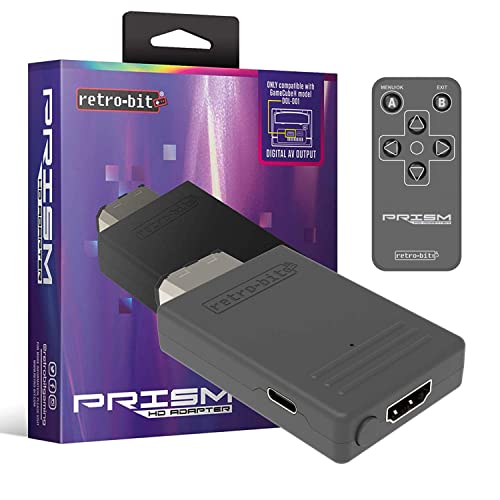
The Retro-Bit Prism adds an on-screen display and scan filters, setting it apart from the adapters that emphasize GCVideo controls or separate audio outputs. It is compatible with GameCube and includes a USB-C data port for firmware updates and additional languages, plus an infrared remote. The maker describes 1080p support and plug-and-play setup.
Bottom line: Consider it for its OSD and filters, but confirm the console-port fit first.
COMeap RCA-to-HDMI Converter

The COMeap converter uses the GameCube’s RCA composite connection rather than its Digital AV port, making it a different route to an HDMI-equipped screen. The package combines an AV cable and RCA-to-HDMI converter; the maker says it supports PAL/NTSC and requires USB power from a 5V source. Choose it if the console’s analog output is the connection you need to convert. It is not a port-specific digital adapter, and the product name and features conflict on cable length, so confirm the cable length before ordering.
Bottom line: Choose this for an RCA-to-HDMI setup, not a Digital AV port connection.
6-Foot Multi-Out RCA AV Cable

The six-foot cable is the simplest analog option here: it connects the console’s multi-out port to yellow-video and red/white-stereo RCA inputs. It is described as compatible with GameCube, N64, and SNES, and needs no converter when the television already has RCA inputs. That makes it suitable for an older display or an existing composite setup. It does not convert the GameCube’s Digital AV output to HDMI, so it will not solve a connection problem on a display with HDMI inputs only.
Bottom line: Use this only when your display accepts composite RCA.
How to choose a GameCube digital AV adapter
Start with the console port: a DOL-001 has the Digital AV port, while DOL-101 models omit it. HDMI adapters that attach to the digital port are therefore the direct route for DOL-001 owners; RCA cables use the analog multi-out port instead. Check the model number on the console label before selecting an adapter.
Next, compare signal processing and audio routing. Line doubling changes how a low-resolution signal is scaled for a modern display, while scanline options alter its appearance; neither changes the original game’s rendered resolution. Choose an HDMI-only adapter for a simple display connection, or favor an adapter with separate audio output if your sound system needs it. If your screen has RCA but no HDMI, an analog cable may be enough; if it has HDMI only, an RCA-to-HDMI converter is a separate option.
GameCube Digital AV port fit and resolution
A Digital AV port is the deciding fit condition: choose a port-specific HDMI adapter only for a DOL-001 console. The Kaico product names that model and describes GCVideo output up to 480p/576p; the GCHD Mk-II also specifies DOL-001 fit and maker-described 1080p upscaling. Those figures describe adapter output or scaling, not native game resolution.
Progressive scan is a mode supported by some GameCube games, not every title. A game’s supported modes and the display’s input handling affect the result, so an adapter cannot make every game render at the same resolution. For a console without the digital port, select an analog connection path instead of assuming an HDMI adapter will attach.
Digital HDMI adapters versus RCA converters
Digital-port adapters and RCA converters connect at different points, so they are not interchangeable. Use this table to match the console output to the display input before deciding which conversion path you need.
| Connection path | Console output | Display input | Best fit condition |
|---|---|---|---|
| Digital adapter | Digital AV port | HDMI | DOL-001 |
| RCA cable | Analog multi-out | Composite RCA | Display has RCA inputs |
| RCA-to-HDMI converter | Analog multi-out | HDMI | Display lacks RCA inputs |
Composite video uses one yellow plug for video, while red and white plugs carry stereo audio. An RCA-to-HDMI converter must be powered when its design requires USB; the COMeap product specifies a 5V USB source. Connecting an HDMI cable does not mean the console’s Digital AV port is being used.
Common GameCube adapter buying mistakes
The most common mismatch is choosing a Digital AV adapter without checking the console model. Confirm that the console is DOL-001 before choosing an adapter that requires the digital port; a DOL-101 needs an analog route. A second mistake is confusing an RCA cable with an RCA-to-HDMI converter: the cable ends in composite plugs, while the converter adds an HDMI output and may need USB power.
Also check the display’s actual input sockets and the adapter’s audio path. HDMI can carry video and audio together, but an adapter with Aux or MiniTOSLINK gives another routing option. If using an RCA converter, connect its USB lead to an appropriate 5V source when required; an unpowered converter may not operate as intended.
Frequently Asked Questions
How can I tell if my GameCube has Digital AV out?
Check the console model number: DOL-001 consoles have a Digital AV port, while DOL-101 models omit it. Choose a digital-port adapter only when the console has that port.
Does every GameCube game output 480p?
No, progressive-scan support depends on the game. An adapter’s 480p or upscaling capability does not make a game render in progressive mode if the title does not support it.
Can I use a GameCube HDMI adapter with a DOL-101?
Only if the adapter connects through a port present on that console. DOL-101 omits the Digital AV port, so use an analog multi-out connection or a converter designed for that route.
Do RCA-to-HDMI converters need USB power?
Some do, and the COMeap converter specifies USB power from a 5V source. Check the converter’s power requirement and connect that supply before expecting HDMI output.
What is the difference between GameCube composite and component video?
Composite carries video on one signal, commonly the yellow RCA plug, with red and white plugs for stereo audio. Component video separates video into multiple signals; the RCA cable here describes composite, not component video.