
Bose Bluetooth Adapter for Wave System: 4 Options

For a Bose Wave system with a Bose link outlet, the Wave Bluetooth Music Adapter is the most direct match because it connects at that outlet. Choose a 3.5 mm adapter instead if you want a general-purpose transmitter or receiver, and confirm that your Wave model has a suitable audio connection.
We earn a commission if you buy through links on this page. As an Amazon Associate I earn from qualifying purchases. Products are compared on manufacturer specifications, not hands-on testing.
- Best overall: Wave Bluetooth Music Adapter – It connects to the Bose link outlet and names compatibility with several Wave and Acoustic Wave systems.
- Best for compact setup: USAV OEM Bluetooth Adapter – It includes a Bluetooth transmitter/receiver and a 3.5 mm audio cable.
- Best for dual-mode use: Bluetooth 5.3 TX/RX Adapter – It switches between transmitter and receiver modes and specifies Bluetooth 5.3.
| Product | Best for | Connection or mode | Wave compatibility | Size or range | Shop |
|---|---|---|---|---|---|
| Wave Bluetooth Music Adapter | Bose link connection | Bose link outlet | Wave III; select Wave II and Acoustic Wave II | 6.5 × 5.3 × 2.125 in | Check Price on Amazon |
| USAV OEM Bluetooth Adapter | Compact accessory kit | 3.5 mm cable included | Wave II, III, IV; AWRCC1, AWRCC2 | Small | Check Price on Amazon |
| Bluetooth 5.3 TX/RX Adapter | Two-way audio | 3.5 mm AUX; TX/RX modes | Wave Radio II, III, IV; AWR1B1, AWR1B2 | Up to 390 in | Check Price on Amazon |
| Bluetooth 5.3 Low-Latency TX/RX Adapter | Video synchronization | TX/RX modes | Wave Radio II, III, IV; AWR1B1, AWR1B2 | 30–40 ft indoors | Check Price on Amazon |
Bose Bluetooth adapters for Wave systems
The key difference is whether the adapter connects through Bose link or uses a general-purpose audio connection.
Wave Bluetooth Music Adapter

Unlike the general-purpose adapters here, this model connects to the system’s Bose link outlet. The maker says it provides a wireless link for music from a Bluetooth device in another room. It is compatible with Wave music system III and Wave radio III, as well as select Wave and Acoustic Wave systems bought from 2010 onward. The dimensions are 6.5 × 5.3 × 2.125 inches. Choose it when your system is among those named and you want the Bose link connection; its compatibility does not cover every Wave model.
Bottom line: Pick this if your Wave model is among the compatible systems and has a Bose link outlet.
USAV OEM Bluetooth Adapter
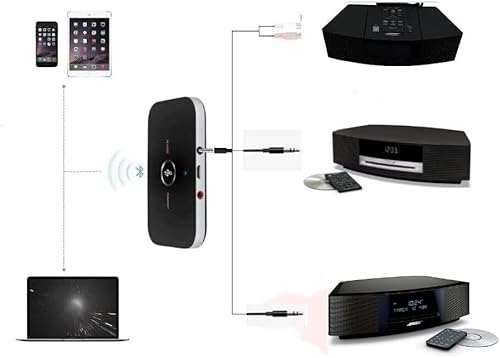
This adapter is supplied with a 3.5 mm AUX audio cable, unlike the Bose link model. The package also includes a Bluetooth transmitter/receiver and a USB charging cable, making it a compact accessory set for the Wave II, III, or IV models named in its title. Its weight is 0.01875, with no unit provided, so that figure is not useful for a weight comparison. Choose it if the included AUX cable and charging cable suit your setup; buyers who need the dedicated Bose link connection should choose a different type.
Bottom line: Pick this if you want an AUX-cable adapter kit for a named Wave model.
Bluetooth 5.3 TX/RX Adapter

Two-way operation separates this model from a receiver-only stereo adapter: TX mode sends audio from a non-Bluetooth source to Bluetooth speakers or headphones, while RX mode sends phone audio to wired speakers through AUX. It names Wave Radio II, III, and IV, along with AWR1B1 and AWR1B2, and uses Bluetooth 5.3. The maker gives a range of up to 390 inches and cautions that surroundings affect it. Choose it when you need both directions of audio; the maximum range is not a guarantee in every room.
Bottom line: Pick this when both transmitting and receiving audio matter.
Bluetooth 5.3 Low-Latency TX/RX Adapter

This model’s distinguishing claim is audio latency reduced by approximately 40 milliseconds, making it the option to consider for video listening. It supports TX and RX modes and names Wave Radio IV, III, and II as compatible. The maker gives an indoor range of 30–40 feet and says the built-in battery can work while charging. Choose it if those features fit your setup; the latency figure is approximate, and actual wireless range can change with obstacles and surroundings.
Bottom line: Pick this if video synchronization and indoor range are priorities.
How to choose a Bose Wave Bluetooth adapter
Start with the connection your Wave system can accept: the dedicated adapter here uses Bose link, while general-purpose adapters use an AUX audio cable. A transmitter sends sound from a non-Bluetooth source to Bluetooth headphones or speakers; a receiver takes sound from a phone and sends it to wired audio equipment. A two-way adapter does both, but its TX/RX mode must match the direction you need. If you need the Wave system itself to send audio to Bluetooth headphones, choose a transmitter mode; if you want phone audio through the Wave, choose a receiver mode. Match the adapter’s connection and model compatibility before choosing by extra features.
Check Wave model and connection fit
Wave compatibility is model-specific, not universal: the dedicated Bose link adapter names Wave III and Wave radio III, plus select systems bought from 2010 onward. The generic adapters name Wave II, III, and IV or particular AWR model codes, so check your system’s model label against the names given for the adapter. Bose link and a 3.5 mm AUX cable are different connection types; do not assume one fits the other’s outlet. If you cannot identify the model, confirm the model code and available audio connection before ordering. This avoids choosing an adapter based only on the word “Wave.”
Understand Bluetooth range and latency
Wireless range claims are maximum or environment-dependent figures, not guaranteed room coverage: walls, furniture, and other obstacles can shorten a connection. One adapter gives an “up to” range of 390 inches, while another gives an indoor range of 30–40 feet; these figures use different units and conditions, so compare them cautiously. For video, lower audio delay can help keep speech and picture aligned; one model claims an approximate 40-millisecond latency reduction. That figure is a maker claim, not a guarantee of synchronization with every television or headset. Prioritize the intended source, destination, and room layout over a headline range.
Set up transmitter and receiver modes
Mode determines which device sends audio: TX takes sound from a source such as a television and transmits it to Bluetooth headphones, while RX receives phone audio and passes it to wired speakers through AUX. Connect the adapter to the appropriate audio output or input before pairing, then select the mode for that signal direction. A common mistake is selecting RX when trying to send Wave audio to headphones; that requires TX capability and a suitable Wave audio output. Keep the adapter near the source during initial pairing, since distance and obstructions can interfere with connection. Check that the selected model explicitly supports the intended direction.
Frequently Asked Questions
Can a Bluetooth adapter connect Wave audio to headphones?
Yes, if the adapter has transmitter mode and the Wave system can provide audio through a compatible output. TX mode sends source audio to Bluetooth headphones; a receiver-only adapter cannot do that.
Can I play phone music through a Bose Wave system?
A receiver-mode adapter can send phone audio to wired speakers through a 3.5 mm AUX connection. Confirm that your Wave model has a compatible input before choosing that setup.
Does Bluetooth range pass through walls reliably?
No wireless range is guaranteed through walls; obstacles and the room layout can reduce the connection distance. Treat a maximum as a best-case figure, not a reliable wall-to-wall distance.
What does TX mode mean on a Bluetooth adapter?
TX means transmitter mode: the adapter sends audio from a non-Bluetooth source to Bluetooth headphones or speakers. RX means receiver mode and sends Bluetooth audio to wired equipment instead.
How do I know which Wave adapter fits?
Match the exact Wave model or AWR code named for the adapter and check the connection type. Bose link and a 3.5 mm AUX cable are different, so confirm the model and available connection before ordering.