
LCD for PC Case: 4 Internal Displays Compared

For most PC cases, Lian Li US88 v1 8.8-inch LCD is the flexible pick because its 8.8-inch screen can display system information or custom media and offers multiple mounting options. Choose Thermalright Trofeo Vision 9.16-inch LCD instead if you want a wider 9.16-inch screen for hardware monitoring; case-screen size and mounting clearance are the key fit checks.
We earn a commission if you buy through links on this page. As an Amazon Associate I earn from qualifying purchases. Products are compared on manufacturer specifications, not hands-on testing.
- Best overall: Lian Li US88 v1 8.8-inch LCD – Its 8.8-inch screen supports hardware stats and custom media, with flexible mounting.
- Best for wide monitoring: Thermalright Trofeo Vision 9.16-inch LCD – The 9.16-inch, 1920 × 480 screen is designed for real-time hardware stats.
- Best for desktop mode: WOWNOVA 8-inch Sensor Panel – Its 8-inch screen can switch to extended desktop mode as well as show system data.
- Best for magnetic mounting: Thermalright Trofeo Vision 6.86-inch LCD – The 6.86-inch screen supports magnetic case-panel mounting.
| Product | Best for | Screen size | Resolution | Connection | Shop |
|---|---|---|---|---|---|
| Lian Li US88 v1 8.8-inch LCD | Flexible mounting | 8.8 in | — | 9-pin or USB Type-A | Check Price on Amazon |
| Thermalright Trofeo Vision 9.16-inch LCD | Wide monitoring | 9.16 in | 1920 × 480 | USB Type-C | Check Price on Amazon |
| WOWNOVA 8-inch Sensor Panel | Extended desktop | 8 in | — | — | Check Price on Amazon |
| Thermalright Trofeo Vision 6.86-inch LCD | Magnetic mounting | 6.86 in | 1280 × 480 | USB Type-C | Check Price on Amazon |
LCD Screens for PC Cases
Compare the screen formats, connections and mounting approaches to find a display suited to your case layout.
Lian Li US88 v1 8.8-inch LCD

Unlike the other options, the Lian Li US88 v1 pairs an 8.8-inch screen with an ARGB frame and flexible mounting. L-Connect 3 offers preset themes and modular information, and the screen can show hardware stats, photos or videos as a secondary display. Its dimensions are 9.33 × 2.87 × 0.51 inches, so compare those measurements with the intended mounting area before installation. The screen connects through a 9-pin port or USB Type-A. The stand instructions distinguish screw lengths; using the specified screws matters, so this choice calls for careful installation.
Bottom line: Choose this if flexible mounting and a customizable ARGB frame matter most.
Thermalright Trofeo Vision 9.16-inch LCD
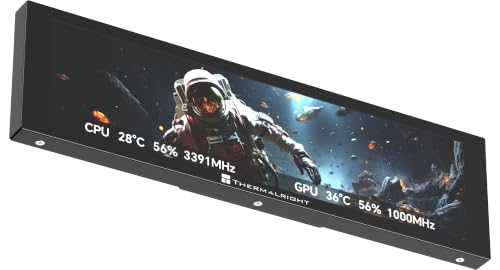
The Thermalright Trofeo Vision has the widest screen among these choices at 9.16 inches, with a 1920 × 480 resolution suited to a broad monitoring layout. Thermalright says its TRCC software can display CPU and GPU temperatures, fan speed and memory usage, with preset themes and DIY customization. The USB Type-C connection is a distinguishing setup feature, and the body measures about 9.88 × 2.68 inches. Its slim 4:1 screen shape favors a horizontal strip rather than a compact, squarer panel; check whether the case has enough uninterrupted width for that format.
Bottom line: Pick this for a wide horizontal stats panel and USB Type-C connection.
WOWNOVA 8-inch Sensor Panel

The WOWNOVA stands out for its extended desktop mode: its 8-inch screen can act as a secondary display as well as show system readings. The maker says its Windows 10/11 software can present CPU, GPU, RAM, FPS and drive data, and supports dynamic video themes. The white panel measures 7.52 × 4.59 × 0.39 inches, making it taller and less panoramic than the 9.16-inch option. That desktop capability may suit someone who wants more than a fixed sensor readout, but the software compatibility is specifically for Windows 10/11.
Bottom line: Choose this if extended desktop mode is more useful than a very wide panel.
Thermalright Trofeo Vision 6.86-inch LCD

The Thermalright Trofeo Vision 6.86-inch model is the compact choice, with a magnetic panel intended for case mounting. Its 1280 × 480 IPS display uses a wide 8:3 format, while TRCC software supports system-parameter displays and static or dynamic themes. The physical size is 7.37 × 2.83 × 0.82 inches, so allow for the full panel depth as well as its face dimensions. The screen uses USB Type-C for power and data communication through a motherboard 9-pin USB interface; that wiring requirement makes it a better fit for builders ready to plan the internal connection.
Bottom line: Pick this if a magnetic mount and a smaller panoramic display suit your case.
How to Choose an LCD for a PC Case
Start with the panel’s physical footprint and mounting position, then compare its resolution and connection. A screen’s diagonal measurement describes the viewable display size, not the width or height of the complete housing; use the product’s body dimensions to check a case opening or mount. Resolution also changes how much information fits: 1920 × 480 is a 4:1 panoramic format, while 1280 × 480 is about 2.67:1. A wider ratio suits a horizontal strip, but a taller screen can be easier to fit on a narrow side panel. If the available flat mounting area is under 8 inches wide, measure the actual panel footprint rather than choosing from diagonal size alone.
Connection type is another deciding factor. USB Type-C and motherboard 9-pin USB are not interchangeable physical connectors, so check which port and cable arrangement your setup can accommodate.
PC Case LCD Screen Fit and Mounting
Measure the case mounting area in three dimensions before selecting an internal screen: width, height and depth. A panel that fits its visible opening may still conflict with a side panel, radiator, fan or cable route behind it. For slim panoramic displays, reserve a clear horizontal strip; for taller sensor panels, check whether the intended location leaves room above and below. A practical rule is to allow at least 0.5 inch beyond the panel’s face dimensions where the mount or cable bend needs additional space, then verify that the actual mounting hardware does not require more.
Magnetic mounting is useful only where the case panel and placement are compatible with the screen’s magnets. Stand-mounted screens need appropriate screw length; a screw that is too long can damage components, so use the specified fasteners for the chosen stand.
Internal LCD Types Compared
Internal PC LCDs commonly serve as sensor panels, secondary displays or decorative media screens; the software and input options determine which role they handle. A sensor panel emphasizes readings such as temperatures and fan speed, while an extended display can show desktop content. A panoramic panel uses a wide aspect ratio to fit a horizontal case window, whereas a near-square screen gives more vertical area. This table compares the practical distinction among these options.
| Use | What to prioritize | Example fit |
|---|---|---|
| Hardware monitoring | Software that supports the readings you want | Thermalright Trofeo Vision 9.16-inch LCD |
| Desktop extension | Extended-screen mode and OS compatibility | WOWNOVA 8-inch Sensor Panel |
| Custom visuals | Media or theme customization | Lian Li US88 v1 8.8-inch LCD |
| Compact panoramic panel | Shorter screen footprint and mounting method | Thermalright Trofeo Vision 6.86-inch LCD |
Confirm the intended software runs on your operating system, and plan for both the display’s physical mounting and its data or power connection.
Frequently Asked Questions
Will a PC case LCD show CPU temperatures?
A sensor panel can show CPU temperatures when its screen software supports system monitoring. For example, Thermalright Trofeo Vision 9.16-inch LCD is described as monitoring CPU and GPU temperatures, fan speed and memory usage; check software compatibility with your operating system before choosing.
How much space does a case LCD need?
The required space depends on the complete panel dimensions, not just its diagonal screen size. For example, Lian Li US88 v1 8.8-inch LCD measures 9.33 × 2.87 × 0.51 inches, and you should also reserve room for its mount and cable routing.
Can a PC case screen work as a second monitor?
Some internal case screens can work as secondary displays, but the mode and software support vary. WOWNOVA 8-inch Sensor Panel supports an extended desktop mode and specifies Windows 10/11 compatibility.
What is the difference between 1920 by 480 and 1280 by 480?
The 1920 × 480 panel has a 4:1 aspect ratio, while 1280 × 480 is about 2.67:1. The wider format gives more horizontal space for a panoramic layout, while both resolutions have 480 vertical pixels.
Does an internal LCD need a motherboard USB header?
Some internal panels use a motherboard 9-pin USB connection, while others offer a USB Type-A or Type-C connection. Check the required connector and available port before routing cables, since the connector formats are different.