
Motorola Edge 5G UW Wireless Charging Options Compared

The Motorola Edge 5G UW wireless charging choice depends first on whether your exact phone supports Qi charging; Motorola TurboPower 15W Wireless Stand is the clearest match because it is a Motorola TurboPower stand bundled with a 33W wall charger and cable.
Choose a pad or alternate stand if you prefer a different desk layout, but confirm that the specific Edge 5G UW model supports wireless charging before ordering.
We earn a commission if you buy through links on this page. As an Amazon Associate I earn from qualifying purchases. Products are compared on manufacturer specifications, not hands-on testing.
- Best overall: Motorola TurboPower 15W Wireless Stand – Motorola TurboPower 15W stand includes a 33W wall charger and USB-C cable.
- Best for adjustable placement: 15W Motorola Phone Stand – Stand format holds the phone upright and lists Edge models from multiple generations.
- Best for two charging spots: 15W Wireless Charging Pad, 2-Pack – The package contains two wireless charging pads.
| Product | Best for | Format | Included power accessory | Shop |
|---|---|---|---|---|
| Motorola TurboPower 15W Wireless Stand | Motorola accessory | Stand | 33W charger and cable | Check Price on Amazon |
| 15W Motorola Phone Stand | Upright phone viewing | Stand | — | Check Price on Amazon |
| 15W Wireless Charging Pad, 2-Pack | Two charging locations | Flat pad, 2-pack | QC 3.0 or QC 2.0 recommended | Check Price on Amazon |
| 15W Wireless Charging Stand | Stand with adapter | Stand | QC 3.0 adapter | Check Price on Amazon |
| 15W Wireless Charging Pad | Flat pad format | Flat pad | QC adapter | Check Price on Amazon |
Motorola Edge 5G UW wireless chargers
Compare each charger’s format, output claim, and included power accessories before choosing.
Motorola TurboPower 15W Wireless Stand

Unlike the other options, this is a Motorola TurboPower wireless stand bundled with a 33W wall charger and a 3.3-foot USB-C cable. Its compatibility includes Edge 2024 and 2025 alongside several Moto G and Razr models; the compatibility list does not identify Edge 5G UW by name. The stand measures 3.15 inches high, 3.7 inches long, and 4.62 inches wide. It suits buyers who want the bundled Motorola charging accessories, but owners of an Edge 5G UW should verify Qi support for their exact model before relying on wireless charging.
Bottom line: Pick this if you want a Motorola-branded stand with its wall charger and cable.
15W Motorola Phone Stand
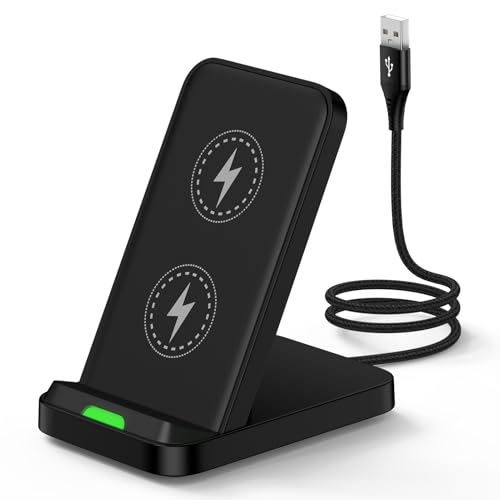
This stand is sized for a desk setup and lists compatibility with several Edge generations, including Edge 2022 through 2026, plus Edge+ models. The maker claims up to 15W output and says the phone can reach 20% in 30 minutes, while noting that wireless charging is generally slower than wired charging. A stand can keep the screen visible while charging, unlike the flat pad choices. Its broad Edge compatibility list does not call out the Edge 5G UW, so check the exact model’s wireless charging support; this is not a fit to assume from the Edge name alone.
Bottom line: Choose this for upright placement if your specific phone supports Qi charging.
15W Wireless Charging Pad, 2-Pack

The two-pad package is the only choice here that provides a pair of flat charging surfaces, useful for setting up separate charging spots. The maker claims up to 15W for compatible Motorola models and recommends a QC 3.0 or QC 2.0 adapter; an adapter is included. Its compatibility text names Moto Edge and Edge+ families but does not explicitly identify the Edge 5G UW, so verify Qi capability for that exact phone. Flat pads do not prop up a screen like the stand options, which matters if you want to read notifications while charging.
Bottom line: Choose this when two flat charging pads are more useful than a phone stand.
15W Wireless Charging Stand

This stand distinguishes itself by including a QC 3.0 adapter, while its broad Motorola compatibility list names numerous Edge, Edge+, Razr, and Moto G models. The maker claims a maximum 15W output and claims a full charge in 2 to 2.5 hours for a compatible phone. Those performance claims should not be read as a guaranteed Edge 5G UW charging rate: the model is not singled out in the compatibility text, and wireless charging depends on phone support. The upright format suits desk use, but buyers seeking a confirmed match for the exact UW model should verify before purchase.
Bottom line: Pick this if you want a stand and bundled QC 3.0 adapter.
15W Wireless Charging Pad

This is a thin, flat pad rather than a phone stand, with a thickness of 0.47 inch. The maker claims 15W charging for selected Motorola models and describes an included QC 3.0 adapter, while also listing support for some Samsung, Google Pixel, and iPhone models at different output levels. Its Motorola compatibility list does not specifically name Edge 5G UW, so verify wireless charging support for the exact handset rather than assuming every Edge variant works. A flat pad is a straightforward option when screen viewing at an upright angle is not important.
Bottom line: Choose this if a low-profile pad suits your charging setup.
How to choose an Edge 5G UW wireless charger
Start by confirming that the exact Edge 5G UW model supports Qi wireless charging, then decide between a flat pad and a stand. Qi chargers transfer power through aligned coils, so placing the phone near the center of the charging surface helps maintain the connection. A 15W label is a maximum output claim, not a promise that every compatible phone will draw 15W; phone support, adapter output, and alignment affect the rate. For a desk where you check the screen, choose a stand; for a compact surface or bedside table, a flat pad is easier to lay flat. A bundled adapter can simplify setup, but check that the power source matches the charger’s requirements.
Motorola Edge 5G UW compatibility and fit
Edge family names do not guarantee identical wireless charging hardware: confirm the exact model and carrier variant before choosing any charger. A phone case can also affect coil alignment; thick cases, metal plates, and magnetic accessories may interrupt charging or cause excess heat. Remove metal attachments and recenter the phone if charging starts and stops. Keep the charger on a hard, ventilated surface, since wireless power conversion produces heat and charging may slow when the phone or pad gets warm. If the phone does not show a charging indicator after repositioning, verify Qi support and test the charger with a known-compatible handset rather than assuming a faster power adapter will solve it.
Wireless charging pads and stands compared
A flat pad favors a low-profile layout, while a stand props the phone upright; both still require the handset’s charging coil to align with the charger’s coil. Use this format comparison to narrow the setup to a desk preference and bundled power needs.
| Need | Format to choose | What to check |
|---|---|---|
| Read the screen while charging | Stand | Phone stability and coil alignment |
| Low-profile placement | Flat pad | Clear, centered contact area |
| Two separate charging spots | Two-pad bundle | Power source for each pad |
| One bundled setup | Stand with adapter and cable | Adapter compatibility |
Use the phone maker’s wireless charging limit as the ceiling, not the charger’s largest printed wattage. Wired charging can be faster because wireless transfer loses more energy as heat.
Safe setup and charging habits
Wireless charging is generally slower and warmer than wired charging, so avoid covering the pad or stand with fabric and keep it away from direct sunlight. Center the phone on the coil, remove metal objects from between the phone and charger, and stop using the setup if either device becomes unusually hot. A case may work if it is thin and nonmetallic, but case thickness and built-in magnets can interfere. For a charging surface shared with other items, keep coins, cards, and metal accessories away from the coil area. Use the or a compatible power adapter; a 15W charger cannot force a phone to accept more power than its own wireless charging system supports.
Frequently Asked Questions
Does the Motorola Edge 5G UW support wireless charging?
Wireless charging support depends on the exact Edge 5G UW model, so confirm the phone’s specification before buying a Qi charger. Edge branding alone is not enough to establish compatibility.
Will a 15W wireless charger charge at 15W?
Not necessarily; 15W describes a charger’s maximum output claim, while the phone controls how much power it accepts. Alignment, adapter capability, and heat can also reduce the charging rate.
Can a phone case stay on during wireless charging?
A thin, nonmetallic case may allow charging, but thick cases, metal plates, and some magnetic accessories can block or misalign the coils. Remove the case if charging repeatedly stops or the phone becomes unusually warm.
How should I position a phone on a wireless charger?
Place the phone near the center of the pad or stand so its internal coil aligns with the charger coil. If the charging indicator does not appear, shift the phone slightly and check for metal items between the devices.
Is wireless charging slower than wired charging?
Wireless charging is generally slower because energy transfer is less efficient and produces more heat than a direct cable connection. The actual difference depends on the phone’s supported charging rates and the wireless charger’s power source.