
Thermalright Assassin X 120 Refined SE Compared

The Thermalright Assassin X120 Refined SE Thermalright Assassin X120 Refined SE is the direct match, with a 5.83-inch height and support for AMD AM4/AM5 and several Intel sockets. Choose an alternative if you need a white ARGB look, a black finish, or a larger dual-fan tower.
CPU air coolers move heat from the processor into a fin stack, where a fan pushes it away; check socket compatibility and case clearance before choosing.
We earn a commission if you buy through links on this page. As an Amazon Associate I earn from qualifying purchases. Products are compared on manufacturer specifications, not hands-on testing.
- Best overall: Thermalright Assassin X120 Refined SE – The direct Refined SE match is 5.83 inches tall and supports AM4/AM5 and listed Intel sockets.
- Best for 120R SE fit: Thermalright Assassin X 120R SE – This related single-tower model has four 6 mm heat pipes and a 120 mm PWM fan.
- Best for black builds: Thermalright Assassin X 120-A Dark – The all-black cooler has a 151 mm height and a 2400 RPM PWM fan.
- Best for white ARGB: Thermalright Assassin X 120R SE White ARGB – The white single-tower model includes a 5V 3-pin ARGB fan.
| Product | Best for | Height | Heat pipes | Fan setup | Shop |
|---|---|---|---|---|---|
| Thermalright Assassin X120 Refined SE | Direct model match | 5.83 in | 4 | 120 mm PWM | Check Price on Amazon |
| Thermalright Assassin X 120R SE | 120R SE variant | 5.83 in | 4 × 6 mm | 120 mm PWM | Check Price on Amazon |
| Thermalright Assassin X 120-A Dark | All-black builds | 5.94 in | 4 | 120 mm PWM, up to 2400 RPM | Check Price on Amazon |
| Thermalright Peerless Assassin 120 SE | Dual-fan cooling | 6.1 in | 6 | Dual 120 mm PWM | Check Price on Amazon |
| Thermalright Assassin X 120R SE White ARGB | White ARGB builds | 5.83 in | 4 | 120 mm PWM, 1550 RPM | Check Price on Amazon |
Thermalright Assassin X 120 Refined SE coolers
Compare the direct Refined SE match with related single- and dual-tower alternatives by size, heat pipes and fan setup.
Thermalright Assassin X120 Refined SE

The Assassin X120 Refined SE is the direct match for this search, pairing a 148 mm-tall (5.83-inch) tower with four heat pipes and a TL-C12C PWM fan. Its socket support covers AMD AM4/AM5 and Intel LGA 1150, 1151, 1155, 1200, 1700 and 1851. The aluminum heatsink has a metal cover, giving the tower a finished top edge.
Choose it when those sockets and its height fit your build. Its single 120 mm fan and 71 mm width make it a different form factor from the larger dual-tower option; confirm clearance around the memory and case before installing.
Bottom line: Pick this for the searched Refined SE model when the socket and case clearances match.
Thermalright Assassin X 120R SE
The Assassin X 120R SE differs from the searched model in its four 6 mm heat pipes and SS2 installation system with a metal pressure plate. It is a 148 mm-tall aluminum-and-copper cooler with a 71 mm width and a 120 mm PWM fan. Its socket support includes AMD AM4/AM5 and Intel LGA 1150, 1151, 1200 and 1700.
This is a suitable alternative when the 120R SE variant is acceptable and your socket appears in that group. Unlike Thermalright Assassin X120 Refined SE, its Intel support omits LGA 1155 and 1851, so verify socket fit carefully if you are building around either one.
Bottom line: Choose this if you want the 120R SE variant and its socket range fits.
Thermalright Assassin X 120-A Dark
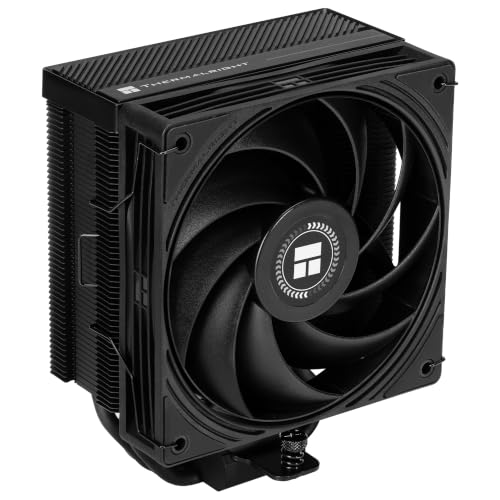
The Assassin X 120-A Dark is the black-finish alternative, with a 151 mm (5.94-inch) single tower, four 6 mm direct-contact heat pipes and a TL-N12-R9 V2 120 mm PWM fan. The maker rates its cooling capacity for up to 240 W TDP and gives the fan a maximum speed of 2400 RPM, airflow of 85.35 CFM and static pressure of 2.95 mm H₂O.
It suits a black, non-RGB build that has room for a taller cooler. Its 151 mm height exceeds the 148 mm height of Thermalright Assassin X120 Refined SE, so a case with less vertical clearance will rule it out; confirm the case’s cooler-height limit before choosing.
Bottom line: Pick this for an all-black build with enough clearance for its 151 mm tower.
Thermalright Peerless Assassin 120 SE

The Peerless Assassin 120 SE is the larger dual-tower alternative, with six heat pipes and two 120 mm PWM fans. Its dimensions are 125 × 135 × 155 mm, or about 4.92 × 5.31 × 6.1 inches, making its width and height notably greater than the single-tower Refined SE. It supports AMD AM4/AM5 and Intel LGA 1150, 1151, 1200, 1700 and 1851.
Choose it if you want the dual-fan arrangement and your case and motherboard have room for its broader tower. The extra width and height are a meaningful fit constraint compared with Thermalright Assassin X120 Refined SE; check case clearance and nearby memory placement before installation.
Bottom line: Choose this when you want a dual-fan tower and can accommodate its wider, taller dimensions.
Thermalright Assassin X 120R SE White ARGB

The Assassin X 120R SE White ARGB adds a white finish and lighting to a single-tower design: it is 148 mm tall, uses four copper heat pipes and has a 120 mm TL-C12CW-S PWM fan rated at 1550 RPM ±10%. Its lighting uses a 5V 3-pin ARGB connector, and the socket range includes AMD AM4/AM5 and Intel LGA 1150, 1151, 1200, 1700 and 1851.
It suits a white build where coordinated lighting matters. The 5V 3-pin ARGB plug is distinct from the fan’s 4-pin power connector; make sure the motherboard or controller has a compatible ARGB connection before choosing it.
Bottom line: Pick this for a white build with a compatible 5V 3-pin ARGB connection.
How to choose a CPU air cooler
Start with socket support, then compare cooler height and fan layout with your case and motherboard. The processor socket determines whether the mounting hardware can attach; a socket name that is not in the cooler’s supported group is a reason to choose another model. Tower height is measured from the motherboard upward, so compare it with the case’s published CPU-cooler clearance rather than the case’s exterior height.
Fan count and tower width also affect fit. A second fan or a broad tower can overlap nearby memory even when the case has enough vertical space. A practical rule: if your case clearance is under 5.83 inches, none of these five coolers fits by height; look for a lower-profile model. Check the motherboard layout and RAM height as well, especially for wider dual-tower designs.
Cooler height and component clearance
Measure the case’s CPU-cooler clearance in inches and compare it with the cooler’s full height before buying. Among these options, tower heights run from 5.83 inches to 6.1 inches, a difference that can decide whether a side panel closes. Leave room for the fan clip and avoid assuming the heatsink height alone captures every part of the installed assembly.
Memory clearance is a separate measurement: a fan can sit over the RAM even when the cooler fits under the side panel. A 120 mm fan is about 4.72 inches across, but its placement on the tower—not its diameter alone—determines overlap. If a fan blocks a memory slot, repositioning may be possible on some coolers, but can increase total height; check the cooler’s mounting arrangement and available clearance before relying on that adjustment.
Single-tower and dual-tower air coolers
Single-tower coolers use one fin stack, while dual-tower models place two fin stacks around the fan arrangement. A dual-tower design can use more heatsink area, but it also occupies more space across the motherboard; the Peerless Assassin 120 SE is 5.31 inches wide versus 2.8 inches for the 148 mm-tall Assassin X models here. Fan count alone does not determine compatibility or cooling capacity, since processor power, airflow and case layout also matter.
Heat pipes transfer heat from the processor contact area into the fins, and a fan moves air through those fins. More heat pipes or higher fan RPM should not be treated as a universal performance ranking across models. Compare published ratings only when they use a comparable basis, and prioritize socket support, physical fit, and your build’s noise and appearance needs.
Installation and airflow checks
Before mounting a tower cooler, confirm the correct socket hardware is in the package and remove any protective film from the cooler’s contact surface. Apply thermal paste as a thin, even layer; excess paste can spill around the processor socket, while too little can leave poor contact. Tighten the mounting points gradually and evenly so the base sits flat against the processor.
Orient the fan so it pushes air through the fin stack toward the case’s rear exhaust in a conventional front-to-back airflow layout. Connect the fan to a CPU fan header so the motherboard can control its PWM speed. ARGB lighting uses a separate connector: a 5V 3-pin ARGB plug is not interchangeable with a 12V 4-pin RGB header, so check the board label before connecting it.
Frequently Asked Questions
How much case clearance does a 148 mm cooler need?
A 148 mm cooler needs at least 5.83 inches of CPU-cooler clearance, measured from the motherboard surface to the case side panel. Allow extra room if a raised fan position or clip adds height.
Can I use a 5V ARGB fan on a 12V RGB header?
No: a 5V 3-pin ARGB connector is not interchangeable with a 12V 4-pin RGB header. Connecting them incorrectly can damage the lighting hardware, so check the motherboard header label first.
Does a dual-tower cooler always cool better?
No single feature guarantees better cooling; CPU power, heatsink design, fan behavior and case airflow all affect results. A dual-tower model also needs more space, so check its width and height along with its cooling ratings.
How much thermal paste should go on a CPU?
Use a small amount that spreads into a thin layer when the cooler is clamped down. Too much can squeeze beyond the processor heat spreader, while incomplete coverage can compromise thermal contact.
Which way should a tower cooler fan face?
In a common front-to-back case layout, point the fan to push air through the heatsink toward the rear exhaust fan. This helps maintain a consistent airflow path through the case.