
Samsung Wireless LAN Adapter WIS09ABGN Compared

The Samsung WIS09ABGN LinkStick is the closest match for Samsung TVs and Blu-ray players that support this adapter; compatibility is limited to certain devices with the specified features. Choose an alternative only after matching your TV’s series and confirming built-in driver support.
USB Wi-Fi adapters connect directly to a device’s USB port, while an Ethernet bridge connects a wired device through its network port.
We earn a commission if you buy through links on this page. As an Amazon Associate I earn from qualifying purchases. Products are compared on manufacturer specifications, not hands-on testing.
- Best overall: Samsung WIS09ABGN LinkStick – The original LinkStick is the named adapter and specifies support for certain Samsung TVs and Blu-ray players.
- Best for dual-band USB: Goshyda RT3572 Dual-Band Adapter – Supports 2.4 GHz and 5 GHz and identifies several Samsung TV series, subject to built-in driver support.
- Best for plug-in simplicity: Dual-Band WIS09ABGN TV Adapter – Claims dual-band operation and plug-in setup for the WIS09ABGN series and several TV series.
- Best for Ethernet devices: BrosTrend AC1200 Wi-Fi Ethernet Bridge – Bridges Wi-Fi to an Ethernet-enabled device instead of using a TV’s USB port.
| Product | Best for | Connection type | Wireless bands | Compatibility | Shop |
|---|---|---|---|---|---|
| Samsung WIS09ABGN LinkStick | Original Samsung match | USB adapter | 802.11a/b/g; draft 802.11n | Select Samsung TVs and Blu-ray players | Check Price on Amazon |
| Goshyda RT3572 Dual-Band Adapter | Dual-band TV option | USB adapter | 2.4 GHz and 5 GHz | WIS09ABGN; B, C, D, E, ES series | Check Price on Amazon |
| Dual-Band WIS09ABGN TV Adapter | Series-based alternative | USB adapter | 2.4 GHz and 5 GHz | WIS09ABGN; B, C, D, E, ES series | Check Price on Amazon |
| BrosTrend AC1200 Wi-Fi Ethernet Bridge | Ethernet-only devices | Wi-Fi-to-Ethernet bridge | 2.4 GHz and 5 GHz | Ethernet-enabled devices | Check Price on Amazon |
Samsung wireless LAN adapters for WIS09ABGN
Start with the original adapter, then compare alternatives by connection type and confirmed TV compatibility.
Samsung WIS09ABGN LinkStick

The Samsung LinkStick is the named WIS09ABGN adapter, rather than a newer PC-focused Wi-Fi dongle. It supports IEEE 802.11a/b/g and draft 802.11n 2.0, with 64/128-bit WEP and WPA/WPA2 security. Samsung identifies compatibility with certain TVs featuring Smart TV, AllShare, or InfoLink, and certain Blu-ray players with BD Live. That makes it the most direct fit when your device matches those criteria. Its limitation is its narrow device compatibility: verify the exact TV or player model before choosing it.
Bottom line: Choose this when your compatible Samsung TV or Blu-ray player calls for the original WIS09ABGN LinkStick.
Goshyda RT3572 Dual-Band Adapter

The Goshyda RT3572 differs from the original by specifying dual-band operation and support for several Samsung TV series. It claims up to 300 Mbps and supports 802.11a/b/g/n; the maker also says the TV needs a corresponding built-in driver. That driver requirement is the deciding limitation, so match the full TV model and confirm its support before relying on the series names alone. The adapter also names Windows 7/8/10/11 support, which may suit a computer use case, but its Samsung-TV compatibility remains dependent on the TV’s driver.
Bottom line: Consider it only after confirming your TV has the required built-in driver.
Dual-Band WIS09ABGN TV Adapter

This USB adapter focuses on the WIS09ABGN family and names B, C, D, E, and ES TV series, while also claiming up to 300 Mbps over dual-band Wi-Fi. Its features include 802.11a/b/g/n support and plug-in setup. Those claims make it a possible alternative when a compatible Samsung TV is the target, but series alone may not identify every supported model; confirm the exact model before ordering. Unlike the original LinkStick, its feature set does not call out Samsung Blu-ray player support.
Bottom line: Pick it as a possible TV alternative after confirming your exact model’s compatibility.
BrosTrend AC1200 Wi-Fi Ethernet Bridge
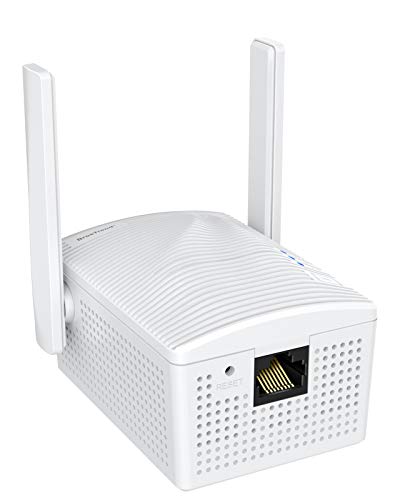
The BrosTrend AC1200 takes a different route: it receives Wi-Fi and passes network access to a device with Ethernet, rather than plugging into a TV’s USB port as a LinkStick does. The maker claims up to 867 Mbps on 5 GHz and 300 Mbps on 2.4 GHz, and lists TVs, Blu-ray players, printers, and game consoles among Ethernet-enabled uses. It may suit a device with a working Ethernet port when USB adapter compatibility is uncertain. Its limitation is the connection requirement: a USB-only TV cannot use this bridge as a direct USB Wi-Fi adapter.
Bottom line: Choose it for a device that can connect by Ethernet, not as a direct USB replacement.
How to choose a WIS09ABGN adapter
Match the adapter to the TV’s exact model before comparing wireless speed claims. The original LinkStick names specific Samsung TV features and certain Blu-ray players; the alternative USB adapters identify series and, in one case, require a corresponding built-in driver. An adapter’s advertised computer operating-system support does not establish that a television can use it. A practical rule: if the TV maker’s supported-device information does not confirm the adapter or its driver, do not assume a generic USB Wi-Fi dongle will work. Also distinguish USB Wi-Fi from Ethernet bridging: USB Wi-Fi needs compatible device software, while an Ethernet bridge needs a network port.
USB Wi-Fi versus an Ethernet bridge
A USB Wi-Fi adapter connects to a compatible USB host, while an Ethernet bridge connects to a device’s Ethernet port and carries traffic over Wi-Fi. The distinction matters more than a larger throughput figure when replacing a discontinued adapter. For example, a TV that supports a specified USB adapter may not recognize a general-purpose computer dongle; conversely, a TV with Ethernet can use a bridge if it accepts a wired network connection. Check the device’s available ports and supported connection method first. Wireless speed claims are maximum rates, not guaranteed internet speeds; the router, signal conditions, and network plan also affect real throughput.
| Connection method | Device requirement | Best fit |
|---|---|---|
| USB Wi-Fi adapter | Compatible USB host and driver | Device supporting the specific adapter |
| Wi-Fi-to-Ethernet bridge | Ethernet network port | Wired-network device near Wi-Fi |
What 2.4 GHz and 5 GHz mean
Dual-band adapters can use both 2.4 GHz and 5 GHz Wi-Fi, but the router and client must support a shared band and compatible wireless protocol. The 2.4 GHz band generally reaches farther and penetrates obstacles better; 5 GHz can provide more capacity at shorter range and is more easily weakened by walls. Placement can therefore matter more than a headline rate: if the TV is separated from the router by several walls, test the connection location before choosing a 5 GHz-only solution. The WIS09ABGN original supports 802.11a/b/g and draft 802.11n 2.0, while the alternatives make different dual-band and protocol claims.
Compatibility checks before connecting
Check the complete TV model code and adapter support before buying a replacement. Model series labels can cover different hardware or software configurations, and the Goshyda adapter specifically makes use conditional on a corresponding built-in TV driver. For older Samsung equipment, confirm whether the intended function is network access for a TV or for a Blu-ray player; the original LinkStick’s player support is tied to BD Live. After confirming the connection type, use the router’s security mode only if the adapter supports it: the original lists WEP and WPA/WPA2, while newer router settings may differ. Do not infer compatibility from a USB plug fitting the port.
Frequently Asked Questions
Will any USB Wi-Fi adapter work with a Samsung TV?
No; the TV must support the adapter’s driver and wireless chipset. Confirm the full model and supported adapter before relying on a USB connection.
Can I use an Ethernet bridge instead of a USB adapter?
Yes, when the TV or player has an Ethernet port and supports a wired network connection. A bridge connects at Ethernet, so it is not a direct replacement for a USB-only device.
Does dual-band mean the adapter always uses 5 GHz?
No; dual-band means support for both 2.4 GHz and 5 GHz, with the usable band depending on the router and connection setup. The 2.4 GHz band is generally more suitable across longer or obstructed paths.
What does 300 Mbps mean on a Wi-Fi adapter?
It is a claimed maximum wireless link rate, not a guaranteed internet speed. Actual throughput is affected by router capability, distance, interference, and the internet connection.
Does the original WIS09ABGN support WPA2?
Yes, the original adapter lists WPA/WPA2 along with 64/128-bit WEP security. The router must use a security mode the adapter and device can negotiate.