
Screen Mirroring Car 1DIN: Adapters and Stereo Compared

For a 1DIN replacement stereo with a large display, the Eonon is the closest match because it combines a single-DIN receiver with a 10.95-inch adjustable screen and wireless CarPlay and Android Auto. Choose an adapter instead if your car already has factory-wired smartphone connectivity; a portable screen suits drivers who want to keep the existing stereo.
We earn a commission if you buy through links on this page. As an Amazon Associate I earn from qualifying purchases. Products are compared on manufacturer specifications, not hands-on testing.
- Best overall: Eonon 10.95-inch 1DIN QLED Stereo – The only single-DIN receiver, with a 10.95-inch adjustable display and wireless CarPlay and Android Auto.
- Best for factory-wired systems: Gatatol 4-in-1 Wireless Adapter – Converts compatible factory-wired CarPlay or Android Auto to wireless and includes AirPlay and MirrorLink.
- Best for a portable display: 4-in-1 Car Screen Mirroring Adapter – Adds a 9-inch touchscreen with wireless CarPlay and Android Auto without replacing the factory stereo.
| Product | Best for | Product type | Display | Connectivity | Shop |
|---|---|---|---|---|---|
| Eonon 10.95-inch 1DIN QLED Stereo | 1DIN replacement | Single-DIN stereo | 10.95-inch QLED 2K | Wireless CarPlay, Android Auto | Check Price on Amazon |
| Gatatol 4-in-1 Wireless Adapter | Factory-wired systems | Wireless adapter | — | CarPlay, Android Auto, AirPlay, MirrorLink | Check Price on Amazon |
| 4-in-1 Car Screen Mirroring Adapter | Passenger casting | Wireless adapter | — | CarPlay, Android Auto, AirPlay, Miracast | Check Price on Amazon |
| TOGUARDGO 9-inch CarPlay Screen | Portable touchscreen | Portable screen | 9-inch HD | Wireless CarPlay, Android Auto, Mirror Link | Check Price on Amazon |
| Hyphoon 4-in-1 Mirroring Adapter | Wireless casting | Wireless adapter | — | CarPlay, Android Auto, AirPlay, Miracast | Check Price on Amazon |
Screen mirroring car 1DIN options
Start by deciding whether you need a single-DIN receiver, a wireless adapter for an existing system, or a separate portable screen.
Eonon 10.95-inch 1DIN QLED Stereo

The Eonon is the only single-DIN receiver here, pairing a 10.95-inch adjustable QLED 2K screen with wireless CarPlay and Android Auto. It has 6GB RAM and 64GB storage, plus 4G LTE and Wi-Fi 6; the maker says its Qualcomm processor supports multitasking and 2K video decoding. This suits drivers replacing a receiver who want a large screen rather than a small in-dash display. The limitation is fit: a single-DIN chassis does not guarantee that the floating screen will clear every dashboard, so confirm dash clearance and mounting space before ordering.
Bottom line: Choose this if you need a single-DIN receiver and have room for its large floating screen.
Gatatol 4-in-1 Wireless Adapter
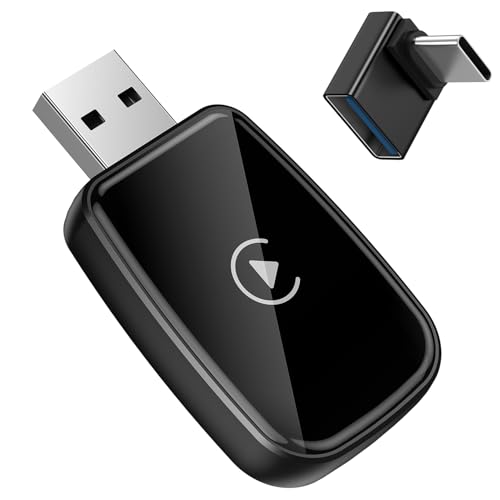
The Gatatol is a compact adapter, not a 1DIN stereo; it is meant to make an existing factory-wired CarPlay or Android Auto system wireless. It supports AirPlay and MirrorLink as well, and its compatibility range includes iPhone with iOS 10 or later and Android 11 or later. The maker says it supports reverse phone control through the car touchscreen and Samsung DeX for Android users. This fits drivers who want to keep their factory receiver. It is not the right choice for a car without factory-wired CarPlay or Android Auto, and it does not add a display.
Bottom line: Choose it only if your car already has factory-wired CarPlay or Android Auto.
4-in-1 Car Screen Mirroring Adapter

This adapter differs from the Gatatol by naming Miracast alongside AirPlay for screen casting, while also converting factory-wired CarPlay and Android Auto to wireless. It uses dual-band 2.4GHz and 5.8GHz Wi-Fi and Bluetooth 5.3, according to its feature claims. That makes it a candidate for compatible cars where passengers want casting on the vehicle’s existing display. The adapter does not include a screen or replace a 1DIN receiver, and its wired-system requirement rules it out if the car lacks factory wired CarPlay or Android Auto. Keep video viewing for passengers rather than the driver.
Bottom line: Choose it for Miracast casting on a compatible factory-wired system.
TOGUARDGO 9-inch CarPlay Screen

The TOGUARDGO is a separate 9-inch touchscreen rather than a 1DIN receiver or a small adapter. Its wireless CarPlay and Android Auto provide navigation, music, calls, and messages without replacing the factory stereo, and Mirror Link is also included. This suits drivers who want a larger interface in an older car while leaving the original receiver in place. Its tradeoff is that the screen is a separate installation rather than an in-dash replacement; it also does not include a backup camera or front dash camera. Check that the mounting position leaves the driver’s view clear.
Bottom line: Choose it if a separate screen is preferable to changing the factory stereo.
Hyphoon 4-in-1 Mirroring Adapter

The Hyphoon is another factory-system adapter, but its feature set explicitly combines CarPlay, Android Auto, AirPlay, and Miracast. It is designed for cars with factory-wired CarPlay or Android Auto; after initial setup, the maker says it can reconnect automatically when the car starts. This suits drivers seeking wireless phone connections and casting while keeping the factory display and receiver. Like the other adapters, it cannot turn a car with no compatible wired system into a 1DIN stereo, and it does not supply a screen. Confirm the vehicle supports wired CarPlay or Android Auto before choosing an adapter.
Bottom line: Choose it if you want AirPlay and Miracast on a compatible wired factory system.
How to choose a screen mirroring car 1DIN setup
Choose a receiver when the goal is to replace the radio; choose an adapter only when the vehicle already has factory-wired CarPlay or Android Auto. A 1DIN chassis is about 2 inches tall and 7 inches wide, but the Eonon’s floating 10.95-inch screen needs additional dash clearance beyond the radio opening. Measure the opening and check for vents, hazard switches, and shifter obstruction before buying. For a portable display, verify that a stable mounting spot is within reach of power and does not obstruct the windshield view. Keep video playback for parked use or passengers, not for the driver while the vehicle is moving.
| Need | Choose | Key condition |
|---|---|---|
| Replace radio with 1DIN | Receiver | Check chassis and screen clearance |
| Keep factory display | Adapter | Requires factory-wired CarPlay or Android Auto |
| Keep factory radio, add screen | Portable screen | Check safe mounting position |
Receiver, adapter, and portable screen differences
A receiver replaces the head unit and integrates the display with the car’s audio installation; an adapter only changes how a compatible factory system connects to a phone. A portable screen adds a separate interface while leaving the existing radio in place. These are different installation paths, not interchangeable sizes. For example, the Gatatol, 4-in-1, and Hyphoon options require existing factory-wired smartphone connectivity, while the Eonon is identified as a single-DIN stereo. If your car only has Bluetooth audio or USB but no factory-wired CarPlay or Android Auto, verify the receiver’s vehicle fit rather than assuming an adapter will add that capability.
Check phone and vehicle compatibility
Compatibility is the deciding factor for wireless adapters: they rely on a car’s factory-wired CarPlay or Android Auto system, not merely a USB port or Bluetooth connection. The Gatatol names iPhone with iOS 10 or later and Android 11 or later; adapters also differ in the mirroring protocols they list, including AirPlay and Miracast. Confirm both the vehicle’s wired system and your phone’s operating system before choosing an adapter. If you are considering a new receiver, check the vehicle’s dash opening, wiring, and mounting depth; a nominal 1DIN size alone does not confirm a complete fit.
Safe screen placement and video use
Mount any added screen so it does not block the driver’s view of the road, mirrors, or required controls. A large floating screen and a portable 9-inch display need a clear sightline and secure mounting; avoid placing a screen where it can shift during hard braking. Video should not be watched by the driver while the vehicle is moving. Use mirroring for parked use or passenger viewing, and set navigation before driving so interaction is minimized. Check local rules for displays visible to the driver, since restrictions can vary by state.
Frequently Asked Questions
Can a screen mirroring adapter work without factory CarPlay?
Most adapters in this group require factory-wired CarPlay or Android Auto; Bluetooth alone is not enough. Check that the car supports one of those wired systems before choosing an adapter.
Does a single-DIN stereo fit every 1DIN dashboard?
No, the radio opening is only part of the fit. Measure the roughly 2-by-7-inch opening and check depth, wiring, and the clearance needed for a floating screen.
Can I mirror movies on a car display while driving?
The driver should not watch video while the vehicle is moving. Reserve video playback for parked use or passengers, and mount displays without obstructing the driver’s view.
What is the difference between AirPlay and Miracast?
AirPlay is Apple’s wireless streaming and mirroring protocol, while Miracast is a Wi-Fi-based display mirroring standard used by many Android devices and Windows PCs. A receiver or adapter must support the protocol used by the sending device.