
Bluetooth Selfie Remote Controls: 3 Models Compared

For a Bluetooth remote control for selfies, Bluetooth Camera Remote for iPhone & GoPro suits the most people because it covers phones and GoPro cameras and has a 65-foot claimed range. Choose zttopo Wireless Phone Camera Remote, 2 Pack or Wireless Camera Remote, 2 Pack instead if you want a two-pack of compact phone remotes rated for 30 feet.
A Bluetooth camera remote sends a shutter command without touching the phone, which helps when the phone is mounted or held at a distance.
We earn a commission if you buy through links on this page. As an Amazon Associate I earn from qualifying purchases. Products are compared on manufacturer specifications, not hands-on testing.
- Best overall: Bluetooth Camera Remote for iPhone & GoPro – Supports phones and GoPro cameras, with a claimed range of 65 feet.
- Best for two remotes: zttopo Wireless Phone Camera Remote, 2 Pack – Includes two remotes and is rated for operation up to 30 feet.
- Best for wrist straps: Wireless Camera Remote, 2 Pack – Includes two remotes with adjustable wrist straps and a 30-foot range.
| Product | Best for | Range | Compatibility | Controls | Shop |
|---|---|---|---|---|---|
| Bluetooth Camera Remote for iPhone & GoPro | Phone and GoPro | 65 ft | iPhone 12–17, Android, GoPro HERO 8–13 | Photo, video, mode, power | Check Price on Amazon |
| zttopo Wireless Phone Camera Remote, 2 Pack | Two phone users | 30 ft | iPhone, Android 4.2.2+, iOS 6.0+ | Photo, video | Check Price on Amazon |
| Wireless Camera Remote, 2 Pack | Strap-secured pair | 30 ft | iPhone, iPad, iPod; Android 4.2.2+ | Photo, video | Check Price on Amazon |
Bluetooth Selfie Remote Controls
Compare these remotes by their supported devices, stated range and shutter functions.
Bluetooth Camera Remote for iPhone & GoPro

Unlike the phone-only options, this remote also supports GoPro HERO 8–13 cameras, according to the manufacturer. The maker claims a 65-foot range and one-tap capture without a separate app. Its controls include photo and video capture, mode switching, and remote power on/off for GoPro use, making it suitable for people who switch between phone selfies and action-camera footage.
The compatibility claim spans iPhone 12–17 and mainstream Android phones. The product name specifies Type-C recharging, but buyers relying on a particular phone or camera should confirm its compatibility before ordering.
Bottom line: Choose this if you want a single remote for a compatible phone and GoPro.
zttopo Wireless Phone Camera Remote, 2 Pack
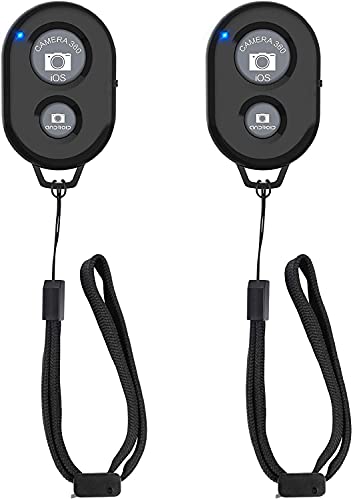
This two-pack is the clearest choice when two people need separate phone remotes. The manufacturer says the remotes work up to 30 feet away and can control photos and video in Instagram and Snapchat, with a long press for video and a short press for a photo. Each is small and lightweight, and the package includes wrist straps.
Compatibility includes Android 4.2.2 and later and iOS 6.0 and later; the maker also mentions built-in camera software or Camera 360. Compared with the longer-range alternative, the 30-foot rating is a limitation for wider shooting setups.
Bottom line: Pick this two-pack for paired phone use and wrist-strap portability.
Wireless Camera Remote, 2 Pack

Adjustable wrist straps distinguish this two-pack, adding a way to keep a remote secured while setting up a phone shot. The manufacturer gives a 30-foot effective range and says the remote can take photos and start or stop video recording. It supports iPhone, iPad and iPod devices running iOS 6.0 or later, along with most Android phones and tablets on version 4.2.2 or later.
The product also names Instagram, Snapchat and Camera 360 compatibility. Its feature notes exclude page turning in TikTok or Kindle, so this is a camera shutter option rather than a general-purpose scrolling or reading controller.
Bottom line: Choose this pair if adjustable wrist straps are useful for your setup.
How to choose a Bluetooth selfie remote
Start with device support, then compare range and shutter controls. A Bluetooth shutter remote usually sends a button command to a paired phone; many phone camera remotes emulate a volume-key press, so camera apps that map volume buttons to shutter may work while apps with different controls may not. Bluetooth range is affected by walls, bodies and radio interference, so a clear line of sight is more reliable than the maximum range printed for a product. For a setup more than 30 feet from the phone, favor a remote rated beyond 30 feet and keep obstacles out of the signal path. Confirm support for your phone model and camera app before relying on video or third-party-app functions.
Pairing and camera app compatibility
Pair a Bluetooth selfie remote in the phone’s Bluetooth settings, then open the camera app and take a test shot before positioning the phone. Bluetooth pairing and camera control are separate: a phone can show a remote as connected even if the chosen app does not interpret its button as a shutter command. Many remotes send a volume-button signal, and camera apps differ in whether that signal captures a photo, changes volume or does nothing. Test photo and video functions separately, since starting or stopping video may require a different press pattern. If the phone connects but the shutter does not respond, try the phone’s native camera app first and check its volume-button behavior.
Range and shooting distance
A 30-foot rating is enough for many tripod selfies and small group shots, while a 65-foot rating gives more room for distant framing. Those figures are maximum claimed operating distances, not a guarantee through walls or crowds; Bluetooth signals weaken with obstructions and interference. Measure from the phone to where you will stand, not from the camera lens to the edge of the room, and allow some margin beyond the measured distance. For outdoor setups beyond 30 feet, a remote rated for 65 feet gives more distance headroom, but test the connection before moving into position. Keep the remote and phone within a clear path when possible.
Remote shutter types and controls
Phone-only shutter remotes are designed for phone cameras, while broader remotes may add controls for action cameras or extra video functions. A shutter button may trigger a single photo, and some remotes use a long press or a second control to start and stop video; app support determines whether those commands work. Read the control descriptions closely: GoPro mode switching or power controls do not mean every phone app can use those same functions. A two-pack is useful when two phones or photographers need remotes, while a single remote can be easier to keep track of. For hands-free operation, secure a small remote on its strap or store it where it will not be misplaced.
| Need | What to prioritize | Relevant option |
|---|---|---|
| Phone and GoPro use | Support for both device types | Bluetooth Camera Remote for iPhone & GoPro |
| Two phone remotes | Two remotes in the package | zttopo Wireless Phone Camera Remote, 2 Pack or Wireless Camera Remote, 2 Pack |
| More than 30 feet away | Range rating above 30 feet | Bluetooth Camera Remote for iPhone & GoPro |
Frequently Asked Questions
Will a Bluetooth selfie remote work with any camera app?
No; app behavior varies even when Bluetooth pairing succeeds. Many remotes send a volume-button command, so test the specific camera app and check whether its volume key triggers capture.
How far away can I stand from a selfie remote?
Use the remote’s range rating as an upper limit, not a promise through obstacles. A 30-foot rating suits shorter setups, while walls and interference can reduce the usable distance.
Can a Bluetooth selfie remote start video recording?
Some remotes support video start and stop, but the control may depend on the app and button sequence. Test the video command in the intended app before setting up a distant shot.
Why does my phone pair but not take a picture?
Bluetooth connection alone does not guarantee that the camera app recognizes the remote’s command. Try the native camera app and verify whether the phone’s volume-button action is set to take a photo.