
Arlo Base Station VMB4000: Compatibility and Alternatives

The Arlo VMB4000 is the right fit if you need a base station for Arlo Pro or Pro 2 cameras and want USB local video backup. If your cameras are newer models, choose a compatible newer hub instead; camera compatibility is the deciding factor.
We earn a commission if you buy through links on this page. As an Amazon Associate I earn from qualifying purchases. Products are compared on manufacturer specifications, not hands-on testing.
- Best overall: Arlo Base Station VMB4000 – Designed for Arlo Pro and Pro 2 cameras, with USB local video backup and support for up to 4K resolution.
- Best for newer cameras: Arlo Pro SmartHub – Its compatibility list includes Essential, Pro 5S and 6, Ultra, Floodlight, and Video Doorbell cameras.
- Best for micro-USB backup: Arlo VMB5000 Ultra 2 SmartHub (Renewed) – Supports several Pro and Ultra camera generations and identifies a Micro USB drive for local backup.
| Product | Best for | Camera compatibility | Local backup connection | Dimensions (inches) | Shop |
|---|---|---|---|---|---|
| Arlo Base Station VMB4000 | Pro and Pro 2 | Pro and Pro 2 | USB drive | 8.19 × 6.42 × 4.09 | Check Price on Amazon |
| Arlo Pro SmartHub (Renewed) | Dedicated network | Ultra 2, Ultra, Pro 5S 2K, Pro 4, Pro 3 | USB Type-A drive | 7 × 5 × 2 | Check Price on Amazon |
| Arlo Pro SmartHub | Newer Arlo models | Essential 1/2/3/3 XL, Pro 5S/6/6 XL, Ultra | USB Type-A drive | 7.2 × 5.42 × 3.1 | Check Price on Amazon |
| Arlo VMB5000 Ultra 2 SmartHub (Renewed) | Micro-USB backup | Ultra, Ultra 2, Pro, Pro 2, Pro 3, Pro 4 | Micro USB drive | 5.88 × 4.78 × 2.94 | Check Price on Amazon |
Arlo Base Station VMB4000 and Compatible Alternatives
Compare camera fit and local storage connections before choosing an Arlo hub.
Arlo Base Station VMB4000

The VMB4000 is the specific Arlo base station in this comparison for Pro and Pro 2 wire-free cameras. It connects those cameras to the internet and supports local video backup through a USB drive. Arlo says it supports up to 4K resolution. The white unit measures 8.19 × 6.42 × 4.09 inches. Choose it when your existing cameras are Pro or Pro 2 and those connections meet your setup; its camera fit is narrower than the newer hubs here, so owners of other generations should verify compatibility first.
Bottom line: Choose this when your cameras are Arlo Pro or Pro 2.
Arlo Pro SmartHub (Renewed)
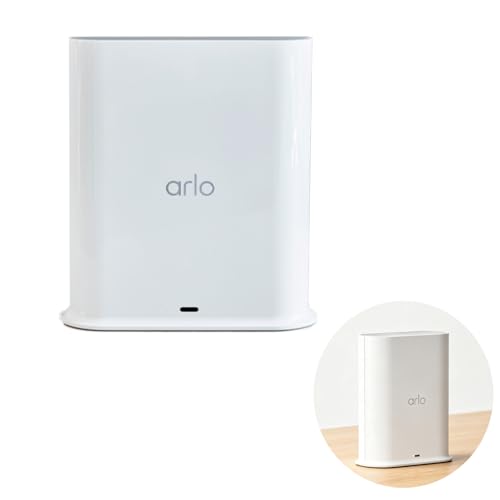
Unlike the VMB4000, this renewed Pro SmartHub names camera support extending from Pro 2 to Ultra 2 and Essential models. Its maker says it creates a dedicated 2.4 GHz camera network and supports automatic local video backup to a USB Type-A drive, which is not included. The hub measures 7 × 5 × 2 inches. It suits a mixed or newer camera setup that matches its compatibility list. The renewed condition and included 90-day warranty distinguish it from the other options; check that warranty and the exact camera model before choosing.
Bottom line: Pick this for a compatible camera mix and a dedicated 2.4 GHz network.
Arlo Pro SmartHub

This Arlo Pro SmartHub is the option here with the broadest named compatibility for newer Essential and Pro generations, as well as Ultra, Floodlight, and Video Doorbell cameras. The maker lists 2.4 GHz Wi-Fi, a smart siren, local backup through a USB Type-A drive, and coverage expansion through additional base stations. It measures 7.2 × 5.42 × 3.1 inches. Choose it when your camera model appears in that compatibility range. Its local storage connection is USB Type-A, so buyers planning a different drive connection should account for that.
Bottom line: Choose this for the newer camera families named in its compatibility list.
Arlo VMB5000 Ultra 2 SmartHub (Renewed)

The VMB5000 differs from the VMB4000 by naming a longer camera compatibility range, including Ultra, Ultra 2, several Pro generations, and Essential 2 and 3. It connects compatible cameras to the internet, and Arlo says it provides long-range connectivity; local video backup uses a Micro USB drive. The renewed white unit measures 5.88 × 4.78 × 2.94 inches. It fits buyers whose cameras match that list and who want its specified backup connection. Because the backup connector differs from USB Type-A hubs, check that your intended drive can connect appropriately.
Bottom line: Pick this if your cameras match its range and Micro USB backup suits your setup.
How to choose an Arlo base station
Start with the exact camera model, not the hub’s name: Arlo base stations are not interchangeable across every camera generation. Compare the camera’s model number with the hub’s compatibility range, then confirm whether your intended local backup drive uses USB Type-A, Micro USB, or another connection. Arlo hubs typically connect to a router by Ethernet while creating the camera connection; the specific network features vary by hub. A dedicated 2.4 GHz camera network can separate camera traffic from household Wi-Fi, but it does not make an incompatible camera work. Choose a hub only after both camera fit and storage connection meet your needs.
Local video backup and USB drive fit
Local backup depends on both the hub’s port and a compatible drive; matching the connector is the first practical check. USB Type-A and Micro USB are different plugs, so a drive that fits one hub may not fit another without an appropriate adapter. The VMB4000 and some SmartHub models identify USB-based backup, while the VMB5000 specifies Micro USB. Local storage is not the same as cloud recording: backup behavior, retention, and remote access can vary by camera, plan, and hub. Before setup, confirm the drive format and capacity supported for your exact hub, and keep the hub and drive in a dry, ventilated indoor location.
Arlo hub compatibility by camera generation
Camera generation determines which Arlo base station belongs in your setup; the product names alone are not enough to establish fit. Older Pro and Pro 2 cameras are specifically named for the VMB4000, while newer hubs list camera families that extend to Ultra and later Essential or Pro models. The table groups the options by the camera range and local storage connector each one identifies.
| Hub | Named camera fit | Backup connection |
|---|---|---|
| VMB4000 | Pro, Pro 2 | USB drive |
| Pro SmartHub (renewed) | Ultra 2 through Pro 2, Essential | USB Type-A |
| Pro SmartHub | Essential, Pro 5S/6, Ultra, Floodlight, Video Doorbell | USB Type-A |
| VMB5000 | Ultra, Pro generations, Essential 2 and 3 | Micro USB |
For a multi-camera system spanning generations, use a hub whose compatibility range explicitly includes every camera model you plan to connect.
Frequently Asked Questions
Can the VMB4000 connect Arlo Pro 2 cameras?
Yes, the VMB4000 is identified for Arlo Pro and Pro 2 cameras. It also supports USB-drive local video backup.
Does the VMB4000 support local video storage?
Yes, the VMB4000 can connect a USB drive for local video backup. Confirm that the drive connector and format suit the hub before setup.
Will a VMB4000 work with Arlo Ultra cameras?
The VMB4000’s named camera fit is Pro and Pro 2, not Ultra. The VMB5000 names Ultra and Ultra 2 among its compatible camera families.
What should I check before replacing an Arlo base station?
Match every camera’s model family to the replacement hub’s compatibility range before changing stations. Also check the local backup connector, since USB Type-A and Micro USB are not the same plug.