
Bluetooth Mouse No USB: 3 Receiver-Free Picks

Logitech M240 Compact Silent suits most people seeking a Bluetooth mouse without a USB receiver because it pairs over Bluetooth and offers quiet clicks in a compact, ambidextrous shape. Choose wegear Silent Bluetooth Mouse instead for a sculpted grip and six buttons, or Lenovo WL310 Silent Mouse if you want three selectable DPI levels.
A Bluetooth mouse connects directly to a computer or other host with Bluetooth, rather than through a USB receiver; the host must have Bluetooth capability.
We earn a commission if you buy through links on this page. As an Amazon Associate I earn from qualifying purchases. Products are compared on manufacturer specifications, not hands-on testing.
- Best overall: Logitech M240 Compact Silent – Bluetooth pairing, quiet clicks and compact ambidextrous design make it a straightforward everyday choice.
- Best for extra buttons: wegear Silent Bluetooth Mouse – Six buttons add forward and backward controls for browsing.
- Best for DPI control: Lenovo WL310 Silent Mouse – Choose among 1000, 1200 and 1600 DPI settings.
| Product | Best for | Buttons | DPI settings | Bluetooth version | Shop |
|---|---|---|---|---|---|
| Logitech M240 Compact Silent | Quiet everyday use | 3 | — | — | Check Price on Amazon |
| wegear Silent Bluetooth Mouse | Extra browsing controls | 6 | Adjustable; range — | 5.0 | Check Price on Amazon |
| Lenovo WL310 Silent Mouse | Selectable pointer speed | — | 1000, 1200, 1600 DPI | 5.0 | Check Price on Amazon |
Bluetooth Mouse No USB Receiver
These receiver-free mice pair over Bluetooth, with differences in grip, button count and pointer-speed options.
Logitech M240 Compact Silent
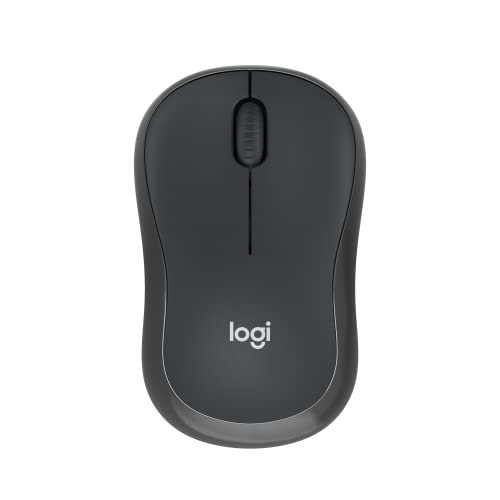
Logitech M240 Compact Silent stands out for combining quiet clicks with a compact, ambidextrous shape. The mouse connects through Bluetooth without a USB receiver and has three buttons that are not customizable. Its maker says the battery can last up to 18 months with an energy-efficient auto-sleep feature. The small, portable form suits travel and either hand, while the simple button layout works best for people who do not need side buttons or custom controls. Choose another option if a sculpted grip or selectable DPI levels matter more than a low-noise, compact design.
Bottom line: Pick this for quiet clicking and a compact shape that works in either hand.
wegear Silent Bluetooth Mouse

wegear Silent Bluetooth Mouse differs with six buttons and a sculpted grip, including forward and backward buttons for navigating web pages. Bluetooth 5.0 and Microsoft Swift Pair are listed for pairing, and the left, right and scroll-wheel buttons are described as silent. It is a medium-sized mouse with adjustable DPI, which suits users who want more controls and a contoured hold. Its shape and extra controls may be unnecessary for someone seeking a basic three-button travel mouse.
Bottom line: Choose this if a sculpted grip and forward/back browsing buttons are priorities.
Lenovo WL310 Silent Mouse

Lenovo WL310 Silent Mouse is the option for buyers who want explicit DPI choices: 1000, 1200 or 1600. It uses Bluetooth 5.0 without requiring a USB receiver and is described as ergonomic, portable and compatible with Windows, Mac and Chromebook. The maker says its clicks are silent. The three DPI steps suit everyday pointer control, but this model is less compelling if a compact ambidextrous shape or a six-button layout is central to the decision. Its dimensions are 4.2 by 1.6 by 2.5 inches, making it a defined-size alternative to the smaller travel-focused option.
Bottom line: Pick this when choosing among three listed DPI levels matters most.
How to choose a Bluetooth mouse without a USB receiver
Choose a Bluetooth mouse based on host compatibility, hand fit and controls before comparing extras. A receiver-free mouse needs a computer or tablet with Bluetooth; Bluetooth pairing cannot replace a missing Bluetooth radio. For basic pointer movement and clicking, a three-button layout can be enough, while side buttons help with browser forward and back. DPI measures how far the pointer moves relative to physical mouse movement: at the same operating-system pointer setting, a higher DPI moves the cursor farther per inch. Pick a model with selectable DPI if you often switch between precise work and broad screen movement. A contoured grip can suit extended use, while a compact ambidextrous shape is easier to pack and accommodates either hand.
Bluetooth pairing and computer compatibility
A Bluetooth mouse pairs through the host device’s Bluetooth settings, not through a USB receiver. First confirm Bluetooth is enabled on the computer, then place the mouse in pairing mode and select it from the available devices; the exact pairing control varies by model. Bluetooth 5.0 is named for wegear Silent Bluetooth Mouse and Lenovo WL310 Silent Mouse, while Logitech M240 Compact Silent is identified only as Bluetooth, so do not assume every model has the same Bluetooth version. Bluetooth 5.0 does not by itself guarantee compatibility with every operating system or computer. For a work device with Bluetooth disabled by policy, a receiver-free mouse will not connect unless the device’s Bluetooth capability can be enabled.
Mouse size, grip and button layout
Mouse shape and controls matter more than a generic “ergonomic” label. A compact, ambidextrous mouse can be a better match for travel or switching hands, while a sculpted grip has a more contoured shape for users who prefer that hold. Count the controls you will actually use: side buttons can move between browser pages, but extra buttons may be wasted if your workflow only needs pointing and clicking. Compare the measurements with a mouse you already find comfortable; a 4.2-inch length can serve as a useful reference point. Avoid choosing by width alone, because hand size, grip style and the position of the scroll wheel all affect comfort.
What DPI settings mean for pointer control
DPI is the mouse sensor’s sensitivity measure: more dots per inch move the pointer farther for the same physical movement. The Lenovo provides 1000, 1200 and 1600 DPI choices, giving three discrete sensitivity levels. A lower setting can make small movements easier to control, while a higher setting can reduce the hand movement needed to cross a large display; operating-system pointer speed also changes the feel. If your work needs fine placement, start with the lowest available DPI and raise it only if the pointer feels too slow. DPI is not a measure of accuracy by itself, so do not treat the largest number as automatically better.
Frequently Asked Questions
Can a Bluetooth mouse work without a USB receiver?
Yes, a Bluetooth mouse can pair directly with a computer that has Bluetooth capability. If the host lacks Bluetooth or has it disabled, the mouse cannot connect receiver-free.
How do I pair a mouse through Bluetooth?
Enable Bluetooth in the computer’s settings, put the mouse in pairing mode, and select it from the device list. Pairing controls differ by model, so use the mouse’s named pairing control if one is provided.
Does a Bluetooth mouse need a USB port?
A receiver-free Bluetooth mouse does not need a USB port for its wireless connection. The computer still needs Bluetooth capability, and any charging or battery needs depend on the mouse model.
What does a higher mouse DPI do?
A higher DPI moves the pointer farther for the same physical mouse movement. For example, 1600 DPI is more sensitive than 1000 DPI, though operating-system pointer speed also affects cursor behavior.
Are Bluetooth 5.0 mice compatible with every computer?
No; the computer still needs Bluetooth support and compatible software. Bluetooth 5.0 is specified for some mice, but that alone does not establish compatibility with every host.