
Old People Panic Button Options Compared by Alert Type

For an older adult who needs an emergency button that calls people, No Monthly Fees Medical Alert Telephone is the closest match because its waterproof button can call 1–30 phone numbers. Choose a siren-only system instead if the goal is to alert people nearby rather than place calls.
A panic button sends an alert when pressed, but the alert may be a phone call or a local sound-and-light alarm; those functions are not interchangeable.
We earn a commission if you buy through links on this page. As an Amazon Associate I earn from qualifying purchases. Products are compared on manufacturer specifications, not hands-on testing.
- Best overall: No Monthly Fees Medical Alert Telephone – Its panic button calls 1–30 phone numbers and has a range of 100–150 feet.
- Best for a local siren: Taoctee Panic Button Alarm System – The system pairs a portable button with an adjustable sound-and-light alarm.
- Best for multiple buttons: Daytech Wireless Panic Button Alarm – Its set includes two call buttons, two remotes, and a siren.
| Product | Best for | Alert type | Button range | Shop |
|---|---|---|---|---|
| No Monthly Fees Medical Alert Telephone | Phone-call alerts | Calls phone numbers | 100–150 ft | Check Price on Amazon |
| Taoctee Panic Button Alarm System | Adjustable siren | Sound and light siren | — | Check Price on Amazon |
| Daytech Wireless Panic Button Alarm | Two-button setup | Strobe siren | 330 ft open area; 130 ft obstacles | Check Price on Amazon |
Old People Panic Button Options
Compare how each alert reaches someone, then match that function to the help the user needs.
No Monthly Fees Medical Alert Telephone

Unlike the siren systems, this medical alert telephone can call people when its panic button is pressed. The button is waterproof, has a 100–150-foot range, and the telephone also includes speakerphone, a strobe-light ringer, amplified sound, talking caller ID, and battery backup. It suits someone who wants the alert to reach selected contacts by phone rather than rely only on a nearby person hearing a siren. The key limitation is the phone-line requirement: the unit needs a dial tone to operate and call out, so it is not a fit where that connection is unavailable.
Bottom line: Choose this when the alert should call designated contacts and a phone-line dial tone is available.
Taoctee Panic Button Alarm System

The Taoctee system stands out for adjustable alarm settings: its siren can be set from 0 to 120 dB and its alarm duration from 30 seconds to 10 minutes. It pairs a lightweight portable panic button with a flashing red light and siren, and the alarm can use DC charging or batteries. This is suited to someone who needs a local sound-and-light alert at home, an office, or a business. Unlike a phone-calling alert, the function is a siren; choose another type if the alert must contact someone who is not nearby.
Bottom line: Pick this for an adjustable local alarm rather than remote phone notifications.
Daytech Wireless Panic Button Alarm
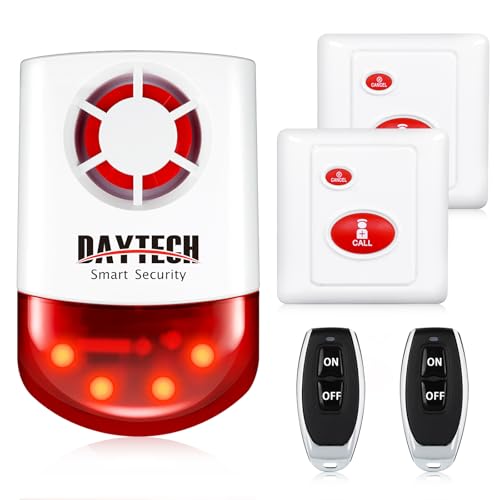
The Daytech set differs from the phone-calling option by using a receiver siren, with two call buttons and two remotes included. The siren sounds at 120 dB and flashes; the call-button range is 330 feet in open areas or 130 feet with obstacles, while the remote range is 65 feet. This can suit a home or shop where a nearby person should hear and see an alarm. The siren cannot work alone: it must be paired with a call button or remote, and the ranges are not the same for both controls.
Bottom line: Choose this for a multi-button local siren setup, not for calling contacts.
Choose between phone calls and a local siren
Start by deciding who must receive the alert: a phone contact or someone close enough to hear an alarm. A personal emergency telephone can dial saved numbers, while a siren system produces sound and light at its receiver; a loud alarm does not by itself notify a distant caregiver. For a phone-based system, confirm that the home has the required phone connection and that the chosen contacts will answer or act on calls. For a siren, consider where the receiver will sit and whether its sound can be heard from the rooms where help may be needed. Do not treat a local alarm as a substitute for emergency calling if no one nearby can respond.
Check button range and placement at home
Wireless range is strongest in open space and can drop when walls, floors, metal, or other obstructions lie between a button and receiver. As a practical rule, if the receiver is more than 100 feet away or separated by several walls, test the signal from the rooms where the button will be used before relying on it. Keep portable buttons within reach in the locations where they are needed, and avoid placing a receiver inside a closed cabinet. An open-area range is not a guarantee for every floor plan. For a phone-line unit, also verify that the dialing connection is live and that a power outage does not interrupt the intended alert path.
Understand what sound and light alarms can do
A siren-and-strobe unit alerts people within earshot or sight of its receiver; it is not the same as a monitored medical alert service. Sound output is measured in decibels, and a 120 dB alarm is extremely loud at close range, so avoid activating a high-output siren beside someone’s ear. Place the receiver where household members can notice it without exposing anyone to direct, close-range sound. A strobe can add a visual cue, but it may not be useful to someone who cannot see it or is not facing it. Choose an alert path according to who can actually respond, rather than assuming a louder alarm automatically brings outside help.
Compare the alert routes
The most important distinction is the destination of the alert: saved phone numbers or a nearby siren receiver. Button count and wireless range matter only after that destination fits the household’s response plan. A phone-call option needs its phone connection; wireless alarms need a compatible receiver within range. Use this comparison to choose the alert route before considering secondary features such as strobe lights or adjustable duration.
| Need | Alert route | Check before choosing |
|---|---|---|
| Contact selected people | Phone dialing | Phone-line dial tone and reachable contacts |
| Alert people nearby | Sound-and-light receiver | Receiver placement and signal through walls |
| Cover multiple spots or users | Several paired buttons/remotes | Which controls activate the receiver |
Frequently Asked Questions
Can a panic button call 911 automatically?
Only a system with a dialing function can place calls, and that does not establish that it calls 911 automatically. Confirm the programmed numbers and test the intended call path without placing an unintended emergency call.
Where should a home panic alarm receiver go?
Place a receiver where household members can hear or see it, not inside a cabinet or behind a closed door. Test it from the farthest room and behind the walls or floors the signal must cross.
Does a waterproof panic button work in the shower?
Waterproof construction can make a button more suitable around water, but the term alone does not establish an immersion depth or duration. Check the exact water-resistance rating before submerging any device.
How often should an emergency button be tested?
Test the alert path after setup and whenever the receiver, phone connection, or button location changes. A brief scheduled check, such as monthly, can catch dead batteries or a disconnected line before an emergency.