
M6 Screws for TV Mounts: 5 Hardware Kits Compared

ReplacementScrews M6 x 30 mm Kit is the closest match for M6 screws for a TV mount because its set covers M6 installations from 12 to 30 mm with spacers and washers. Choose a mixed-size kit instead if you also need M4, M5 or M8 screws; confirm the correct M6 length for your TV before installing.
We earn a commission if you buy through links on this page. As an Amazon Associate I earn from qualifying purchases. Products are compared on manufacturer specifications, not hands-on testing.
- Best overall: ReplacementScrews M6 x 30 mm Kit – The set is focused on M6 and includes spacers for installation lengths from 12 to 30 mm.
- Best for labeled storage: WALI 68-Piece Universal Kit – The 68-piece kit includes M4, M5, M6 and M8 hardware in pre-divided compartments.
- Best for stainless steel: Quacc 24-Piece Stainless Steel Kit – The kit includes 304 stainless-steel M6 x 23 mm screws, plus M4 and M8 sizes.
| Product | Best for | M6 coverage | Other screw sizes | Kit format or material | Shop |
|---|---|---|---|---|---|
| ReplacementScrews M6 x 30 mm Kit | M6-only installations | 12–30 mm installation range | None specified | Washers and 5/10 mm spacers | Check Price on Amazon |
| WALI 68-Piece Universal Kit | Organized mixed sizes | Included | M4, M5, M8 | 68-piece set; alloy steel | Check Price on Amazon |
| Quacc 24-Piece Stainless Steel Kit | Stainless steel hardware | M6 x 23 mm | M4, M8 | 24-piece set; 304 stainless steel | Check Price on Amazon |
| Universal Hardware Kit with Box | Sorted replacement parts | Included | M4, M5, M8 | Box; screw material unspecified | Check Price on Amazon |
| MOUNTUP Universal Hardware Kit MU9041 | Common mixed sizes | Included | M4, M8 | Box; length up to 22 mm | Check Price on Amazon |
M6 Screws for TV Mounts
Compare the M6-focused set with mixed-size kits, and match screw length to the TV and mount before fastening.
ReplacementScrews M6 x 30 mm Kit

This set is the most focused option for an M6-only replacement because it covers installation lengths from 12 to 30 mm with 5 mm and 10 mm spacers. It includes spring and flat washers, and the hardware has black plating. The set suits a TV that requires M6 screws when the available screw reach falls within that range. The universal compatibility does not determine the correct length for an individual TV; measure the mount plate and account for any spacer before choosing a screw.
Bottom line: Choose this set when the TV requires M6 and its needed installation length falls between 12 and 30 mm.
WALI 68-Piece Universal Kit

Unlike the M6-focused set, this 68-piece kit combines M4, M5, M6 and M8 screws with washers and spacers. Its hardware is alloy steel, and the pieces are pre-divided with sizes shown on the package. That makes it useful when a household needs several metric screw sizes rather than only M6. The kit is intended for TVs and monitors up to 80 inches, including curved models, but that broad compatibility claim does not replace checking the thread size and screw reach for the particular screen.
Bottom line: Choose this mixed-size kit if you want M6 alongside other common TV screw sizes.
Quacc 24-Piece Stainless Steel Kit

This kit stands apart by specifying 304 stainless steel and a fixed M6 screw length of 23 mm. It also includes M4 x 10 mm and M8 x 24 mm screws, plus washers and spacers for accommodating uneven TV backs. The 23 mm M6 option suits buyers whose required screw length matches that measurement after accounting for the mount plate and any spacer. It is less flexible than a kit with several M6 lengths, so verify the required reach before selecting it.
Bottom line: Choose it when 23 mm M6 screws suit the installation and stainless steel is your priority.
Universal Hardware Kit with Box

This kit’s distinguishing feature is its box with labeled, separated compartments for the screws, washers and spacers. It includes M4, M5, M6 and M8 sizes, making it a general replacement option when the needed screw size is not yet known. The organized storage can also help keep unused hardware together after installation.
Bottom line: Choose it for labeled storage and a range of sizes when you still need to identify the right M6 length.
MOUNTUP Universal Hardware Kit MU9041
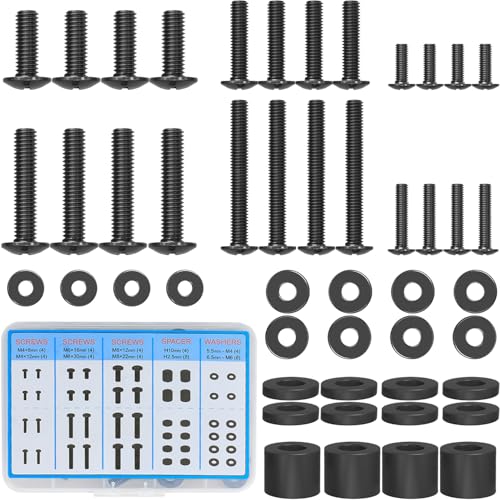
This MOUNTUP kit groups M4, M6 and M8 screws with washers and spacers in a storage box, and lists screw length up to 22 mm. It is intended for use with TVs, monitors, wall mounts, stands and mobile carts, giving it broader mounting contexts than a kit described only for wall mounting. Choose it when M6 is needed alongside the other included sizes and the required screw length is within the maximum.
Bottom line: Choose it when you need a boxed mix of M4, M6 and M8 hardware and a length up to 22 mm works.
How to choose M6 screws for a TV mount
Start with the TV’s required thread size, then determine screw length from the mount plate, washer, spacer and usable threaded depth in the TV. M6 refers to a nominal 6 mm thread diameter; it does not specify how long the screw should be. A commonly used coarse metric M6 thread has a 1.0 mm pitch, but confirm the TV’s requirement rather than forcing a screw that does not turn freely. As a practical check, start the screw by hand and stop if it binds. The screw should secure the plate without bottoming out in the TV’s threaded insert. If a screw reaches the end of the insert before clamping the plate, use a shorter screw or an appropriate spacer.
How to measure TV mount screw length
Measure the screw’s usable reach from beneath the screw head to its tip, then account for the thickness of the mount plate, washer and any spacer. For example, adding a 5 mm spacer changes the portion of the screw that reaches into the TV by 5 mm. The needed engagement depth depends on the TV’s threaded insert, so there is no single M6 length that fits every screen. Keep the screw straight and turn it by hand for the first few rotations; cross-threading can damage the insert. Do not force a screw or tighten it until the plate flexes. A fixed-length screw is a good fit only when its reach matches the particular TV and mounting stack.
M6 TV mount hardware types compared
Pick a focused M6 kit when you know the TV needs M6 and want multiple reach options; choose a mixed-size kit if the thread size is still uncertain or other devices need hardware too. VESA describes the spacing pattern of the mounting holes, not the screw length, so a VESA pattern match alone cannot confirm screw fit. Many TV brackets use four mounting points, but the TV and bracket determine the actual pattern and hole count. The table separates screw-size coverage from the length-fit question, which must be checked against the TV and installed plate.
| Need | Suitable kit type | Check before fastening |
|---|---|---|
| Known M6 requirement | M6-focused set | Required reach with plate and spacer |
| Unsure of screw size | Mixed metric sizes | TV thread requirement |
| Known M6 length | Fixed-length M6 screws | Insert depth and mounting stack |
Safe installation checks for TV mount screws
Support the TV securely during mounting and use the screw size and length intended for its threaded inserts. A screw that is too long can bottom out and damage the insert or TV; one that is too short may not hold the bracket securely. Keep the TV’s weight within the wall mount’s rated capacity, and fasten the mount to a suitable structural support according to its installation requirements. Tighten evenly without overtightening, since excessive force can strip threads or damage the screen housing. If the screw does not turn smoothly by hand, remove it and recheck the thread size and alignment instead of using a power tool to force it.
Frequently Asked Questions
What does M6 mean on a TV mounting screw?
M6 identifies a metric screw with a nominal thread diameter of 6 mm. The designation does not tell you the screw length, so check the TV’s required reach separately.
How long should an M6 TV mount screw be?
There is no single length for every TV because the mount plate, washer, spacer and insert depth change the needed reach. Measure the installed stack and make sure the screw clamps the plate without bottoming out in the TV.
Can I use any M6 screw for my TV mount?
No; the screw must match the TV’s thread and have a suitable length for the mounting stack. A commonly used coarse M6 thread has a 1.0 mm pitch, but do not force a screw that does not start smoothly by hand.
Does a VESA pattern tell me the screw length?
No; VESA pattern measurements describe the spacing between mounting holes, not the screw length. Check the TV’s required thread size and account for the plate and any spacers when selecting reach.
Can a TV mount screw be too long?
Yes; an overlong screw can bottom out in the TV’s threaded insert and damage it or the TV. Stop tightening if the screw reaches resistance before the bracket is clamped securely.
Should I use a power drill to tighten TV mount screws?
A hand tool gives better control for starting and tightening screws into a TV’s inserts. Begin by hand to avoid cross-threading, and stop if the screw binds or the screen housing begins to flex.