
Floppy Disc to USB Adapter: 5 External Drives Compared

3.5-Inch USB-A/C Floppy Drive is the best match for most people seeking a floppy disc to USB adapter because it includes USB-A and USB-C connectors for connecting a 3.5-inch drive to a computer. These external drives let a compatible computer read or write floppy disks; choose a USB-A-only option if that is the connector you need, and verify operating-system compatibility before buying.
We earn a commission if you buy through links on this page. As an Amazon Associate I earn from qualifying purchases. Products are compared on manufacturer specifications, not hands-on testing.
- Best overall: 3.5-Inch USB-A/C Floppy Drive – Its USB-A/C connector supports two common computer port types.
- Best for a slim drive: 3.5-Inch USB-A/C Floppy Drive, Brushed – It is 0.63 inch thick and weighs 0.52 pound.
- Best for USB-A PCs: YEY 3.5-Inch USB-A Floppy Drive – It has a fixed USB-A plug and supports 3.5-inch 1.44MB disks.
| Product | Best for | Connector | Disk format | Thickness | Shop |
|---|---|---|---|---|---|
| 3.5-Inch USB-A/C Floppy Drive | Dual-port computers | USB-A/C | 3.5-inch, 1.44MB | 0.78 in | Check Price on Amazon |
| 3.5-Inch USB-A/C Floppy Drive, Brushed | Slim dual-port setup | USB-A/C | 3.5-inch, 1.44MB | 0.63 in | Check Price on Amazon |
| CIpotZIZ 3.5-Inch USB-A/C Floppy Drive | Thin dual-port drive | USB-A/C | 3.5-inch | 0.63 in | Check Price on Amazon |
| RAAYOO 3.5-Inch USB Floppy Drive | USB-A Windows PCs | USB | 3.5-inch, 1.44MB | 0.65 in | Check Price on Amazon |
| YEY 3.5-Inch USB-A Floppy Drive | USB-A 1.44MB disks | USB-A | 3.5-inch, 1.44MB | 0.59 in | Check Price on Amazon |
Floppy Disc to USB Adapter Drives
Compare connector type, disk support, and dimensions to find an external drive suited to your computer and floppy disks.
3.5-Inch USB-A/C Floppy Drive
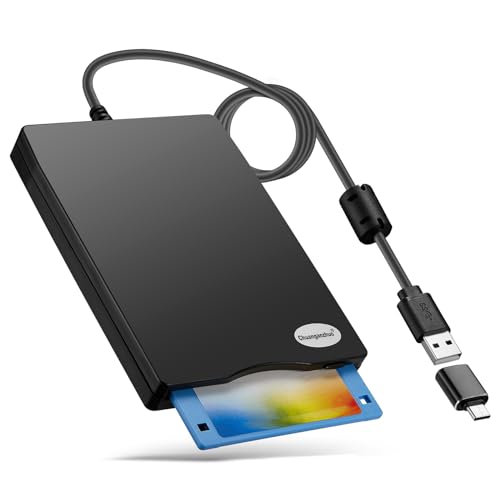
For a 3.5-inch floppy drive with both USB-A and USB-C connectors, 3.5-Inch USB-A/C Floppy Drive offers a straightforward match for computers with either port. It is 5.46 inches long, 3.9 inches wide, and 0.78 inch high, with a frosted-texture finish. The maker says it supports reading and writing and is plug-and-play on Windows 11, 10, 8, 7, 2000, and XP. Choose it if connector flexibility matters more than minimum thickness; it is thicker than the 0.63-inch alternatives here. The maker says it does not work with Mac or Chrome.
Bottom line: Pick this if your computer may need either USB-A or USB-C.
3.5-Inch USB-A/C Floppy Drive, Brushed

At 0.63 inch thick, 3.5-Inch USB-A/C Floppy Drive, Brushed is a slimmer dual-connector option than 3.5-Inch USB-A/C Floppy Drive, while retaining USB-A and USB-C connectivity. Its dimensions are 5.51 by 4 inches, and the maker gives its weight as 0.52 pound. The maker says it reads and writes floppy disks without an extra driver on Windows 11, 10, 8.1, 7, 2000, and XP. That OS range makes it a candidate for older Windows computers as well as newer ones. The maker says it is not compatible with Mac, so it is unsuitable for a Mac-only setup.
Bottom line: Choose this when a slim profile and both connector types matter.
CIpotZIZ 3.5-Inch USB-A/C Floppy Drive

CIpotZIZ 3.5-Inch USB-A/C Floppy Drive combines USB-A/C connectivity with a 0.63-inch-thick brushed-texture body, giving it the same thickness as 3.5-Inch USB-A/C Floppy Drive, Brushed but a different finish. The maker says the USB-powered drive can read and write 3.5-inch floppy disks and requires no extra driver on Windows 11, 10, 8.1, 7, 2000, and XP. Its weight is 0.679 pound. It suits a Windows user who wants a slim dual-connector drive; its weight is greater than 3.5-Inch USB-A/C Floppy Drive, Brushed’s 0.52 pound, which may matter when minimizing carry weight. The maker excludes Mac support.
Bottom line: Pick this for a slim USB-A/C drive with a brushed finish.
RAAYOO 3.5-Inch USB Floppy Drive

Its black body measures 5.5 by 4 inches and 0.65 inch high. The maker says it can read and write disks and describes it as portable. Unlike the dual USB-A/C models, its connector type is not clear from the specifications, so confirm the computer connection you need before ordering. That check matters particularly for computers with USB-C ports and no USB-A port.
Bottom line: Consider this for a Windows PC after confirming its connector matches.
YEY 3.5-Inch USB-A Floppy Drive

YEY 3.5-Inch USB-A Floppy Drive is the clear USB-A-only choice, with a fixed USB-A plug and a 0.59-inch-thick body measuring 5.63 by 4 inches. It supports reading and writing compatible 3.5-inch, 1.44MB high-density floppy disks; the maker explicitly excludes 720KB, 1.2MB, and 5.25-inch formats. The maker says no additional driver or software is normally required on Windows 11, 10, 8, 7, or XP, and that the drive draws power over USB. Choose it when its narrower format support matches your disks; the disk itself is not included.
Bottom line: Choose this for compatible 1.44MB disks and a USB-A computer.
How to choose a floppy disc to USB adapter
Start with the disk size and format, then match the drive connector to an available computer port. These options are for 3.5-inch floppies, and YEY 3.5-Inch USB-A Floppy Drive explicitly supports 1.44MB high-density disks rather than 720KB, 1.2MB, or 5.25-inch media. USB-A/C models offer a choice of plug, while YEY 3.5-Inch USB-A Floppy Drive has a fixed USB-A plug. Most standard 3.5-inch high-density disks hold 1.44MB unformatted capacity; usable file space is lower after formatting. If you have under 1.44MB of files, that still does not guarantee compatibility: the disk must use a format the drive and operating system can read. Check the disk label and your computer’s ports before choosing.
Floppy disk formats and computer compatibility
A 3.5-inch disk’s physical size does not prove that its data format is supported. High-density 1.44MB and double-density 720KB disks are common 3.5-inch formats, while 5.25-inch disks require a different drive; YEY 3.5-Inch USB-A Floppy Drive specifically excludes the other formats. A disk created by older equipment may also use a nonstandard or copy-protected format that a typical USB floppy drive cannot access. The product makers for 3.5-Inch USB-A/C Floppy Drive, CIpotZIZ 3.5-Inch USB-A/C Floppy Drive, and 3.5-Inch USB-A/C Floppy Drive, Brushed name Windows versions and exclude Mac; YEY 3.5-Inch USB-A Floppy Drive also gives a Windows-only compatibility range. For important files, keep the original disk unchanged and make a separate copy after transfer. Confirm the exact OS and disk format match before relying on a drive.
Safely transferring files from floppy disks
Copy files from floppy media promptly and keep the disk away from magnets, heat, dust, and moisture. A floppy’s magnetic coating and flexible disk can be damaged by contamination or rough handling, and aging media may become unreadable. Slide the disk into the drive without forcing it; if it resists, remove it and check orientation rather than pushing. Many 3.5-inch disks have a small write-protect tab: opening the tab protects against ordinary writes, but does not create a backup. Copy files to a computer and verify that important documents open correctly before treating the transfer as complete. For irreplaceable data, make more than one copy on separate storage, since a single computer copy can also be lost.
Common floppy-to-USB transfer problems
When a drive is not detected, first check that the connector is fully seated and that the computer recognizes the USB device. A connector mismatch, unsupported operating system, damaged disk, or unsupported disk format can all prevent access. A 1.44MB drive will not read a 5.25-inch disk; the physical size requires different hardware. Even a 3.5-inch disk can fail if it is 720KB or uses a format the drive does not support. Avoid repeatedly trying a disk that makes unusual mechanical noises or appears physically damaged, because further handling may worsen the problem. Test with a known-compatible disk and computer before concluding that the files themselves are unreadable.
Frequently Asked Questions
Can a USB floppy drive read 5.25-inch disks?
No, these products are for 3.5-inch disks, and YEY 3.5-Inch USB-A Floppy Drive explicitly excludes 5.25-inch media. A 5.25-inch disk needs a compatible 5.25-inch drive.
Do USB floppy drives support 720KB disks?
Support depends on the drive and disk format. YEY 3.5-Inch USB-A Floppy Drive explicitly excludes 720KB disks, so check the format before choosing that model.
Can I use these floppy drives with a Mac?
The makers of 3.5-Inch USB-A/C Floppy Drive, CIpotZIZ 3.5-Inch USB-A/C Floppy Drive, and 3.5-Inch USB-A/C Floppy Drive, Brushed say those models are not compatible with Mac. Confirm compatibility for your specific computer before relying on another model.
Why will my floppy disk not open on Windows?
A drive may fail to open a disk if its format is unsupported, the disk is damaged, or the connection is not recognized. Try a compatible 3.5-inch disk and confirm that the computer supports the drive’s operating system requirements.
How should I protect files during floppy transfers?
Copy files to another storage location and verify that important files open before relying on the transfer. Keep the original disk away from heat, moisture, dust, and magnetic fields.