
SANSUI 27-Inch 240Hz Gaming Monitors Compared

SANSUI 27-Inch Curved FHD 240Hz is the direct match for a SANSUI 27-inch 240Hz gaming monitor, with a 1500R curve and Full HD resolution. Choose SANSUI 27-Inch WQHD Fast IPS 260Hz or SANSUI 27-Inch Curved WQHD Dual Mode instead if you want a 1440p screen; their refresh modes differ from a straightforward 240Hz FHD display.
These monitors use high refresh rates to show more frequent screen updates, but your computer and connection also need to support the desired resolution and rate.
We earn a commission if you buy through links on this page. As an Amazon Associate I earn from qualifying purchases. Products are compared on manufacturer specifications, not hands-on testing.
- Best overall: SANSUI 27-Inch Curved FHD 240Hz – It is the direct 27-inch 240Hz match and supports up to 240Hz over HDMI and DisplayPort.
- Best for 1440p IPS: SANSUI 27-Inch WQHD Fast IPS 260Hz – Its 2560 × 1440 Fast IPS panel supports up to 260Hz over DisplayPort.
- Best for dual mode: SANSUI 27-Inch Curved WQHD Dual Mode – It offers 1440p at 280Hz or HD at 400Hz, plus a 1500R curve.
| Product | Best for | Resolution | Refresh rate | Panel / shape | Shop |
|---|---|---|---|---|---|
| SANSUI 27-Inch Curved FHD 240Hz | FHD 240Hz gaming | 1920 × 1080 | 240Hz | Fast VA, 1500R curved | Check Price on Amazon |
| SANSUI 27-Inch WQHD Fast IPS 260Hz | 1440p Fast IPS | 2560 × 1440 | Up to 260Hz DP; 144Hz HDMI | Fast IPS, flat | Check Price on Amazon |
| SANSUI 27-Inch Curved WQHD Dual Mode | Dual-mode gaming | 2560 × 1440 / HD | 280Hz WQHD; 400Hz HD | Curved, 1500R | Check Price on Amazon |
| SANSUI 27-Inch WQHD Fast IPS 180Hz | 1440p IPS gaming | 2560 × 1440 | Up to 180Hz DP; 144Hz HDMI | Fast IPS, flat | Check Price on Amazon |
SANSUI 27-Inch 240Hz Gaming Monitors
Compare each model’s resolution, panel style and connection-specific refresh limits before choosing.
SANSUI 27-Inch Curved FHD 240Hz

SANSUI 27-Inch Curved FHD 240Hz is the direct fit for a 27-inch SANSUI monitor with a 240Hz mode, pairing Full HD resolution with a curved Fast VA panel. The maker says HDMI and DisplayPort can each reach 240Hz; the screen also has a 1ms MPRT response-time rating, FreeSync, and a 300-nit brightness rating. Its 1500R curve and 4000:1 contrast ratio distinguish it from the flat IPS alternatives. The tradeoff is lower resolution than the 1440p options, which matters if you want finer detail or more desktop space.
Bottom line: Pick this if 240Hz at Full HD and a curved VA screen are your priorities.
SANSUI 27-Inch WQHD Fast IPS 260Hz

SANSUI 27-Inch WQHD Fast IPS 260Hz is the 1440p alternative with a flat Fast IPS panel and a 260Hz maximum over DisplayPort. Its HDMI 2.0 ports support up to 144Hz, so the connection you use changes the available rate. The maker lists a 1ms MPRT response time, FreeSync Premium, HDR10, and 320-nit brightness. At 27 inches, 1440p gives a sharper image than 1080p, but reaching the top refresh rate depends on DisplayPort and a compatible source. Choose another model if you specifically need a curved screen or a 240Hz FHD configuration.
Bottom line: Choose this for 1440p Fast IPS and a high DisplayPort refresh ceiling.
SANSUI 27-Inch Curved WQHD Dual Mode

SANSUI 27-Inch Curved WQHD Dual Mode stands apart with two resolution-and-refresh modes: 2560 × 1440 at up to 280Hz or HD at up to 400Hz. Its 1500R curved screen, HDR400 rating, and 5000:1 contrast ratio also separate it from the flat 1440p option. The maker lists HDMI 2.1 ports supporting up to 280Hz at 2K and DisplayPort 1.4 supporting up to 280Hz at 2K. This is not a simple 240Hz FHD match; the dual-mode setup suits buyers willing to choose between sharper resolution and a higher refresh ceiling.
Bottom line: Pick this if you want to switch between WQHD detail and an HD high-refresh mode.
SANSUI 27-Inch WQHD Fast IPS 180Hz
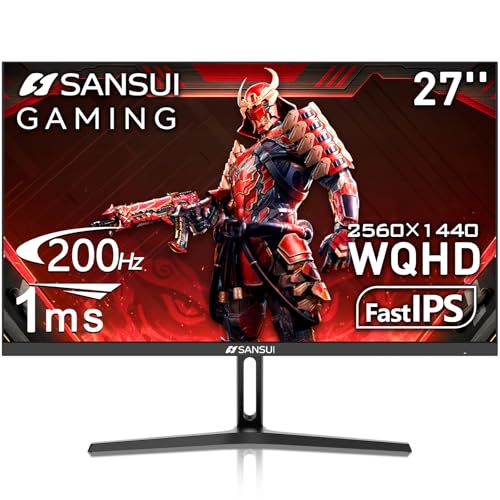
SANSUI 27-Inch WQHD Fast IPS 180Hz is a flat 1440p Fast IPS model with a lower refresh ceiling than the 240Hz match. Its two DisplayPort 1.2 inputs support up to 180Hz, while its two HDMI 2.0 inputs support up to 144Hz. The maker lists 1ms response time, Adaptive Sync, HDR, and 320-nit brightness; a DisplayPort cable is included. This model may suit someone prioritizing 1440p resolution and IPS over a 240Hz mode. It is the least direct fit for the search because neither listed input reaches 240Hz.
Bottom line: Choose this for 1440p IPS with a 180Hz DisplayPort limit.
How to choose a 27-inch gaming monitor
Start with resolution and the refresh rate your computer can actually drive. A 27-inch 1080p screen has about 82 pixels per inch, while 27-inch 1440p has about 109 pixels per inch, so 1440p gives finer detail. Higher refresh rates can make motion updates more frequent, but the game, graphics hardware, and connection all affect whether you can use the maximum mode. For a 240Hz target, select a model and input that both specify at least 240Hz at your chosen resolution. Pick a 1440p alternative if sharper text and game detail matter more than matching a 240Hz FHD configuration.
Panel shape is another decision: the curved models here use a 1500R curve, while the IPS alternatives are flat. Curvature is a viewing preference, not a substitute for checking resolution and input limits.
Resolution and refresh rate by connection
Check the input’s own limit rather than relying on the monitor’s headline maximum. A monitor can support different refresh rates through different ports, and a cable or source that cannot carry the target mode can prevent you from selecting it. The table pairs the specified resolution and rate for each model’s relevant connection.
| Model | Connection | Specified maximum |
|---|---|---|
| SANSUI 27-Inch Curved FHD 240Hz | HDMI or DP 1.4 | 240Hz |
| SANSUI 27-Inch WQHD Fast IPS 260Hz | DP 1.4 | 260Hz |
| SANSUI 27-Inch WQHD Fast IPS 260Hz | HDMI 2.0 | 144Hz |
| SANSUI 27-Inch Curved WQHD Dual Mode | HDMI 2.1 or DP 1.4 | 280Hz at 2560 × 1440 |
| SANSUI 27-Inch WQHD Fast IPS 180Hz | DP 1.2 | 180Hz |
| SANSUI 27-Inch WQHD Fast IPS 180Hz | HDMI 2.0 | 144Hz |
For SANSUI 27-Inch Curved WQHD Dual Mode, the maker also specifies an HD mode up to 400Hz. Confirm that your graphics output and cable support the resolution and refresh mode you plan to use.
Curved VA or flat IPS
Choose between curved VA and flat IPS based on the screen shape and panel type you prefer, not on a shared marketing label. The 1500R curve appears on SANSUI 27-Inch Curved FHD 240Hz and SANSUI 27-Inch Curved WQHD Dual Mode, both of which use VA panels; SANSUI 27-Inch WQHD Fast IPS 260Hz and SANSUI 27-Inch WQHD Fast IPS 180Hz are flat Fast IPS models. The 1500R figure describes the curve radius, with a smaller radius indicating a tighter curve. A curved screen can suit a centered single-player setup, while a flat screen may be preferable if you want a conventional shape or often view the display from different positions. The maker does not establish a universal winner for color or motion, so weigh the panel and screen attributes against your own use.
Set up the monitor and avoid refresh-rate mistakes
Use a connection rated for your target mode and then select the intended refresh rate in your computer’s display settings; connecting a high-refresh monitor alone does not ensure that mode is active. This matters most for models whose HDMI and DisplayPort limits differ, such as SANSUI 27-Inch WQHD Fast IPS 260Hz and SANSUI 27-Inch WQHD Fast IPS 180Hz. The monitors support VESA mounting at 100 × 100 mm, and the tilt range is roughly 5 degrees forward to 15 degrees back for models with that range. Leave room to adjust screen position before tightening a mount. These monitors have no built-in speakers, so plan on separate audio equipment or headphones if you need sound.
Frequently Asked Questions
Does a 240Hz monitor make every game run at 240 fps?
No; the refresh-rate ceiling does not make a game render at that frame rate. The game and graphics hardware must produce enough frames, and the selected connection must support the monitor’s target mode.
Is 1440p noticeably sharper than 1080p at 27 inches?
Yes, 27-inch 1440p works out to about 109 pixels per inch, compared with about 82 pixels per inch for 1080p. That higher pixel density makes fine detail appear sharper, though it also asks more of the graphics hardware.
Can HDMI reach 240Hz on these SANSUI monitors?
The 27-inch curved FHD model specifies up to 240Hz over HDMI, and the curved WQHD dual-mode model specifies up to 280Hz at 2K over HDMI 2.1. The HDMI limits for the other two models are 144Hz, so check the input limit for the specific model.
Do these monitors have built-in speakers?
No; the maker identifies no built-in speakers for these models. Use headphones or separate speakers if you need audio output.
What does 1500R mean on a curved monitor?
A 1500R label describes the screen’s curvature radius in millimeters; a smaller radius means a tighter curve. These monitors also list tilt adjustment, which can help position the screen for a centered viewing setup.