
Smart Car OBD2 GPS Gauge HUD: 5 Models Compared

For a smart car OBD2 GPS gauge HUD, WiiYii P6 OBD2/GPS Gauge is a practical starting point because it combines OBD and GPS functions with multiple display layouts and an adjustable mounting bracket. Choose another option if you need a larger screen, GPS speed when OBD-II data is unavailable, or a specific set of vehicle readings.
A HUD is a compact display positioned near the windshield or on the dashboard so key readings can be viewed without looking down at the instrument cluster.
We earn a commission if you buy through links on this page. As an Amazon Associate I earn from qualifying purchases. Products are compared on manufacturer specifications, not hands-on testing.
- Best overall: WiiYii P6 OBD2/GPS Gauge – Offers OBD and GPS functionality, multiple screen layouts and adjustable mounting.
- Best for a large screen: 5.5-Inch GPS/OBD2 Car HUD – Its 5.5-inch display is the largest screen size specified among these options.
- Best for selectable layouts: Kravynorx 3.5-Inch OBD2 GPS HUD – Provides 10 layouts and describes OBD-II data availability as vehicle-dependent.
| Product | Best for | Connection modes | Display or layouts | Dimensions (inches) | Shop |
|---|---|---|---|---|---|
| WiiYii P6 OBD2/GPS Gauge | Flexible mounting | OBD2 and GPS | 10 interfaces | 5.24 × 3.54 × 4.33 | Check Price on Amazon |
| MH OBD2+GPS Head-Up Display | Data monitoring | OBD2 and GPS | — | 4.3 × 3.3 × 3.0 | Check Price on Amazon |
| OBD2 GPS Dual-System Car HUD | GPS compatibility | OBD2 and GPS | Customizable modes | 4.0 × 3.0 × 2.0 | Check Price on Amazon |
| 5.5-Inch GPS/OBD2 Car HUD | Large display | GPS and OBD2 | 5.5-inch screen | 4.92 × 0.59 × 2.95 | Check Price on Amazon |
| Kravynorx 3.5-Inch OBD2 GPS HUD | Fault-code reading | OBD2 and GPS | 3.5-inch screen; 10 layouts | — | Check Price on Amazon |
Smart Car OBD2 GPS Gauge HUD Options
Compare the connection options, display details and functions that distinguish these car HUD gauges.
WiiYii P6 OBD2/GPS Gauge
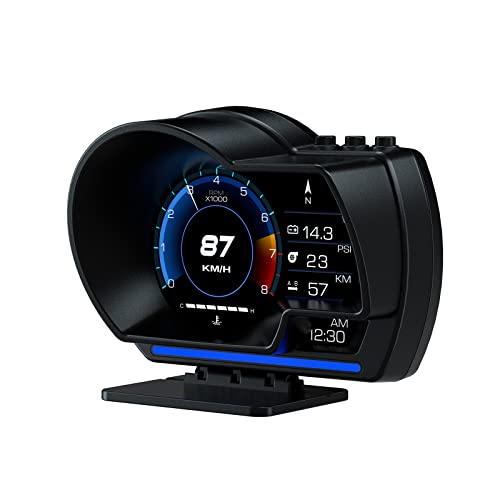
WiiYii P6 OBD2/GPS Gauge combines OBD and GPS functions with 10 selectable interfaces, giving drivers a choice of readout layouts. The feature set also includes speed, voltage, fuel consumption, RPM, water temperature, fault-code reading and data streams. Its adjustable bracket supports dashboard or windshield placement, and the maker describes installation as non-destructive. This option suits drivers who want several vehicle readings and a choice of mounting position in one unit. The maker does not identify which vehicle readings work with each car, so verify the functions you need against your vehicle before relying on them.
Bottom line: Pick this if you want multiple layouts and adjustable dashboard or windshield mounting.
MH OBD2+GPS Head-Up Display

MH OBD2+GPS Head-Up Display emphasizes a broad mix of driving readouts and fault-code functions. Its feature set names speed, tachometer, fuel consumption, water temperature, drive time, altitude, mileage, turbo pressure, compass, clock and voltage, alongside live data streams and acceleration/brake tests. It also describes scanning and clearing engine fault codes. That combination suits drivers who want diagnostic functions as well as a speed display.
Bottom line: Choose this if fault-code functions and varied live readings are priorities.
OBD2 GPS Dual-System Car HUD

OBD2 GPS Dual-System Car HUD distinguishes itself with a GPS option intended to provide speed information across vehicle types, including older vehicles. Its feature set describes more than 20 parameters, such as speed, RPM, water temperature, voltage, altitude, trip time and distance, and pressure readings. It also includes a 360-degree rotating suction-cup bracket. This may suit drivers who need a GPS-based alternative to vehicle data or want a wide range of configurable readouts. The specifications do not establish which of the named readings are available on a particular vehicle, so confirm the needed functions before purchase.
Bottom line: Consider this when GPS speed and a rotating suction-cup mount matter.
5.5-Inch GPS/OBD2 Car HUD

5.5-Inch GPS/OBD2 Car HUD stands apart with a specified 5.5-inch screen and an automatic brightness-adjustment feature. The specifications name GPS speed in MPH or KM/H, engine RPM, water temperature and voltage alerts, plus OBD2 data. This larger-screen format may suit drivers who want a prominent readout rather than a smaller gauge.
Bottom line: Pick this if the specified 5.5-inch screen is your main priority.
Kravynorx 3.5-Inch OBD2 GPS HUD

Kravynorx 3.5-Inch OBD2 GPS HUD specifies a 3.5-inch display, 10 layouts and supported fault-code reading, making its display size and diagnostic emphasis easy to distinguish. It can show readings such as speed, RPM, coolant temperature, voltage, fuel consumption, trip distance, driving time, altitude and compass direction. The maker says OBD2 functions vary by vehicle make, model, year and ECU protocol; GPS mode provides speed and trip information when OBD2 data is unavailable. That makes it a fit for drivers who value a fallback mode. Drivers needing a larger screen should compare the 5.5-inch option.
Bottom line: Choose this for a specified 3.5-inch screen, selectable layouts and fault-code functions.
How to Choose an OBD2 GPS Car HUD
Choose first by the readings you need and whether you can use vehicle data or need GPS speed. OBD-II is the vehicle diagnostic connection; GPS-based displays derive speed from satellite positioning rather than the vehicle computer. OBD-II data access depends on the vehicle and the particular parameter, so a HUD that lists coolant temperature or fuel consumption may not show that reading on every car. Check the supported functions for your vehicle, not just the total number of advertised readings. If you mainly want speed, prioritize a clear, easy-to-glance display; if you want engine data or fault codes, prioritize confirmed OBD-II support for those functions. A display with more readings is not automatically the better fit if the needed values are unavailable on your vehicle.
OBD-II and GPS Compatibility
OBD-II became standard on US light-duty vehicles in the mid-1990s, but that does not guarantee that every HUD function works on every vehicle. The connector may provide standardized diagnostic access while individual readings still depend on vehicle equipment, ECU protocol and supported parameters. GPS mode can provide speed without reading the vehicle ECU, but satellite reception can be reduced by tunnels, garages, tall buildings and obstructed sky views. If the vehicle predates OBD-II or its support is uncertain, choose a unit with GPS mode and verify that its GPS functions match your needs. Neither connection should replace the vehicle’s own warning indicators or speedometer.
HUD Placement and Windshield Visibility
Position a HUD where its numbers are easy to glance at without blocking the forward view. Windshield projection and a dashboard-mounted display are different approaches: projection relies on the windshield surface, while a dashboard unit presents the readout on its own screen. Some windshields can create a doubled reflection; a reflective film or supplied reflector can improve visibility, but use only components included or approved for the specific display. Before settling on a mount, check that the device does not obstruct the driver’s view or interfere with airbags, controls or visibility regulations. A suction mount also needs a clean, smooth surface to hold securely. Adjust the angle while parked, then confirm that the display remains legible in daylight and at night.
What OBD2 and GPS Readings Can Tell You
OBD-II gauges can show live engine data and, on supported vehicles, retrieve diagnostic trouble codes. A trouble code identifies a detected system or circuit condition; it does not by itself confirm the failed part or explain the repair. GPS speed is calculated from position changes and may update differently from the car’s speedometer, especially during abrupt speed changes or poor reception. Use the vehicle’s own speedometer and warning lights as the primary references, and treat HUD readings as supplemental. This quick guide separates the two connection types:
| Mode | Source | Useful when |
|---|---|---|
| OBD-II | Vehicle computer | Seeking supported engine readings or diagnostic codes |
| GPS | Satellite positioning | Seeking speed without vehicle ECU data |
Frequently Asked Questions
Will an OBD2 HUD work in an older car?
US light-duty vehicles generally adopted OBD-II in the mid-1990s, so an older car may not support an OBD-II HUD connection. GPS mode can provide speed independently of the vehicle diagnostic port, subject to satellite reception.
Can GPS speed work without an OBD2 connection?
Yes, a GPS-based mode can calculate speed without accessing the vehicle ECU. Reception can weaken in tunnels, covered parking and locations with obstructed sky view.
Why might an OBD2 display omit coolant temperature?
An OBD-II display can show only parameters supported by the vehicle and its ECU. Confirm the specific reading for your car, since the presence of an OBD-II connector alone does not guarantee every live-data value.
Do HUD fault codes identify the exact broken part?
No, a diagnostic trouble code indicates a detected system or circuit condition, not necessarily the failed component. Diagnosis may require checking the vehicle’s symptoms and testing the affected system.
Where should I place a car HUD display?
Place the display where it is easy to glance at without blocking the road view, controls or airbag areas. Adjust its angle while parked and check for doubled windshield reflections before driving.