
Zelotes Gaming Mouse: 4 Wired Models Compared

For most players, Zelotes T90 Gaming Mouse is the most flexible Zelotes gaming mouse because it combines six DPI settings with removable weights and programmable buttons. Choose Zelotes Joystick Gaming Mouse instead if you want a thumb joystick, or Zelotes 12-Button Wired Mouse if you need more programmable controls; the wireless vertical model is not a gaming mouse.
We earn a commission if you buy through links on this page. As an Amazon Associate I earn from qualifying purchases. Products are compared on manufacturer specifications, not hands-on testing.
- Best overall: Zelotes T90 Gaming Mouse – Six DPI settings, eight removable weights and eight buttons provide multiple ways to tailor control.
- Best for joystick controls: Zelotes Joystick Gaming Mouse – Its thumb joystick supports five directions and the mouse offers up to 10,000 DPI.
- Best for programmable buttons: Zelotes 12-Button Wired Mouse – It has 12 programmable buttons and eight 2.5-gram weight blocks.
| Product | Best for | Maximum DPI | Buttons | Weight tuning | Shop |
|---|---|---|---|---|---|
| Zelotes T90 Gaming Mouse | Adjustable feel | 9,200 DPI | 8 | 8 weights | Check Price on Amazon |
| Zelotes Joystick Gaming Mouse | Thumb joystick | 10,000 DPI | 11 | — | Check Price on Amazon |
| Zelotes 12-Button Wired Mouse | Many shortcuts | 8,000 DPI* | 12 | 8 × 2.5 g | Check Price on Amazon |
| Zelotes T80 Wired Mouse | Simple DPI steps | 7,200 DPI | 7 | — | Check Price on Amazon |
Zelotes gaming mice
Compare the wired gaming models by sensitivity options, control layout and adjustable mass.
Zelotes T90 Gaming Mouse

Zelotes T90 Gaming Mouse stands apart with a removable weight set, so players can adjust the mouse’s feel rather than relying on a fixed shell mass. It has six DPI steps from 1,000 to 9,200, eight programmable buttons and 13 LED modes. The fire key can switch between double- and triple-click behavior, while thumb buttons handle forward and back navigation. This is a good match for players who want sensitivity and weight options in one wired mouse. The dimensions include a 0.1-inch height, so confirm the physical height before ordering if desk or hand clearance matters.
Bottom line: Choose this if adjustable weight and six selectable DPI levels matter more than an extra button or joystick.
Zelotes Joystick Gaming Mouse
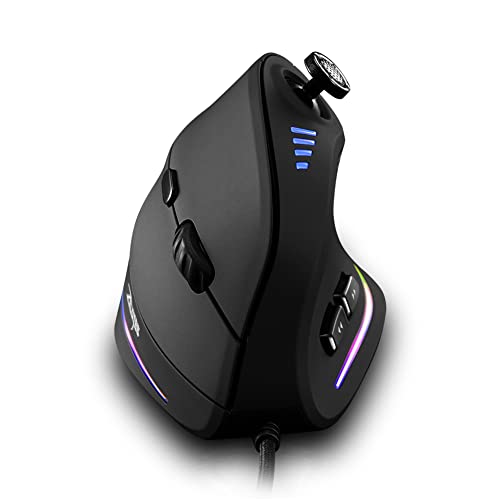
Zelotes Joystick Gaming Mouse is the only option here with a five-direction thumb joystick, which distinguishes its control layout from standard side-button designs. The joystick defaults to keyboard inputs W, S, A, D and space, and its settings can be customized. Five DPI choices range from 1,500 to 10,000, and the vertical shape positions the hand differently from a conventional horizontal mouse. It suits players who want joystick input close to the thumb or prefer a vertical grip.
Bottom line: Pick this if a thumb-operated five-way joystick is more useful than adjustable weights.
Zelotes 12-Button Wired Mouse
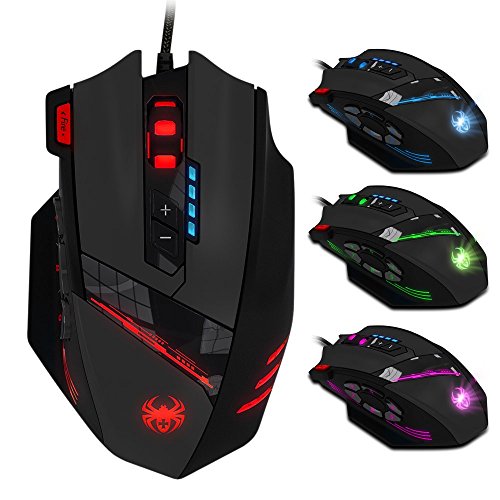
Zelotes 12-Button Wired Mouse has the most programmable buttons in this group, with 12 controls that can be customized for gaming or office tasks. Eight removable weight blocks are included, each weighing 2.5 grams. Its four listed DPI presets are 1,000, 1,500, 2,000 and 4,000; the maker says software can adjust sensitivity to 8,000 DPI. That makes it a fit for players who want many mapped actions and a customizable weight. The sensitivity range depends on software adjustment, so buyers who need a particular DPI should confirm it is available in their intended setup.
Bottom line: Choose it for the largest button count and included 2.5-gram weight blocks.
Zelotes T80 Wired Mouse

Zelotes T80 Wired Mouse is the straightforward option in this group: it has seven buttons and five selectable DPI levels, with a colored LED indicator for each level. The steps are 1,000, 1,600, 2,400, 3,200 and 7,200 DPI. Its dimensions are 5.12 inches long, 3.54 inches wide and 1.77 inches high, making the size useful for comparing desk and hand fit. This model suits players who want a conventional wired shape and visible sensitivity selection without a joystick or weight kit. It offers fewer DPI steps than the six-level T90.
Bottom line: Pick it for a conventional seven-button mouse with five color-coded DPI settings.
How to choose a Zelotes gaming mouse
Choose by control layout first, then compare DPI and weight options. DPI describes how far the pointer moves relative to physical mouse movement; higher DPI means more pointer travel for the same hand movement, not automatically better aim. Many players tune sensitivity in both the mouse and game, so changing either setting can alter the feel. A practical starting rule is to pick a DPI step you can use consistently, then adjust in small increments rather than jumping between extremes. For additional mapped actions, compare the programmable button counts; for a thumb joystick, select the model built around that control. The number of buttons alone does not establish whether every control is comfortable to reach.
DPI steps and sensitivity settings
Mouse sensitivity depends on both DPI and the game’s sensitivity setting, so a DPI number alone cannot predict an in-game turn distance. These models offer multiple preset steps, with the T90 spanning 1,000 to 9,200 DPI and the joystick model reaching 10,000 DPI. Use lower settings when small physical movements produce too much screen travel, and raise sensitivity when you consistently run out of mouse-pad space. Make one adjustment at a time and test it in the same game scenario. If a game has its own sensitivity control, avoid changing that and the mouse DPI together, or it becomes harder to identify which change improved control.
Buttons, joystick and weight tuning
Button layout changes what actions are available without reaching for the keyboard. The joystick-equipped model offers five directions under the thumb, while the 12-button model has the largest programmable button count in this group. Removable weights change the mouse’s mass and balance; the T90 has eight weights, and the 12-button model’s blocks are 2.5 grams each. Add or remove mass in small steps and retain a setup that remains easy to move and stop. A feature count does not guarantee comfortable access: hand size, grip style and thumb reach determine whether side controls are practical.
Wired gaming mouse fit and setup
A wired mouse avoids a wireless connection and battery as part of its setup, but cord routing can affect movement across the desk. Keep enough slack for full left-to-right movement and route the cord away from sharp edges or objects that catch it. Compare mouse length, width and height with a mouse you already find comfortable; dimensions are more actionable than broad ergonomic labels. For the T80, the measurements are 5.12 inches long, 3.54 inches wide and 1.77 inches high. Place the mouse on a stable, clean surface, and keep the cable and USB connection dry to reduce electrical and connection risks.
Frequently Asked Questions
Does higher DPI make a gaming mouse more accurate?
Higher DPI increases pointer movement for a given hand movement, but does not by itself make aim more accurate. Game sensitivity, screen resolution and the player’s control all affect the result.
What DPI should I start with for gaming?
Start with a DPI step that lets you move across the play area without repeatedly lifting the mouse. Change one setting at a time and adjust in small steps until the movement feels controllable.
Can programmable mouse buttons work in every game?
No, game support and button mapping can differ. Check whether the game recognizes the intended inputs, especially if relying on a joystick or custom assignments.
How should I adjust removable mouse weights?
Change the weight in small increments and compare movement and stopping control using the same task. The 12-button model’s included blocks weigh 2.5 grams each.
How much desk space does a wired gaming mouse need?
Allow enough clear surface for the movement range you use, plus slack for the cable so it does not pull at the ends of a swipe. A mouse pad’s dimensions and your sensitivity setting both affect the space needed.