
10 Gigabit Ethernet NICs: Four PCIe Cards Compared

For a 10 gigabit Ethernet NIC with broad listed Windows and Linux compatibility and an included Cat6a cable, TP-Link TX401 10Gb PCIe NIC is the most straightforward choice. Choose another card if you need a specific PCIe generation, the RTL8127 controller, or a compact-slot fit.
A 10GbE NIC adds a wired network port to a computer, but it reaches 10 Gbps only when the slot, cable, and connected network equipment can support that speed.
We earn a commission if you buy through links on this page. As an Amazon Associate I earn from qualifying purchases. Products are compared on manufacturer specifications, not hands-on testing.
- Best overall: TP-Link TX401 10Gb PCIe NIC – Lists Windows, server, and Linux support and includes a Cat6a cable.
- Best for PCIe 4.0 x1: BrosTrend PCIe 4.0 x1 10Gb NIC – Names PCIe 4.0 x1 support and explains that PCIe 3.0 x1 may limit throughput.
- Best for low-profile builds: NICGIGA RTL8127 PCIe 4.0 x1 NIC – Includes a low-profile bracket and names the RTL8127 controller.
- Best for RTL8127AT: VunLink RTL8127AT PCIe 4.0 x1 NIC – Specifies the RTL8127AT chipset and compatibility with Windows 10/11 and Linux.
| Product | Best for | PCIe interface | Negotiated rates | Operating systems | Shop |
|---|---|---|---|---|---|
| TP-Link TX401 10Gb PCIe NIC | Broad OS support | PCIe (generation unspecified) | 10G, 5G, 2.5G, 1G, 100M | Windows 7–11, Server 2012 R2–2019, Linux | Check Price on Amazon |
| BrosTrend PCIe 4.0 x1 10Gb NIC | PCIe 4.0 slots | PCIe 4.0 x1; fits x1/x4/x8/x16 | 10G, 5G, 2.5G, 1G, 100M, 10M | Windows 10/11, Server 2022, Linux | Check Price on Amazon |
| NICGIGA RTL8127 PCIe 4.0 x1 NIC | Low-profile cases | PCIe 4.0 x1 | 10G, 5G, 2.5G, 1G, 100M | Windows 10/11, Server, Linux | Check Price on Amazon |
| VunLink RTL8127AT PCIe 4.0 x1 NIC | RTL8127AT systems | PCIe 4.0 x1 | 10G, 5G, 2.5G, 1G, 100M | Windows 10/11, Linux | Check Price on Amazon |
10 gigabit Ethernet NICs compared
Compare the connection rates, slot requirements, and compatibility that distinguish these PCIe 10GbE cards.
TP-Link TX401 10Gb PCIe NIC

TP-Link TX401 10Gb PCIe NIC stands out for its broad listed Windows and server support and an included Cat6a cable. The PCIe 10GBase-T adapter negotiates among 10 Gbps, 5 Gbps, 2.5 Gbps, 1 Gbps, and 100 Mbps, and its feature set includes QoS. TP-Link says it reaches up to 10 Gbps when the network supports that rate. This card suits a PC that needs a cable supplied with the upgrade. Its PCIe generation is not identified here, so buyers matching a particular slot bandwidth should confirm compatibility before ordering.
Bottom line: Choose this if a Cat6a cable and broad listed OS support matter most.
BrosTrend PCIe 4.0 x1 10Gb NIC

BrosTrend PCIe 4.0 x1 10Gb NIC is the only card here that explicitly explains how PCIe generation affects maximum network throughput. It uses a PCIe 4.0 x1 interface, fits x1, x4, x8, and x16 slots, and negotiates rates from 10 Gbps down to 10 Mbps. BrosTrend says PCIe 3.0 x1 may cap speeds at approximately 6–7 Gbps, while PCIe 4.0 x1 supports full 10GbE. It suits a build with a compatible slot and listed OS. The limitation is that a physically compatible older slot may still constrain speed.
Bottom line: Pick this for a PCIe 4.0 x1 system where slot bandwidth is a priority.
NICGIGA RTL8127 PCIe 4.0 x1 NIC
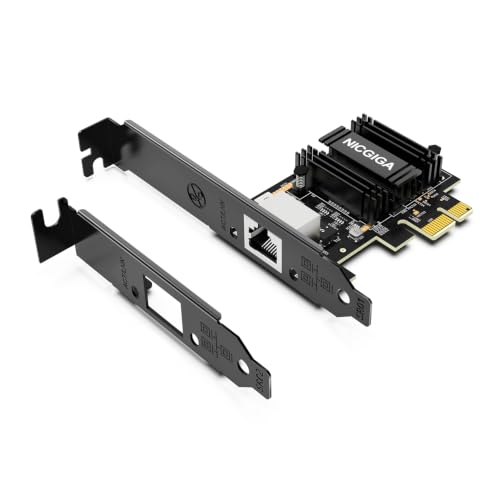
NICGIGA RTL8127 PCIe 4.0 x1 NIC distinguishes itself with a named Realtek RTL8127 controller and a low-profile bracket. The card supports 10G, 5G, 2.5G, 1G, and 100M rates, Wake-on-LAN, and Cat6a, Cat7, or high-quality Cat6 cable. The manufacturer says it reaches up to 10 Gbps and supports Windows, Linux, and NAS use. This is a fit-oriented option for a compact case that needs a low-profile bracket. Its compatibility does not include a specific Linux kernel version, so verify driver support for a narrowly managed Linux system.
Bottom line: Choose this when the low-profile bracket and RTL8127 controller fit your build.
VunLink RTL8127AT PCIe 4.0 x1 NIC

VunLink RTL8127AT PCIe 4.0 x1 NIC names the Realtek RTL8127AT chipset, setting it apart from the card that lists RTL8127 without the AT suffix. The PCIe 4.0 x1 adapter negotiates 10G, 5G, 2.5G, 1G, or 100M, and the manufacturer recommends Cat6a cable and a compatible 10G device for optimal 10GbE performance. Its uses include PCs, NAS systems, servers, and workstations. This card suits buyers seeking that specific chipset and a Windows 10/11 or Linux platform. Cable inclusion is not established, so plan to supply a suitable cable separately if needed.
Bottom line: Pick this if the RTL8127AT chipset and listed OS support match your setup.
How to choose a 10 gigabit Ethernet NIC
Choose a 10GbE NIC only when the computer slot and the rest of the network can carry the intended speed. A 10 Gbps Ethernet link equals 1.25 GB/s before protocol overhead, so a PCIe 3.0 x1 slot’s roughly 985 MB/s theoretical bandwidth can bottleneck it; PCIe 4.0 x1 provides roughly 1.97 GB/s. Also check whether the card supports your OS and whether its bracket fits the case. Multi-gig cards can negotiate lower speeds, but auto-negotiation does not make a 1 Gbps switch port deliver 10 Gbps.
Use this need-to-choice guide before selecting a card.
| Need | What to match |
|---|---|
| Full 10GbE slot bandwidth | PCIe 4.0 x1 or a faster compatible slot |
| Existing slower network | Card and network equipment with a shared negotiated rate |
| Compact case | Bracket height and physical clearance |
Ethernet cable choice for 10GbE
Cat6a is the straightforward copper-cable choice for 10GBASE-T, supporting 10GbE channels up to 100 meters. Cat6 can support 10GbE over shorter runs—commonly up to 55 meters depending on installation conditions and crosstalk—so use Cat6a when the run is long or the route is uncertain. Cat7 is also named as compatible by one card maker, but the cable category alone cannot compensate for a slower switch, router, or NAS port. For a 10 Gbps connection, every link component must support 10GbE, and a device on the other end must negotiate that rate.
PCIe slot bandwidth and fit
A PCIe card can fit a slot yet still be limited by that slot’s generation and lane count. PCIe 3.0 x1 has about 985 MB/s of theoretical bandwidth in one direction, below the 1,250 MB/s raw data rate of 10 Gbps Ethernet; PCIe 4.0 x1 offers about 1,969 MB/s. These are bus figures, not guaranteed application transfer speeds. Check the motherboard manual for the slot’s generation and whether other devices share its lanes. In a compact case, also verify whether a low-profile bracket is required; a low-profile bracket does not change link speed.
What multi-gig auto-negotiation means
Multi-gig auto-negotiation lets a network adapter and its link partner select a shared supported rate instead of requiring every connection to run at 10 Gbps. The cards here list rates such as 10, 5, 2.5, and 1 Gbps; the BrosTrend also lists 100 and 10 Mbps. The slowest port in a direct connection or network path can determine the link rate, so a 10GbE NIC connected through a 1GbE switch port will not create a 10GbE path. For large file transfers, the NAS or server, switch, cabling, and computer all need adequate capacity.
Frequently Asked Questions
Can a 10GbE card work in a PCIe 3.0 x1 slot?
Yes, but bandwidth may limit throughput below 10 Gbps. PCIe 3.0 x1 has roughly 985 MB/s theoretical bandwidth, while 10 Gbps corresponds to 1,250 MB/s before overhead.
Will a 10GbE NIC work with a 1GbE switch?
It can connect if both ends support a shared rate, typically 1 Gbps in this case. The network connection will not run at 10 Gbps through a 1GbE switch port.
What cable should I use for 10 gigabit Ethernet?
Cat6a is the reliable default for 10GBASE-T copper links up to 100 meters. Cat6 may support 10GbE on shorter runs, commonly up to 55 meters depending on installation and crosstalk.
Does a 10 gigabit NIC make file transfers ten times faster?
Not necessarily: 10 Gbps is the link rate, equivalent to 1.25 GB/s before overhead. The storage device, protocol overhead, PCIe bandwidth, and other network links can lower actual transfer speed.
Do I need a 10GbE device on the other end?
For a 10 Gbps link, yes: the network path must include a compatible 10GbE port at the other end. Auto-negotiation can select a lower shared rate when either side lacks 10GbE support.