
7th Gen iPod Classic: Models and Battery Compared

The Apple iPod Classic 7th generation 160GB is the closest match for shoppers seeking an Apple player, with a 2.5-inch, 320-by-240 display and broad audio-format support. Choose a compatible player if Apple branding is not essential, or the replacement battery if you already own a compatible iPod and need a repair part.
We earn a commission if you buy through links on this page. As an Amazon Associate I earn from qualifying purchases. Products are compared on manufacturer specifications, not hands-on testing.
- Best overall: Apple iPod Classic 7th Gen 160GB – The renewed Apple model is the only option identified as an Apple iPod Classic 7th generation.
- Best for Rockbox: Compatible Classic Player 160GB – The compatible 160GB player mentions Rockbox support and FLAC playback.
- Best for battery replacement: OHZHAO Classic Replacement Battery – The replacement battery is listed as compatible with several iPod Classic generations, including the 7th.
| Product | Best for | Storage | Product type | Color | Shop |
|---|---|---|---|---|---|
| Apple iPod Classic 7th Gen 160GB | Apple player seekers | 160GB | Renewed player | Black | Check Price on Amazon |
| Compatible Classic Player 160GB | Rockbox users | 160GB | Compatible player | Space gray | Check Price on Amazon |
| Compatible Classic Player 80GB | Silver 80GB player | 80GB | Compatible player | Silver | Check Price on Amazon |
| Compatible Apple iPod Classic 80GB | Black 80GB option | 80GB | Compatible player | Black | Check Price on Amazon |
| OHZHAO Classic Replacement Battery | Battery repair | — | Replacement battery | Green | Check Price on Amazon |
7th Gen iPod Classic Options
Compare the Apple model, compatible players and a replacement battery by what each one is designed to do.
Apple iPod Classic 7th Gen 160GB
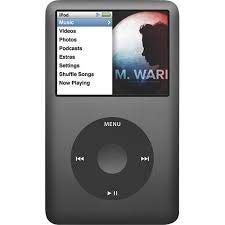
This is the only option identified as an Apple iPod Classic 7th generation, so it is the clearest match for someone seeking the original Apple player rather than a compatible substitute. Its features include a 2.5-inch color LCD with LED backlight, 320-by-240-pixel resolution, and support for AAC, MP3, Audible, Apple Lossless, AIFF and WAV. Apple rates playback at up to 36 hours of music or 6 hours of video on a full charge. The product name says 160GB, while its maker says 120GB; confirm the actual storage capacity before ordering.
Bottom line: Pick this if Apple branding and the original iPod Classic format matter most.
Compatible Classic Player 160GB

Unlike the Apple-branded model, this is described as a compatible music player, with color possibly varying between space gray and silver. Its standout stated capability is the option to install Rockbox custom firmware, which the seller says enables FLAC playback and syncing larger batches of music. The product also mentions iTunes compatibility and a high-capacity battery, but gives no playback duration to compare with the Apple model. Choose it if you are open to a compatible device and specifically want the firmware option; skip it if you need an Apple-branded iPod.
Bottom line: Choose this if Rockbox and FLAC support are priorities over Apple branding.
Compatible Classic Player 80GB

This silver 80GB compatible player is a lower-capacity alternative to the 160GB Apple model and the 160GB compatible player. That makes it a narrower fit for buyers who want a compatible silver player and have a music library that fits within 80GB. Check the device identity and capacity before choosing it for an existing collection.
Bottom line: Pick this if a compatible silver player with 80GB capacity fits your library.
Compatible Apple iPod Classic 80GB

Unlike the two products that explicitly say 7th generation, this one is a less certain fit for shoppers who need that exact generation. Its dimensions are 5.0 inches long, 3.0 inches wide and 0.5 inch high. Consider it only if compatibility is acceptable and those dimensions and 80GB capacity suit your setup; verify the generation before buying if you need a specific 7th-generation device.
Bottom line: Choose this only if the black 80GB compatible player suits your needs and generation is not critical.
OHZHAO Classic Replacement Battery

This is a repair part, not a music player, and is listed for iPod Classic 5th through 7th generations, including 7th-generation 160GB models. The battery is rated at 1,050mAh and 3.7V, and the product includes tool kits. Its compatibility list also names several other capacities and generations, so match your device model before starting a repair. Replacing an internal battery requires opening the player; this is a poor choice if you need a ready-to-use music player or are not prepared to handle a device repair.
Bottom line: Pick this if you already have a compatible Classic and intend to replace its battery.
How to Choose a 7th Gen iPod Classic
Start with whether you need an Apple-made iPod or only a compatible music player. The products explicitly naming 7th generation include one Apple-branded model and two compatible players, while the 80GB compatible option does not state a generation. Storage is another deciding factor: 80GB may fit a smaller collection, while 160GB gives twice the nominal capacity. For a simple choice, select the Apple model when brand identity is essential; consider a compatible player only when its storage or firmware capability matches your priorities.
Storage, Audio Formats and Firmware
Choose storage by the size of the music library you plan to carry; these options span 80GB and 160GB, although one product has conflicting capacity figures. The Apple model lists AAC, protected AAC, MP3, variable-bitrate MP3, Audible, Apple Lossless, AIFF and WAV. The 160GB compatible player says Rockbox can add FLAC playback, but that is a firmware change rather than a feature shared by every option. A practical rule is to choose the 80GB option only if your collection fits comfortably below that capacity; leave room for playlists, artwork and other files. Check file-format support and syncing requirements against your existing library before settling on a device.
The table separates the three purchase types represented here.
| Type | Best fit | Key distinction |
|---|---|---|
| Apple player | Buyers seeking an Apple iPod | Apple branding and listed display/audio specifications |
| Compatible player | Buyers open to alternatives | Capacity and firmware options differ |
| Replacement battery | Owners repairing a player | Part rather than a complete music player |
Check Compatibility Before Buying
Match the generation and storage printed on your player with the product’s compatibility claims before choosing a compatible device or battery. The replacement battery names 5th through 7th generation models and multiple capacities, including the 7th-generation 160GB version. A useful rule is to proceed with a generation-specific purchase only when the device model you own appears in the compatibility wording; otherwise confirm the fit first. For players, also confirm whether the seller is offering an Apple product or a compatible alternative, since those are different purchase expectations.
Battery Replacement and Repair Safety
Replacement batteries are internal parts, so they require opening the player rather than simply connecting an accessory. This battery is rated at 1,050mAh and 3.7V and includes tool kits, but those specifications do not by themselves confirm that the repair is suitable for every device condition. A swollen lithium-ion battery should not be pressed, punctured or pried against; stop and seek qualified repair help if the battery is swollen or damaged. Before repair, check the exact model code and capacity against the compatibility list, and use tools carefully around the battery and internal components. Choose a complete player instead if you do not intend to open and service an existing device.
Frequently Asked Questions
How much storage does a 7th generation iPod Classic have?
The Apple 7th-generation model is commonly associated with 160GB, and the Apple-branded option here names 160GB. Its maker says 120GB, so confirm the capacity of that specific unit before ordering.
Can a 7th gen iPod Classic play FLAC files?
The Apple model’s formats do not include FLAC. The compatible 160GB player says installing Rockbox can enable FLAC playback, so do not assume that capability applies to the Apple model as supplied.
What audio formats does the Apple Classic support?
The Apple model lists AAC, protected AAC, MP3, MP3 VBR, Audible, Apple Lossless, AIFF and WAV. Check your library’s formats against that list before transferring music.
Is a replacement battery safe to install at home?
A replacement battery requires opening the player, and lithium-ion cells can be hazardous if punctured, crushed or shorted. Do not handle a swollen or damaged battery; use qualified repair help instead.
How do I check whether a replacement battery fits?
Match the device’s generation and capacity with the battery compatibility list before buying. The battery here names iPod Classic generations 5 through 7 and includes several capacity variants, so confirm the exact model.