
TP-Link Deco AX5000: Coverage, Speed and Alternatives

The TP-Link Deco AX5000 three-pack suits households that want a Wi-Fi 6 mesh system with a claimed coverage area of up to 7,100 square feet. Choose a different Deco if you need Wi-Fi 6E’s 6 GHz band, a smaller two-node set, or Wi-Fi 7.
Mesh Wi-Fi uses multiple nodes to extend a home network beyond the reach of one router; walls, layout and node placement affect real coverage.
We earn a commission if you buy through links on this page. As an Amazon Associate I earn from qualifying purchases. Products are compared on manufacturer specifications, not hands-on testing.
- Best overall: TP-Link Deco AX5000 3-Pack – Its three Wi-Fi 6 routers claim coverage up to 7,100 square feet and speeds up to 5.0 Gbps.
- Best for Wi-Fi 6E: TP-Link Deco XE75 Wi-Fi 6E 3-Pack – The three-pack adds a 6 GHz band and claims coverage up to 7,200 square feet.
- Best for Wi-Fi 7: TP-Link Deco BE63 Wi-Fi 7 2-Pack – This two-pack uses Wi-Fi 7 and claims coverage up to 5,800 square feet.
| Product | Best for | Wi-Fi generation | Claimed coverage | Pack size | Shop |
|---|---|---|---|---|---|
| TP-Link Deco AX5000 3-Pack | Wi-Fi 6 coverage | Wi-Fi 6 | Up to 7,100 sq. ft. | 3-pack | Check Price on Amazon |
| TP-Link Deco XE75 Wi-Fi 6E 3-Pack | 6 GHz access | Wi-Fi 6E | Up to 7,200 sq. ft. | 3-pack | Check Price on Amazon |
| TP-Link Deco X55 Wi-Fi 6 3-Pack | Wired backhaul | Wi-Fi 6 | Up to 6,500 sq. ft. | 3-pack | Check Price on Amazon |
| TP-Link Deco BE63 Wi-Fi 7 2-Pack | Wi-Fi 7 upgrade | Wi-Fi 7 | Up to 5,800 sq. ft. | 2-pack | Check Price on Amazon |
| TP-Link Deco XE75 Wi-Fi 6E 2-Pack | Smaller 6E setup | Wi-Fi 6E | Up to 5,500 sq. ft. | 2-pack | Check Price on Amazon |
TP-Link Deco mesh systems
Compare the Deco options by Wi-Fi generation, coverage claim and number of nodes.
TP-Link Deco AX5000 3-Pack

The AX5000 is the direct match for a three-node TP-Link Wi-Fi 6 system, with a claimed coverage area up to 7,100 square feet and speeds up to 5.0 Gbps. TP-Link says the system supports up to 150 devices and works with Wi-Fi-enabled devices and internet service providers. Its dual-band design is a fit when Wi-Fi 6 is sufficient and a 6 GHz band is not a requirement. The main limitation is that it is not a Wi-Fi 6E or Wi-Fi 7 system, so buyers seeking those newer standards should compare the alternatives.
Bottom line: Choose this if you want a three-node Wi-Fi 6 system and do not need 6 GHz or Wi-Fi 7.
TP-Link Deco XE75 Wi-Fi 6E 3-Pack

The XE75 adds a 6 GHz band to a three-node mesh setup, unlike the AX5000’s dual-band Wi-Fi 6 design. TP-Link claims coverage up to 7,200 square feet and total speeds up to 5,400 Mbps, with support for up to 200 devices. The 6 GHz band can serve as node backhaul by default or be switched to a network for compatible Wi-Fi 6E devices. That extra band is useful only if the home has compatible devices or the backhaul option suits its layout; it is not a necessary upgrade for every household.
Bottom line: Choose this if you want a three-pack with a 6 GHz band and Wi-Fi 6E device support.
TP-Link Deco X55 Wi-Fi 6 3-Pack

The Deco X55 differentiates itself with three Gigabit Ethernet ports per unit and support for Ethernet backhaul, while retaining a three-node Wi-Fi 6 setup. TP-Link claims coverage up to 6,500 square feet and support for up to 150 devices. Ethernet backhaul can connect mesh nodes over cable rather than relying on a wireless link between them, which can be useful when rooms already have Ethernet wiring. Its coverage claim is lower than the AX5000’s, so buyers comparing these two should consider the home’s size as well as whether wired node connections are practical.
Bottom line: Choose this if you can wire mesh nodes and want three Gigabit ports on each unit.
TP-Link Deco BE63 Wi-Fi 7 2-Pack

The BE63 is the Wi-Fi 7 option here, packaged as two nodes rather than the AX5000’s three. TP-Link claims coverage up to 5,800 square feet and support for over 200 devices; its feature set also includes VPN and HomeShield. The smaller node count and lower coverage claim make it a different fit from a large-area three-pack, even though Wi-Fi 7 may suit a household building around newer compatible devices. Check the Ethernet port requirements against your modem, switch and wired devices before choosing this system.
Bottom line: Choose this if Wi-Fi 7 and a two-node setup fit your home and devices.
TP-Link Deco XE75 Wi-Fi 6E 2-Pack
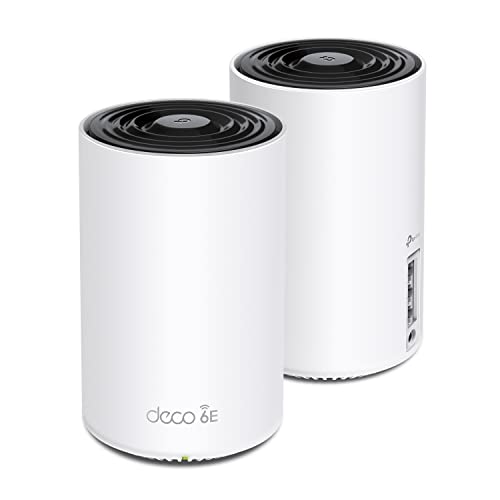
This XE75 version provides the same Wi-Fi 6E generation and 6 GHz band as the three-pack, but with two nodes and a claimed coverage area up to 5,500 square feet. TP-Link says the 6 GHz band can serve as backhaul by default or be switched to a network for compatible devices, and the system claims total speeds up to 5,400 Mbps. It can suit a smaller home that wants Wi-Fi 6E without a third node. Its coverage claim is lower than the three-pack’s, so it is less suited to a larger or more segmented floor plan.
Bottom line: Choose this if you want Wi-Fi 6E in a two-node setup for a smaller coverage area.
How to choose a Deco mesh system
Start with the Wi-Fi generation and the size of the area you need to cover, not the headline speed alone. Wi-Fi 6 operates on 2.4 GHz and 5 GHz; Wi-Fi 6E adds 6 GHz, while Wi-Fi 7 is a later generation. The Deco options here also differ in node count and claimed coverage, so compare those figures with your floor plan rather than assuming a larger speed number guarantees stronger service in every room. As a practical rule, if your home is above 5,500 square feet, look first at the systems whose claims reach beyond that area, then account for walls and floors that can reduce signal. A three-pack offers an extra placement point, but placement still matters.
What 6 GHz changes in a mesh system
Wi-Fi 6E adds access to the 6 GHz band, but devices need Wi-Fi 6E compatibility to connect to that band. In the XE75 systems, TP-Link says 6 GHz can be used as node backhaul by default or switched to a network for compatible devices. A dedicated wireless backhaul can keep node-to-node traffic off the bands used by household devices, while a wired Ethernet backhaul is another option when cabling is available. The 6 GHz band has less range through obstacles than lower-frequency bands, so node placement and open paths matter. If your devices are older, the added band may not change their direct connection.
Mesh placement and coverage limits
Place mesh nodes in open areas between the main router node and weak-signal rooms; do not hide them in cabinets or behind large appliances. Wi-Fi signals weaken through walls, floors and dense materials, and a node placed inside a dead zone may not receive a strong enough connection to extend. Coverage claims are maximum areas, not guarantees for every floor plan. A useful starting point is to place the next node about halfway between the main node and the problem area, then adjust based on connection quality. For homes with several floors or masonry walls, plan for more careful placement than a single open floor of the same square footage.
When Ethernet backhaul is useful
Ethernet backhaul connects mesh nodes with network cable instead of using Wi-Fi for the node-to-node link. It can help when walls or distance weaken wireless communication between nodes, and it leaves more wireless capacity for client devices. The X55 specifically supports Ethernet backhaul and has three Gigabit ports per unit. Gigabit Ethernet has a theoretical link rate of 1 Gbps, although actual internet throughput also depends on the service plan, equipment and network conditions. Before choosing a mesh system for wired backhaul, map where nodes can sit and whether cable can reach those locations. A wireless mesh is simpler where wiring is impractical, but node-to-node signal remains important.
Frequently Asked Questions
Does Wi-Fi 6E require new devices?
Wi-Fi 6E devices are required to connect over the 6 GHz band. Older Wi-Fi devices can still connect on compatible bands, but they will not use 6 GHz.
How many mesh nodes does a house need?
A three-node system provides more placement points than a two-node system, but the right count depends on layout, obstacles and the system’s coverage claim. In a multi-floor home or one with dense walls, plan placement around weak areas rather than square footage alone.
Can mesh nodes connect over Ethernet?
Yes, Ethernet backhaul uses cable for the connection between mesh nodes. The Deco X55 specifically supports Ethernet backhaul, which can be useful where wireless node links cross walls or long distances.
Will a Wi-Fi 6 router work with Wi-Fi 6E devices?
Wi-Fi 6E devices can connect to earlier Wi-Fi generations using compatible bands, but they cannot use a Wi-Fi 6 router’s 6 GHz band because that router does not provide one. Wi-Fi 6E’s 6 GHz access requires both a 6E-capable router and client device.
Where should I place a mesh Wi-Fi node?
Place a node in an open spot between the main node and the area needing better coverage, rather than inside the dead zone itself. Walls and floors reduce signal, so a halfway placement is a useful starting point that may need adjustment.