
Car CD Player USB Options Compared for Vehicle Fit

For a car without a built-in CD drive, POSSPO Jupiter USB CD Player is the most direct match if your stereo has USB, because it connects through that port without a decoder. Choose another option if you need an included remote, broad device compatibility, or an AUX connection as part of your setup.
We earn a commission if you buy through links on this page. As an Amazon Associate I earn from qualifying purchases. Products are compared on manufacturer specifications, not hands-on testing.
- Best overall: POSSPO Jupiter USB CD Player – Uses a USB connection to the stereo and includes an extension cable for flexible placement.
- Best for disc formats: Portable USB/AUX Car CD Player – Supports CD, CD-R, CD-RW, MP3, WMA, and WAV playback.
- Best for remote control: Portable External Car CD Player with Remote – Includes a remote and anti-skip protection.
| Product | Best for | Connection | Dimensions | Shop |
|---|---|---|---|---|
| POSSPO Jupiter USB CD Player | USB-only stereos | USB; AUX uses decoder | 6.3 × 6.1 × 2.0 in | Check Price on Amazon |
| Portable USB/AUX Car CD Player | Format flexibility | USB and AUX | — | Check Price on Amazon |
| Portable External Car CD Player with Remote | Remote operation | USB and AUX | 5.2 × 5.2 × 0.9 in | Check Price on Amazon |
| ENVYCLOUD Portable USB/AUX Car CD Player | Compact footprint | USB and AUX | 4.5 × 4.5 × 0.85 in | Check Price on Amazon |
Car CD Player USB Options
Compare connection requirements, disc support, and physical size before choosing an external player for your vehicle.
POSSPO Jupiter USB CD Player

POSSPO Jupiter USB CD Player is the only option here whose setup is specifically described as connecting to a car stereo through USB alone. It includes a USB extension cable, giving you more flexibility to position the player near a center console, dashboard, or glove box. The maker says AUX connection uses a decoder for louder, clearer sound, and the player has anti-skip playback and resume functionality. This is a fit for vehicles whose stereo recognizes USB storage devices. The key limitation is that USB recognition is required; confirm that your stereo supports this connection before ordering.
Bottom line: Choose this if your stereo has USB and you want flexible placement.
Portable USB/AUX Car CD Player

Portable USB/AUX Car CD Player stands out for its disc and audio-format range: it supports CD, CD-R, CD-RW, MP3, WMA, and WAV, while excluding DVD discs. It connects through USB or AUX and is described as powered directly by USB, without an additional adapter. The maker also claims touchscreen and steering-wheel control once connected, which may suit a car whose stereo supports those controls. Its limitation is format-specific: DVD playback is not supported, so it will not serve buyers seeking a video disc player.
Bottom line: Pick this if you want support for multiple CD and audio formats.
Portable External Car CD Player with Remote

Portable External Car CD Player with Remote is the choice here with an included remote, which can be useful when the player is mounted away from the dashboard controls. The maker says it works as an external CD drive for a car or laptop and includes anti-skip protection for vehicle use. Its compact stated dimensions are about 5.2 inches square and 0.9 inch tall.
Bottom line: Choose this if an included remote is important to your setup.
ENVYCLOUD Portable USB/AUX Car CD Player
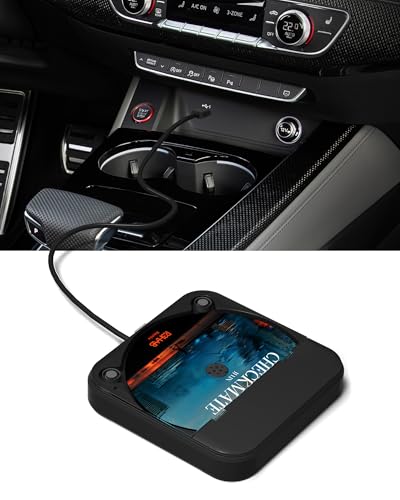
ENVYCLOUD Portable USB/AUX Car CD Player has the smallest footprint among these models, at 4.5 inches square and 0.85 inch tall, making it a useful option when storage space is tight. It connects to a car radio through USB or AUX and is also described as compatible with computers and televisions. The maker claims touchscreen and steering-wheel control after connection.
Bottom line: Pick this when a smaller stated size is the priority.
How to choose a USB CD player for a car
Start with the stereo’s input, because an external CD player only helps when the car can receive its audio. A USB port may be for charging only, or it may read storage devices; those functions are not interchangeable. Check the stereo manual or test with a USB drive before choosing a USB-dependent model. AUX is a separate analog audio input and can work when the stereo cannot read a CD player as USB storage. A useful rule: if the stereo does not recognize USB storage, choose a player setup that supports AUX and verify that the car has a 3.5 mm AUX input. Also check how the player receives power; USB power does not by itself guarantee audio routing.
USB versus AUX connections in a car
USB can carry power and digital data, while a 3.5 mm AUX input carries analog audio. Some car stereos only accept music files from USB drives and may not recognize an external optical drive, so a USB socket alone is not proof of compatibility. AUX avoids that USB file-reading issue when the player can output audio through the connection, but it uses the stereo’s AUX source and may require separate power. Set the stereo source to the same input used by the player, and keep cables clear of pedals, steering, and airbag deployment areas. Never route a loose cable where it could interfere with driving.
Disc formats and car stereo compatibility
Standard audio CDs, recordable CD-R discs, and rewritable CD-RW discs are distinct formats; players may support some but not all. MP3, WMA, and WAV refer to audio file formats, and support for those files does not imply DVD playback. Before choosing a player, match its supported formats to the discs you actually own and check whether your stereo can browse tracks through an external USB device. The format range in this comparison is explicit for one model and narrower or unspecified for others. Avoid assuming that a player’s ability to connect to a laptop means the car stereo will recognize it the same way.
| Need | Connection or feature to prioritize |
|---|---|
| Stereo recognizes USB storage | USB connection to the stereo |
| Stereo has AUX but limited USB playback | AUX input and compatible audio output |
| Burned or compressed audio discs | Explicit CD-R, CD-RW, or file-format support |
| Player must sit away from the stereo | USB extension cable or remote |
Placement and safe use while driving
Place an external player where it cannot slide, block visibility, or obstruct controls; a center console compartment can work if the lid and cables do not interfere with shifting or access. Keep all cables away from pedals, the steering column, and airbag areas, since even a small loose item can become a hazard in sudden braking. Anti-skip protection can help with movement, but it does not make an unsecured player safe. Set up the connection and select the track before driving. If the player needs to be handled or repositioned, pull over first rather than reaching for it while the vehicle is moving.
Frequently Asked Questions
Will a USB CD player work with every car stereo?
No, a USB socket may provide charging without reading an external CD player as storage. Check whether the stereo recognizes USB drives; if it does not, an AUX input may be needed for audio.
Can a car USB CD player play DVDs?
Not necessarily: CD and DVD are different disc formats. The model with format support explicitly excludes DVD discs, so choose based on the formats your discs use.
What is the difference between CD-R and CD-RW?
CD-R discs are recordable once, while CD-RW discs can be erased and rewritten. Confirm both formats are supported if your collection includes rewritable discs.
Where should I place an external CD player in my car?
Use a stable spot that does not block the driver’s view, controls, or access to the gear selector. Keep cords clear of pedals, steering, and airbag deployment areas.