
ADAS Dash Cam Android: 3 USB Models Compared

For most Android-radio setups, Realdio USB Car DVR is the strongest fit because it pairs ADAS warnings with a 170° lens and an included 64GB TF card. Choose another model if your head unit cannot run its companion app or if you need a different storage arrangement.
These USB dash cams record through a compatible Android radio; ADAS features such as lane-departure and forward-collision warnings provide alerts, not automatic braking.
We earn a commission if you buy through links on this page. As an Amazon Associate I earn from qualifying purchases. Products are compared on manufacturer specifications, not hands-on testing.
- Best overall: Realdio USB Car DVR – Combines LDWS and FCWS with a 170° lens and a 64GB TF card.
- Best for included storage: Hikity USB DVR – Includes a 32GB TF card and supports loop recording and motion detection.
- Best for flexible card size: USB Dash Cam 1080P DVR – Supports 8GB to 32GB cards, which are not included.
| Product | Best for | Included storage | ADAS warnings | Shop |
|---|---|---|---|---|
| Realdio USB Car DVR | Wide field of view | 64GB TF card | LDWS, FCWS | Check Price on Amazon |
| Hikity USB DVR | Included 32GB card | 32GB TF card | LDWS, FCWS | Check Price on Amazon |
| USB Dash Cam 1080P DVR | Flexible card capacity | Not included; 8–32GB supported | Lane and front-collision alerts | Check Price on Amazon |
ADAS Dash Cams for Android Radios
Compare included storage, stated field of view and warning features before choosing a camera for your head unit.
Realdio USB Car DVR

The Realdio stands out with its 170° lens and included 64GB TF card, giving buyers a wider stated field of view and storage in the box. It is a USB mini camera for Android radios and includes lane-departure and forward-collision warning features. Loop recording can overwrite older video as the card fills. The maker says its warnings calculate distance to the vehicle ahead in real time; such alerts depend on camera view and road conditions, so they should not replace attentive driving. Choose another model if its radio compatibility or app support does not match your setup.
Bottom line: Choose it if a wide lens, included card and both warning types matter.
Hikity USB DVR
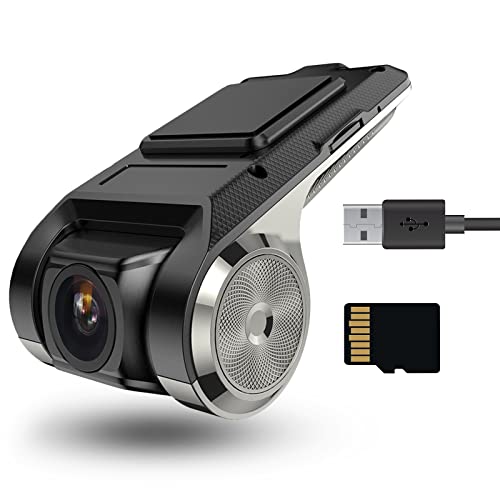
The Hikity is distinguished by its included 32GB TF card and a 1080p recording resolution, so a separate card is not needed to start recording. It connects by USB to an Android radio and provides LDWS, FCWS, night vision, motion detection and loop recording. The maker says 24-hour parking recording requires the USB recorder to remain powered; confirm that your vehicle and radio can keep it powered when parked. That power requirement makes this a less suitable choice for buyers who need parking recording without a continuous power source.
Bottom line: Pick it when the included 32GB card and powered parking recording suit your setup.
USB Dash Cam 1080P DVR

The USB Dash Cam 1080P DVR differs by supporting 8GB to 32GB memory cards without including one, which lets buyers use a compatible card they already have. Its name identifies it as a dual car driving recorder, and the maker describes low-light capture, motion detection and loop recording that overwrites older footage when storage fills. ADAS provides lane and front-collision voice alerts. Because the card is separate, account for selecting and installing a supported card before relying on recording. Buyers who want storage in the box should consider a different option.
Bottom line: Choose it if you already have, or plan to add, an 8GB to 32GB card.
How to choose an ADAS dash cam for Android
Start with the radio, because a USB connector alone does not guarantee that a head unit can run a camera app. Confirm the radio supports the camera’s required app and USB device before choosing; the Hikity’s installation directions require installing its DVR APK on the Android stereo. Next compare included storage and stated resolution, then decide whether the warnings and recording modes fit your needs. Lane-departure alerts work best when lane markings are visible, while forward-collision alerts are advisory and do not apply the brakes. A camera with a wider stated lens angle may capture more of the sides of the scene, but lens angle alone does not establish image quality or useful detail at distance.
ADAS warnings and their limits
LDWS and FCWS are driver alerts, not substitutes for attention or vehicle safety systems. Lane-departure warning depends on the camera seeing lane boundaries; worn markings, glare, weather, curves and partial obstruction can make those boundaries harder to detect. Forward-collision warning relies on camera interpretation of the scene ahead, and a warning is not a guarantee that a collision will be detected or avoided. Keep the camera pointed through a clear windshield area and avoid placing it where a mirror, tint band or accessory blocks its view. If the radio or camera offers alert settings, choose settings you can hear and understand without distracting you from driving.
Storage and loop recording choices
Card capacity affects how much footage can remain available before loop recording overwrites older files. The options range from 8GB to 64GB, but recording duration also changes with resolution, clip length and file encoding, so capacity alone cannot establish hours of footage. Loop recording typically replaces the oldest files when the card fills; any footage you need to retain should be copied elsewhere promptly. Use a card within the camera’s supported capacity, and check that it is seated correctly before driving. For the Hikity, the maker says parking recording requires continued USB power, so verify power availability before expecting recording while parked.
Positioning and setup mistakes to avoid
Mount a dash cam high enough to see the road while keeping the driver’s direct view clear and the lens aimed through clean glass. A camera mounted behind a dark tint band, dotted windshield frit, or a wiper-free patch can have a compromised view even if the lens itself has a wide angle. Route the USB cable so it cannot interfere with steering, pedals or airbags. Test that the camera records and that saved video can be opened before relying on it for a trip. If the Android radio does not recognize the device or its app, resolve that compatibility issue before assuming the camera is recording.
Frequently Asked Questions
Do Android dash cams need a compatible radio app?
Yes, these USB cameras rely on a compatible Android radio and camera software. Confirm the head unit can install or run the camera’s required app before choosing a model.
What does a 170-degree dash cam lens cover?
A 170° lens captures a broad forward scene, but the usable view depends on placement and windshield obstruction. Keep the lens clear and aimed through the windshield rather than toward a tint band.
Can ADAS dash cam warnings stop the car?
No, LDWS and FCWS are warnings rather than automatic braking. Treat alerts as assistance only and keep full attention on driving.
How does loop recording affect saved dash cam video?
Loop recording overwrites older files as storage fills. Copy any footage you need to keep before the camera reuses that space.
Can a USB dash cam record while the car is parked?
It can only record while it remains powered and its parking mode is active. The Hikity maker specifically says to keep the USB recorder powered for 24-hour recording.