
Apevia Power Supply Options Compared by Fit and Connectors

For a standard ATX build needing two PCIe power plugs, Apevia Spirit 600W ATX is the most suitable choice because it provides 600W and two 6+2-pin connectors. Choose Apevia Venus 500W ATX for a simpler ATX setup with one PCIe plug, or Apevia ITX-PFC500W when a compact ITX/Flex ATX form factor is required.
A PC power supply converts AC wall power into the DC rails used by the motherboard, processor and other components; match its form factor and cable ends to your case and parts.
We earn a commission if you buy through links on this page. As an Amazon Associate I earn from qualifying purchases. Products are compared on manufacturer specifications, not hands-on testing.
- Best overall: Apevia Spirit 600W ATX – Its 600W output and two PCIe 6+2-pin connectors distinguish it from the other ATX option.
- Best for basic ATX builds: Apevia Venus 500W ATX – The 500W unit includes one PCIe 6+2-pin connector and three SATA plugs.
- Best for compact cases: Apevia ITX-PFC500W – The ITX/Flex ATX unit measures 6.3 × 2.9 × 1.4 inches and is fully modular.
| Product | Best for | Maximum power | Form factor | PCIe connectors | Shop |
|---|---|---|---|---|---|
| Apevia Spirit 600W ATX | Two PCIe plugs | 600W | ATX | 2 × 6+2-pin | Check Price on Amazon |
| Apevia Venus 500W ATX | Single PCIe plug | 500W | ATX | 1 × 6+2-pin | Check Price on Amazon |
| Apevia ITX-PFC500W | Compact builds | 500W | ITX / Flex ATX | 2 × 6+2-pin | Check Price on Amazon |
Apevia power supplies
Compare the wattage, physical format and graphics-card power plugs before choosing a unit.
Apevia Spirit 600W ATX
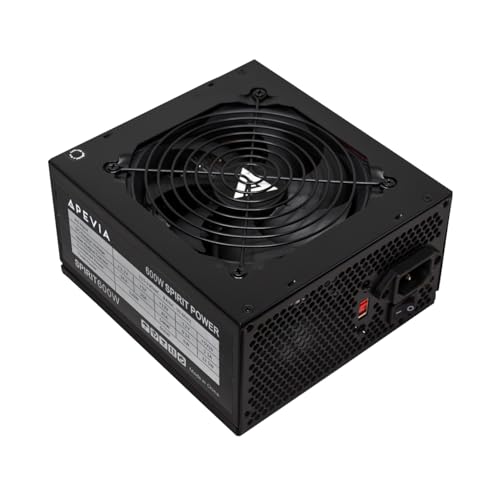
Apevia Spirit 600W ATX stands out among the ATX options with two PCIe 6+2-pin plugs and 600W maximum power. Its connector set also includes a 20/24-pin main plug, a 4+4-pin 12V connector, four SATA and four Molex plugs. Dimensions are 6.3 × 5.9 × 3.3 inches. Apevia says the unit has a thermally controlled 120mm fan and short-circuit, over-current, over-voltage, over-power, under-voltage and over-temperature protections. The 12V output is rated at 45A. Its ATX size and single 12V output make it a fit to consider for builds that need those connections; buyers needing a smaller unit should look elsewhere.
Bottom line: Choose this for an ATX build that needs two PCIe plugs and has room for its dimensions.
Apevia Venus 500W ATX

Apevia Venus 500W ATX is the lower-wattage ATX alternative, with one PCIe 6+2-pin connector, three SATA plugs and three peripheral plugs. The package dimensions are 5.9 × 5.5 × 3.4 inches. Its main connector is 20/24-pin and its CPU power lead is 4+4-pin. Apevia says the 120mm fan is auto-thermally controlled and describes the unit as having short-circuit, over-current, over-voltage, over-power, under-voltage and over-temperature protections. The manual input-voltage switch is a notable setup consideration: confirm the switch setting matches the available input before powering on. A single PCIe plug limits its fit for graphics cards requiring more than one auxiliary power connection.
Bottom line: Choose this when one PCIe plug and the ATX dimensions match the build.
Apevia ITX-PFC500W

Apevia ITX-PFC500W is the compact-format choice, measuring 6.3 × 2.9 × 1.4 inches and supporting Mini-ITX/Flex ATX form factors. It is fully modular, so the included cable types can be connected as needed; its connectors include two PCIe 6+2-pin plugs, two SATA and two Molex. The unit has active PFC with a 90–264V input range. Apevia lists a 40mm double-ball-bearing fan and overvoltage, overload, overcurrent, over-temperature and short-circuit protections. Its 500W maximum and 33A 12V output make capacity and component draw important checks before selection. The small format is not a substitute for confirming the case’s power-supply mounting dimensions.
Bottom line: Choose this for a compact case that accepts ITX/Flex ATX units and fits its dimensions.
How to choose an Apevia power supply
Start with the case format and the component power connections, then consider wattage. A power supply must physically fit its mounting bay and provide the motherboard and CPU plugs your system uses; a graphics card may require one or more PCIe plugs. Add the rest of the system’s expected power draw and leave headroom rather than selecting by the GPU connector count alone. The products here list 500W or 600W maximum output, but that figure alone does not establish suitability for a particular build. Check the graphics card’s required power connectors and the CPU’s EPS connector type, then compare those needs with the cable set. Do not use modular cables from another power supply: pinouts can differ even when plugs fit.
ATX and ITX power supply fit
ATX supplies commonly use a 150 × 86mm face, while compact Flex ATX units use a narrower, shorter form; chassis mounting depth and clearance still vary. Measure the available bay, including room for cable bends, before ordering. Apevia Venus 500W ATX and Apevia Spirit 600W ATX are labeled ATX, while Apevia ITX-PFC500W supports Mini-ITX/Flex ATX and measures 6.3 × 2.9 × 1.4 inches. A case advertised for Mini-ITX motherboards does not necessarily accept a Flex ATX supply, because motherboard size and PSU format are separate standards. Use the case maker’s PSU compatibility list or dimensions as the deciding check, especially if the bay is under 6.3 inches long.
Power supply connector types compared
Connector labels indicate which components a cable is meant to power: the 20/24-pin lead serves the motherboard, 4+4-pin 12V commonly serves the CPU, and 6+2-pin PCIe leads serve compatible graphics cards. Match the exact connector requirement from each component; an available plug does not guarantee enough total wattage. SATA power serves SATA drives and accessories, while Molex is used by some older peripherals and adapters. The count and format vary across these three Apevia models.
| Build need | Connector to match |
|---|---|
| Motherboard | 20/24-pin main |
| CPU power | 4+4-pin 12V |
| Graphics card | Required number of PCIe 6+2-pin plugs |
| SATA devices | SATA power plugs |
Never force a plug into a socket that does not match its keyed shape.
Frequently Asked Questions
How much power should my PC power supply provide?
Estimate the combined draw of the CPU, graphics card and other components, then leave headroom instead of treating the PSU’s maximum wattage as a target. A 500W or 600W rating by itself cannot confirm fit; compare against the component makers’ power recommendations and the exact build.
Can I use a power supply with fewer PCIe plugs?
Only if the graphics card’s required auxiliary power plugs are all available through its supported connection method. For example, Apevia Venus 500W ATX has one PCIe 6+2-pin plug, while Apevia Spirit 600W ATX and Apevia ITX-PFC500W each have two; check the card’s socket count and type before choosing.
Are ATX and Flex ATX power supplies interchangeable?
No; their dimensions and mounting patterns differ, so a case must explicitly support the PSU format. Measure the bay and confirm its mounting compatibility; Apevia ITX-PFC500W measures 6.3 × 2.9 × 1.4 inches.
Can modular power supply cables be swapped?
Do not assume modular cables are interchangeable, even when the plugs fit. Pin assignments can vary by model, so use only cables designated for that exact power supply.
What does a 4+4-pin power cable connect to?
A 4+4-pin 12V cable is commonly used for CPU power at the motherboard’s EPS socket. Check the motherboard socket and power supply cable labels rather than confusing it with a PCIe 6+2-pin graphics-card lead.