
Best Magnetic Phone Cooler: 5 Options Compared

For most people, Boowe Magnetic Phone Cooler is the best magnetic phone cooler because its detachable 3,000mAh battery supports up to 3 hours of cordless cooling. Choose a plug-in model instead if you want to stay at a desk or need a different mount style.
We earn a commission if you buy through links on this page. As an Amazon Associate I earn from qualifying purchases. Products are compared on manufacturer specifications, not hands-on testing.
- Best overall: Boowe Magnetic Phone Cooler – Its detachable battery gives up to 3 hours of cordless operation, with wired power available too.
- Best for display controls: Black Shark Magnetic Phone Cooler 6 Pro – Its 0.71-inch display shows cooling level, device temperature, power output and fan speed.
- Best for clip mounting: CHONCHOW PH-X76 Magnetic Cooler – It supports either magnetic attachment or a back clip and calls for a 15W+ USB-C adapter for peak performance.
| Product | Best for | Power | Power source | Shop |
|---|---|---|---|---|
| Boowe Magnetic Phone Cooler | Cordless sessions | — | USB or 3,000mAh battery | Check Price on Amazon |
| Black Shark Magnetic Phone Cooler 6 Pro | On-device readouts | Up to 35W | Wired; 40W+ charger recommended | Check Price on Amazon |
| Black Shark Magnetic Phone Cooler 5 Pro | RGB customization | Up to 35W | Wired; 40W+ charger recommended | Check Price on Amazon |
| Black Shark FunCooler 5 | Simple wired use | 20W | Wired; supply must exceed 20W | Check Price on Amazon |
| CHONCHOW PH-X76 Magnetic Cooler | Clip or magnetic mount | 15W+ adapter for peak performance | Wired USB-C | Check Price on Amazon |
Magnetic phone coolers
Compare the power requirements, mounting options and cordless capability before choosing a cooler.
Boowe Magnetic Phone Cooler

Unlike the plug-in-only options, this cooler can run from a detachable 3,000mAh battery or wired power. Boowe says its cooling system can reach as low as 10.4°F when plugged in and achieve a temperature drop of at least 57.6°F; the battery supports up to 3 hours of cordless use on a full charge. Powerful, Quiet and AI smart temperature modes let you choose how it runs. It suits players who move between a desk and a mobile setup. The cordless run time is limited, so it is less suited to sessions longer than 3 hours away from power.
Bottom line: Choose this if you want battery-powered cooling for short sessions away from an outlet.
Black Shark Magnetic Phone Cooler 6 Pro
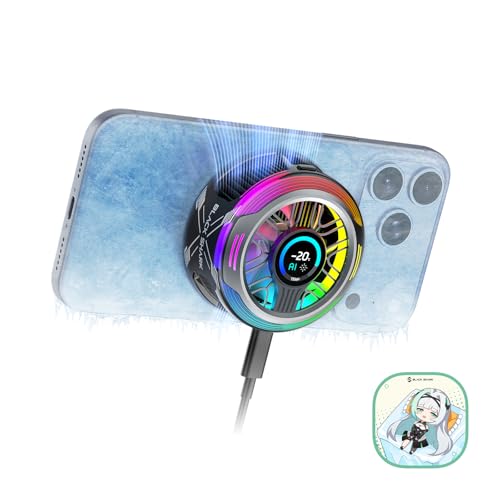
The 0.71-inch full-color display sets this model apart, showing power output, cooling level, device temperature and fan speed. Black Shark says the cooler offers up to 35W power and a temperature drop of up to 122°F; its recommended 40W-or-higher wall charger is not included. It also supports custom wallpaper uploads and has RGB lighting. This model suits users who want operating information visible on the cooler rather than relying only on a phone app. Its charger requirement matters if you do not already have a suitable power adapter.
Bottom line: Choose this for a built-in display and visible operating readouts.
Black Shark Magnetic Phone Cooler 5 Pro

Customizable lighting is the main distinction here: the cooler has 18 addressable RGB LEDs, including a Rubik’s Cube lighting mode. Black Shark says its 35W cooler can drop below zero in 25 seconds and achieve a temperature drop of up to 113°F; the recommended 40W-or-higher wall charger is not included. Dual NTC sensors support its smart temperature control. The detachable grip adds a handling option for gaming or streaming setups. This is a wired choice, so it is a weaker fit for anyone who needs cooling away from an outlet.
Bottom line: Pick this if customizable RGB lighting and a detachable grip matter to your setup.
Black Shark FunCooler 5

The FunCooler 5 uses a simple wired setup: connect its Type-C interface to a power supply, then switch between overclocking and silent modes with a button. Black Shark says its 20W thermoelectric cooler lowers the phone’s temperature by about 95°F, and specifies that the power supply must exceed 20W for optimal performance. Its 12N magnetic force is intended to hold the phone in place. It suits users who want two selectable modes without a battery-powered setup. The cable is not included, so account for that when assembling a usable setup.
Bottom line: Choose this for a straightforward wired cooler with two operating modes.
CHONCHOW PH-X76 Magnetic Cooler

The PH-X76 offers a back clip as well as magnetic mounting, unlike models that rely on magnetic attachment alone. CHONCHOW describes it as a wired USB-C cooler and calls for a 5V/3A or 15W-or-higher adapter for peak performance; the maker claims cooling up to 32°C. That dual mounting approach can suit phones or tablets where a magnetic mount is not the preferred fit. It is a plug-in option, not a cordless one, and the adapter requirement makes it important to have an adequate power source nearby.
Bottom line: Pick this when you want the choice of a clip or magnetic mount.
How to choose a magnetic phone cooler
Choose by power access, mount fit and the readouts or controls you will actually use. Thermoelectric coolers use a powered semiconductor to move heat from the phone-facing plate to a heat sink; the fan moves that heat away, so a fan-only phone stand is a different product. The input power and cooling claims are not directly comparable unless test conditions, starting temperature and measurement point match. Treat maker temperature-drop figures as product claims, not a guarantee for your phone in every room or workload.
A practical rule: if you need to use the phone away from an outlet for more than a brief session, prioritize a cooler with a battery and check its claimed runtime against your session length. For a fixed desk setup, compare its power requirement with your adapter and cable. Pick a display or app control only if you want the added monitoring or adjustment; they do not replace checking whether the cooler physically fits your phone.
Magnetic phone cooler fit and attachment
Magnetic attachment depends on the phone or case having a compatible magnetic ring in the correct position; a magnetic phone cooler does not make every phone magnetic. Confirm the cooler’s mounting method against the phone and case before ordering. Thick cases, camera bumps and off-center rings can keep a cooler from sitting flat, and a poor contact area can reduce heat transfer. For Android phones or tablets without a built-in magnetic mount, check whether the product includes or requires a separate ring plate; do not assume every cooler includes one.
Clip mounting is another option when magnets are unsuitable, but the clip must fit the device’s thickness and avoid buttons or camera areas. Leave airflow around the cooler’s fan openings rather than pressing them against a hand, stand or soft surface. On tablets, verify contact placement and weight balance so the attachment does not obstruct the screen or put strain on the connector.
Cooling claims, condensation and phone safety
Semiconductor coolers can make their cold plate colder than the surrounding air, unlike an ordinary fan that mainly moves air. That means moisture is a consideration: when a surface falls below the room’s dew point, water can condense on it. Avoid prolonged, unattended cooling at an extreme setting in humid conditions, and stop if moisture appears around the phone or cooler. Do not assume a phone’s water resistance makes condensation harmless, especially around ports and seams.
Cooling performance also changes with room temperature, airflow, case thickness and how hard the phone is working. Remove a thick case if it blocks heat transfer, but keep the phone stable and the cooler’s vents clear. A phone cooler can remove heat from the back surface; it does not guarantee a particular battery temperature, frame rate or protection from thermal shutdown.
Power and session planning for phone coolers
Check both the cooler’s input requirement and the adapter you plan to use; a higher wattage recommendation is not the same as an included charger. USB-C describes the connector shape, not by itself the power available. A wired cooler needs a cable and live power throughout use, while a battery model trades that tether for finite runtime and recharging. Keep cables routed so they do not pull the phone off its mount during gaming or recording.
Match runtime to the actual session rather than assuming a battery model will last all day. A cooler advertising up to 3 hours of cordless operation may run for less depending on mode and conditions. For long sessions, plan access to power, allow unobstructed fan intake and exhaust, and stop using any setup that becomes unstable, wet or unusually hot.
Frequently Asked Questions
Do magnetic phone coolers work without a case?
Yes, if the phone itself has a compatible magnetic attachment point. Phones without one may need a separate ring plate, so confirm compatibility and fit before attaching a cooler.
Can a phone cooler cause condensation?
Yes, a cold plate can collect moisture when its surface falls below the surrounding air’s dew point. Humid rooms raise the risk, so stop if you see moisture near the phone or cooler.
Does a magnetic phone cooler need a charger?
A wired cooler needs a power source while running, and its adapter must meet the product’s power requirement. A battery-powered model can work untethered, but runtime is limited; the Boowe model claims up to 3 hours on a full charge.
Should I remove my phone case for cooling?
Remove a case if it prevents the cooler from sitting flat against the phone or blocks heat transfer. Check that the attachment remains secure and that the cooler does not cover buttons, cameras or vents.
Can a phone cooler keep gaming performance stable?
A cooler can move heat away from the phone’s back, but it cannot guarantee a specific frame rate or prevent thermal shutdown. Workload, room temperature, case fit and airflow all affect results.