
Best Metal iPhone Case: 4 Models Compared by Fit

For a rugged metal iPhone case with a built-in screen protector, Marrkey Aluminum Case for iPhone 15 is the best fit for iPhone 15 owners who want dual-layer construction. Choose another option if you have a different iPhone model or need a case advertised as MagSafe compatible.
Metal iPhone cases combine a metal element with other materials; the mix and exact phone fit matter as much as the metal finish.
We earn a commission if you buy through links on this page. As an Amazon Associate I earn from qualifying purchases. Products are compared on manufacturer specifications, not hands-on testing.
- Best overall: Marrkey Aluminum Case for iPhone 15 – Its aluminum-alloy shell, soft inner bumper and built-in tempered-glass protector make it the most complete rugged option here for iPhone 15.
- Best for iPhone 16 MagSafe: LAPOPNUT Metal-Texture Case for iPhone 16 – It is made for iPhone 16 and its maker says the built-in magnets support MagSafe accessories and wireless charging.
- Best for iPhone 17 Pro Max: YAOZOCASE Aluminum Frame for iPhone 17 Pro Max – Its aluminum frame, PC backboard and MagSafe compatibility are specified for iPhone 17 Pro Max.
- Best for dust protection: Lanhiem Metal Armor for iPhone 17 Pro / 18 Pro – Its dual-layer metal design, built-in glass protector and sealed ports target rugged use with iPhone 17 Pro or 18 Pro.
| Product | Best for | Compatible model | Construction | Charging support | Shop |
|---|---|---|---|---|---|
| Marrkey Aluminum Case for iPhone 15 | Rugged iPhone 15 | iPhone 15, 6.1 in. | Aluminum alloy, silicone bumper | — | Check Price on Amazon |
| LAPOPNUT Metal-Texture Case for iPhone 16 | MagSafe iPhone 16 | iPhone 16, 6.1 in. | Metal-texture finish | MagSafe and wireless charging | Check Price on Amazon |
| YAOZOCASE Aluminum Frame for iPhone 17 Pro Max | Pro Max MagSafe | iPhone 17 Pro Max | Aluminum frame, PC backboard | MagSafe compatible | Check Price on Amazon |
| Lanhiem Metal Armor for iPhone 17 Pro / 18 Pro | Dust-conscious protection | iPhone 17 Pro or 18 Pro, 6.3 in. | Aluminum alloy, soft bumper, glass protector | Wireless charging | Check Price on Amazon |
Metal iPhone Cases
Match the case to your exact iPhone model first, then compare protection features and charging compatibility.
Marrkey Aluminum Case for iPhone 15
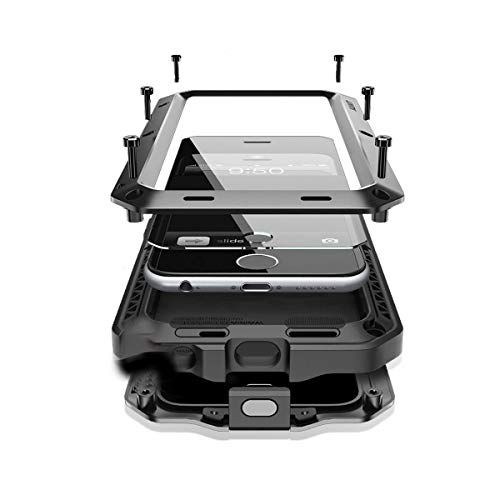
For iPhone 15 owners prioritizing full-body protection, this case combines a hard aluminum-alloy shell with a soft inner bumper and built-in tempered-glass screen protector. A raised beveled edge is intended to keep the camera from contacting surfaces, while the design leaves the camera and charging ports accessible. The maker says the cover can handle rain or sudden water exposure, but it is not for swimming, surfing or diving. Its bulky, heavy-duty form is a tradeoff for anyone who prefers a slim case; confirm that the 6.1-inch iPhone 15 is your exact model.
Bottom line: Choose this if you want rugged construction and a built-in screen protector for iPhone 15.
LAPOPNUT Metal-Texture Case for iPhone 16

For iPhone 16 users who want magnetic accessory support, this case combines a silver metal-texture look with built-in magnets. Its maker says the magnets work with MagSafe accessories and support wireless charging, and the case is designed to guard against scratches, bumps and sudden impacts. The matte, frosted back is intended to provide grip, and its appearance is styled to resemble a newer Pro Max model. Unlike the rugged dual-layer options, the features do not describe a built-in screen protector or a separate metal shell. Verify the 6.1-inch iPhone 16 fit before choosing it.
Bottom line: Pick this for an iPhone 16 when magnetic accessory compatibility is a priority.
YAOZOCASE Aluminum Frame for iPhone 17 Pro Max

For iPhone 17 Pro Max owners seeking a magnetic case with a metal frame, this design pairs aluminum with a PC backboard rather than using the rugged dual-layer construction of some alternatives. The maker describes it as MagSafe compatible and military-grade drop protection, and the raised screen edges and camera guard frame add coverage around those areas. The product name calls it slim fit, which may suit buyers who do not want a bulky armor-style cover. Its features do not describe a built-in screen protector, so buyers wanting one should favor a case that explicitly includes glass.
Bottom line: Choose this if you need a MagSafe-compatible aluminum-frame case for iPhone 17 Pro Max.
Lanhiem Metal Armor for iPhone 17 Pro / 18 Pro

For iPhone 17 Pro or 18 Pro owners concerned about dust at the ports, this armor-style case adds sealed ports to a hard aluminum-alloy shell and soft inner bumper. It also has a built-in tempered-glass screen protector and raised camera edges, while the maker says wireless charging is supported. The rugged, full-body design is described as bulky, so it is a less suitable choice if a thin, light-feeling case matters most. Compatibility is limited to the two specified 6.3-inch Pro models; check the model name carefully because it will not fit other iPhone series.
Bottom line: Pick this for a rugged, port-sealing case with built-in glass for the specified Pro models.
How to Choose a Metal iPhone Case
Start with the exact iPhone model, then decide whether you want a metal frame or a rugged shell around the phone. Metal cases often combine metal with plastic, silicone or another material; the design determines where the metal sits and what other protection is included. A built-in screen protector, raised edges and sealed ports are separate features, not automatic results of choosing a metal case. For magnetic accessories, look for explicit MagSafe compatibility rather than assuming a metal finish includes magnets. If you want wireless charging, confirm that the specific case supports it and test your charger with the case fitted. A measurable decision rule: if a built-in screen protector is essential, select only a model whose features explicitly include one.
Check iPhone Model and Case Fit
Choose by the full model name, not just the iPhone generation or screen size. Case dimensions and camera cutouts differ across models, and a case made for one size may not align with another phone’s buttons, camera or charging port. The options here specify iPhone 15, iPhone 16, iPhone 17 Pro Max, or iPhone 17 Pro and 18 Pro; do not treat those as interchangeable. Before choosing a dual-model case, verify which of the named phones you own. A snug fit should leave buttons, camera openings and the charging port accessible; forcing a mismatched case can compromise access and protection. Screen diagonal alone is not enough to confirm a case fit.
Metal Frames and Rugged Cases Compared
Metal-frame cases and rugged full-body cases solve different problems. A frame-and-backboard design can prioritize a slim profile and magnetic accessory support, while a dual-layer armor case may add a soft bumper, raised edges or an integrated screen protector. Compare the actual build rather than treating “metal” as a complete construction description. The table separates the main choice by design and included features.
| Design | Typical emphasis | Feature to confirm |
|---|---|---|
| Metal frame with backboard | Slimmer profile and magnetic use | MagSafe and screen coverage |
| Dual-layer armor | Coverage with inner shock-absorbing material | Bulk and exact model fit |
| Full-body sealed case | Port and screen coverage | Charging and port access |
Wireless Charging and Metal Case Compatibility
Wireless charging depends on the phone, charger and case working together, so a metal finish alone does not guarantee compatibility. Metal placed between a phone and a charging coil can obstruct wireless charging; designs that claim compatibility may use a different material arrangement or magnets. Check the case’s explicit charging claim and remove it if charging becomes unreliable or the phone heats unusually. MagSafe compatibility and ordinary wireless charging are related but not identical features: confirm support for the charging method and accessories you plan to use. Avoid assuming a magnetic ring or metal frame contains the magnets needed to attach accessories.
Frequently Asked Questions
Can metal iPhone cases interfere with wireless charging?
Metal between a phone and a wireless charging coil can obstruct charging. Choose a case that explicitly supports wireless charging, and check whether charging works reliably with the case fitted.
Does MagSafe compatibility mean a case has magnets?
MagSafe-compatible cases are designed to work with MagSafe accessories, but a metal finish alone does not establish magnetic support. Check for an explicit MagSafe compatibility claim before choosing accessories.
Should I buy an iPhone case by screen size alone?
No; match the case to the full iPhone model name. Two phones with similar screen diagonals can differ in camera layout, button position and body dimensions.
Do raised edges protect an iPhone screen?
Raised edges can keep a screen from directly contacting a flat surface when the phone is face down. They do not replace a screen protector, and protection depends on the edge height and impact.