
Gaming Mouse Left-Handed: 3 Models Compared by Fit

For most left-handed players seeking a gaming mouse, Pulsar X3 LHD CrazyLight Mini stands out for its 43 g weight and mini shape designed for palm or relaxed-claw grip. Choose Razer Naga Left-Handed instead if MMO play calls for 12 programmable thumb buttons; choose Acer Dual-Mode Gaming Mouse if you want a mouse made for either hand.
We earn a commission if you buy through links on this page. As an Amazon Associate I earn from qualifying purchases. Products are compared on manufacturer specifications, not hands-on testing.
- Best overall: Pulsar X3 LHD CrazyLight Mini – Its 43 g mini design is shaped for left-handed palm and relaxed-claw grips.
- Best for MMO controls: Razer Naga Left-Handed – It has 12 programmable thumb buttons for skills, macros, and hotkeys.
- Best for either hand: Acer Dual-Mode Gaming Mouse – Its shape is specified for left- and right-handed use, with eight programmable buttons.
| Product | Best for | Weight | Maximum DPI | Programmable buttons | Shop |
|---|---|---|---|---|---|
| Pulsar X3 LHD CrazyLight Mini | Lightweight grip | 43 g | 32,000 DPI | — | Check Price on Amazon |
| Razer Naga Left-Handed | MMO hotkeys | 136 g | 8,200 DPI | 12 | Check Price on Amazon |
| Acer Dual-Mode Gaming Mouse | Ambidextrous use | — | 24,000 DPI | 8 | Check Price on Amazon |
Left-handed gaming mice
Compare these options by hand fit, weight, sensor range, and the controls your games require.
Pulsar X3 LHD CrazyLight Mini

At 43 g, this mini wireless mouse is the lightest specified option here, and its hybrid left-handed shape is designed for palm and relaxed-claw grips. Pulsar says the XS-1 sensor reaches 32,000 DPI and 750 IPS, and the included dongle supports wireless polling up to 8,000 Hz. Optical switches are rated for 100 million clicks. Its compact size suits players who want a small, low-weight shape; players who prefer a full-size shell or need a specified button count should compare the alternatives. The 8,000 Hz mode works best with a recent CPU and USB 3.0 port.
Bottom line: Choose this for a very light mini mouse and palm or relaxed-claw grip.
Razer Naga Left-Handed
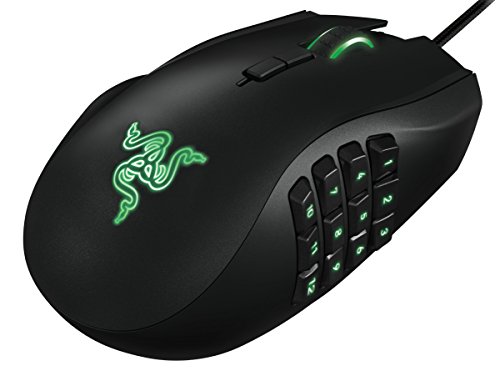
The left-handed Naga is the MMO-focused choice, with 12 programmable thumb buttons and a scroll wheel that also tilts left and right. Its 8,200 DPI 4G laser sensor is a lower maximum than the other specified gaming sensors here, while the button layout offers more direct access to commands. Razer says the controls can be customized for skills, macros, and hotkeys through its in-game configurator. The larger control array suits players who want many mapped commands close to the thumb; players prioritizing low weight or an FPS-oriented minimal layout may prefer a simpler mouse.
Bottom line: Choose this when MMO commands and thumb-accessible controls matter most.
Acer Dual-Mode Gaming Mouse

Unlike the explicitly left-handed shapes, this Acer is specified for either hand, making it the flexible pick for shared setups or players who want a more neutral fit. It supports wired or 2.4 GHz wireless use, has eight programmable buttons, and offers a 24,000 DPI optical sensor with a 1,000 Hz polling rate. Acer says its driver can customize the six DPI levels, whose default range begins at 1,200 DPI. The medium-size mouse fits buyers who value two connection modes and button remapping; its maker does not establish a dedicated left-hand contour.
Bottom line: Choose this for either-hand use, wired or wireless connection, and eight programmable buttons.
How to choose a left-handed gaming mouse
Start with hand shape and game controls, not the largest DPI number. A purpose-shaped left-handed mouse gives left-hand users a dedicated contour, while an ambidextrous mouse is designed for either hand; compare the shape and grip guidance before choosing. For MMO play, count the buttons you can reach without shifting your grip, while an FPS player may prefer a lighter design with fewer controls. Sensor DPI sets cursor sensitivity, not a guarantee of better aim: many players use a modest sensitivity and adjust in-game settings. If you plan to use a high polling mode, make sure your PC and USB connection can support the maker’s requirements.
What DPI and polling rate mean for gaming
DPI describes how far the pointer moves for a given mouse movement; a higher maximum mainly gives more sensitivity range, not inherently more precision. A 1,000 Hz polling rate corresponds to a report interval of 1 millisecond, while 8,000 Hz corresponds to 0.125 milliseconds. The practical difference depends on the game, display, system load, and whether your computer can handle the higher report rate. Treat a sensor’s maximum DPI and polling figures as capability ceilings, then tune sensitivity in smaller steps until your normal hand movement covers the screen area you need. A very high setting can make small movements difficult to control.
Left-handed shape versus ambidextrous design
A dedicated left-handed shape can place contours and thumb support for a left hand, while an ambidextrous shell is intended for either hand and may feel more neutral. The grip guidance here is explicit for Pulsar X3 LHD CrazyLight Mini: palm and relaxed-claw. The MMO control layout on Razer Naga Left-Handed adds 12 thumb buttons, so check whether your thumb can rest naturally without accidental presses. An ambidextrous label alone does not guarantee that every button is equally convenient from either side. If hand comfort is the deciding factor, compare width and shape against your current mouse and confirm the actual hand orientation before ordering.
Match mouse features to the game
Choose buttons around the commands you use often: a 12-button thumb grid is suited to command-heavy MMO play, while eight programmable buttons give room for remapping without the same large thumb array. For quick aiming, lower weight can make repeated repositioning easier, but control and grip remain personal. Wireless modes also differ: a receiver-based high-polling setup may need an available USB 3.0 port and a recent CPU, while a dual-mode model offers a wired alternative. Avoid changing DPI, polling rate, and in-game sensitivity all at once; adjust one setting at a time so you can identify what improves control.
Frequently Asked Questions
Does higher DPI make a gaming mouse more accurate?
No; DPI changes sensitivity, so a higher setting moves the pointer farther for the same hand movement. Maximum DPI is a range limit, and players can use lower settings for finer control.
How much polling rate do I need for gaming?
A 1,000 Hz rate reports every 1 millisecond, while 8,000 Hz reports every 0.125 milliseconds. Higher polling requires more system capacity, so use it only if your PC handles it smoothly.
Is an ambidextrous mouse the same as left-handed?
No; an ambidextrous design is intended for either hand, while a dedicated left-handed shape is contoured for the left hand. Check button access and thumb rest placement as well as the orientation.
How should I choose a mouse for MMO games?
Count the commands you want available without keyboard presses and check whether you can reach the thumb buttons without shifting your grip. A 12-button thumb layout can suit command-heavy play, while fewer buttons may be easier to manage for a simpler setup.
What grip works with a mini gaming mouse?
A mini mouse is most suitable when its shape fits your hand without forcing your fingers into an awkward position. The grip guidance for Pulsar X3 LHD CrazyLight Mini specifically names palm and relaxed-claw use, so compare that with how you naturally hold a mouse.