
Best Mice for Small Hands: 3 Fits Compared

Logitech Signature M550 Small is the best fit for most people with small hands because it is explicitly sized for small-to-medium hands and measures about 4.26 inches long. Choose Luhaso 57° Vertical Mouse instead if you want a vertical grip, or Logitech Signature M650 Small if quieter clicks matter more than a compact length difference.
A mouse for small hands should let you reach the buttons without stretching your fingers; compare hand length and grip style before choosing.
We earn a commission if you buy through links on this page. As an Amazon Associate I earn from qualifying purchases. Products are compared on manufacturer specifications, not hands-on testing.
- Best overall: Logitech Signature M550 Small – Designed for small-to-medium hands, with a 4.26-inch length and SmartWheel scrolling.
- Best for vertical grip: Luhaso 57° Vertical Mouse – Its 57-degree handshake shape is made for small-to-medium hands.
- Best for quiet clicks: Logitech Signature M650 Small – SilentTouch clicks and small-to-medium sizing suit quieter work areas.
| Product | Best for | Length | Connection | Power | Shop |
|---|---|---|---|---|---|
| Logitech Signature M550 Small | Everyday scrolling | 4.26 in | Bluetooth LE or Logi Bolt | 2-year battery | Check Price on Amazon |
| Luhaso 57° Vertical Mouse | Vertical grip | — | 2.4GHz USB receiver | Rechargeable | Check Price on Amazon |
| Logitech Signature M650 Small | Quiet clicking | 4.22 in | Bluetooth LE or Logi Bolt | 2-year battery | Check Price on Amazon |
Mice for Small Hands
These picks cover compact conventional shapes and a vertical grip, so match both the mouse dimensions and your preferred hand position.
Logitech Signature M550 Small

At 4.26 inches long, this mouse is explicitly sized for small-to-medium hands and pairs a compact footprint with a SmartWheel that switches between line-by-line and fast scrolling. The contoured shape, soft thumb area and rubber side grips are intended to support a settled grip during long work sessions. Bluetooth Low Energy and the Logi Bolt receiver provide two connection choices. Logitech says battery life is up to two years. The main trade-off is that the shape is conventional rather than vertical, so choose another style if changing wrist posture is your priority.
Bottom line: Pick this for a compact everyday mouse with flexible scrolling.
Luhaso 57° Vertical Mouse

The 57-degree vertical shape is the key distinction here: this mouse is built for a handshake-style grip rather than the flatter posture of the two Logitech options. Its maker sizes it for small-to-medium hands and gives it 800, 1200 and 1600 DPI settings, plus forward and back buttons. It recharges over USB-C, so it avoids replaceable batteries. The ergonomic benefit is a maker claim, not a guarantee; people switching from a standard mouse may need time to adjust, and anyone wanting Bluetooth should choose a different connection type.
Bottom line: Choose this if you prefer a vertical grip and rechargeable power.
Logitech Signature M650 Small
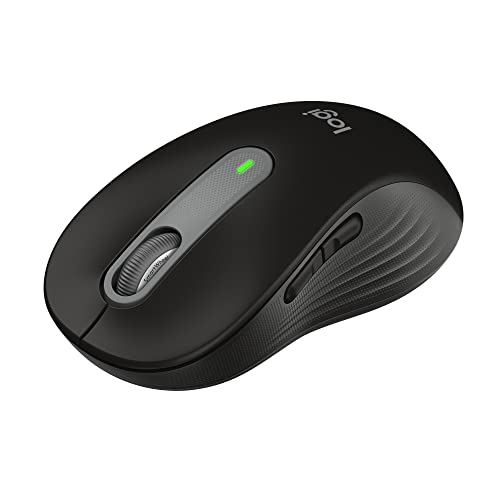
Quiet clicks set this compact Logitech apart: SilentTouch is said to reduce click noise by 90 percent, while its 4.22-inch length and small-to-medium sizing suit smaller hands. The SmartWheel handles precise document scrolling or faster movement through long pages, and the shape includes a soft thumb area and rubber side grips. Bluetooth Low Energy and Logi Bolt are both supported, and Logitech says the battery lasts up to two years. This is a standard horizontal mouse, not a vertical design; consider the Luhaso if a handshake grip is the deciding feature.
Bottom line: Pick this for small-hand fit when quieter clicks are a priority.
How to choose a mouse for small hands
Start with hand length and finger reach, then consider grip style and button placement. Measure from the wrist crease to the tip of the middle finger; a commonly used sizing guide calls hands under about 7.5 inches small, though brands do not all use the same cutoff. A mouse should let your fingertips rest on the main buttons without stretching, and your palm should not be forced far forward to reach the wheel. If hand length is under 7.5 inches, prioritize models explicitly labeled small or small-to-medium, then check the length. People with fingertip grips often prefer a shorter mouse, while palm grippers need enough body support without excessive width.
Compact and vertical mouse shapes
Compact horizontal mice keep the familiar hand position and are often the easiest transition from a standard mouse. Vertical mice rotate the hand toward a handshake posture; the angle varies by model, so a 57-degree design is not interchangeable with a fully upright shape. A vertical mouse can feel unfamiliar at first, and pointer control may take practice. Use the comparison table to narrow the shape before weighing extra features.
Choose by the trade-off that matters most: compact familiarity, a vertical grip, or quieter clicking.
| Need | Shape to consider | What to check |
|---|---|---|
| Familiar pointing | Compact horizontal | Mouse length and finger reach |
| Handshake-style posture | Vertical | Angle and thumb-button reach |
| Quieter work setting | Quiet-click horizontal | Whether the quiet function applies to the clicks you use |
Measure fit before settling on a size
Mouse length alone does not determine fit: width, hump position and button reach also affect how a small hand sits on the shell. Compare a candidate’s length with a mouse you already control comfortably, and avoid choosing by a broad “small” label alone. A useful fit check is whether your index and middle fingers can rest on the buttons with a relaxed curve; if you must straighten them or slide your palm forward to reach the wheel, choose a shorter body. Left-handedness also matters because many ergonomic contours are handed. Check that a mouse’s shape and side controls match the hand you use before ordering.
Wireless connection and battery choices
Wireless mice commonly connect through Bluetooth or a USB receiver; Bluetooth frees a USB port, while receiver models need an available compatible port. Some mice offer both methods, which is useful when moving between computers with different connectivity. Battery design changes the routine: replaceable batteries need periodic replacement, while rechargeable models need access to charging. A mouse’s DPI setting controls pointer sensitivity, not physical accuracy; higher DPI moves the cursor farther for the same hand motion. For small desks or precise tasks, adjust sensitivity until the pointer reaches the screen edges without repeated lifting, then keep the setting consistent.
Frequently Asked Questions
How do I measure my hand for a small mouse?
Measure from the wrist crease to the tip of your middle finger. A common sizing guide treats under about 7.5 inches as small, but compare the mouse’s actual length and finger reach because brand sizing categories differ.
Is a shorter mouse always better for small hands?
No; length is only one part of fit. Check width and button reach too, and favor a body that lets your fingers curve naturally without stretching.
Do vertical mice take time to get used to?
Often, yes: a vertical shape changes the hand’s angle and can feel unfamiliar during the transition. Keep pointer sensitivity moderate at first and allow several work sessions to adapt.
What does DPI mean on a wireless mouse?
DPI sets how far the pointer travels for a given hand movement. Many general-purpose mice offer settings around 800 to 1600 DPI, and a lower setting can help with controlled movement on a compact desk.
Should I use Bluetooth or a USB receiver?
Bluetooth does not occupy a USB port, while a receiver requires a compatible port on the computer. If switching between computers, check which connection method each one supports before choosing.