
Best Non-Graphing Scientific Calculators Compared

The TI-30XS MultiView is the best fit for most students because its four-line display can show several calculations together without graphing.
Non-graphing scientific calculators handle operations such as trigonometry, statistics and scientific notation without plotting full graphs.
We earn a commission if you buy through links on this page. As an Amazon Associate I earn from qualifying purchases. Products are compared on manufacturer specifications, not hands-on testing.
- Best overall: Texas Instruments TI-30XS MultiView – Its four-line MultiView screen supports comparing calculations, and it can display textbook-style expressions.
- Best for function range: SC-216 Non-Graphing Scientific Calculator – It offers 240 functions, including trigonometry, statistics and engineering modes.
- Best for approved exams: Texas Instruments TI-30XIIS – The manufacturer says it is approved for SAT, ACT and AP exams.
| Product | Best for | Display | Power | Notable functions | Shop |
|---|---|---|---|---|---|
| Casio FX-115ESPLSB-WA-IT | Textbook-style math | Natural Textbook Display | — | Advanced scientific | Check Price on Amazon |
| Texas Instruments TI-30XS MultiView | Comparing calculations | Four-line MultiView | — | Table of values; scientific notation | Check Price on Amazon |
| Texas Instruments TI-30XIIS | Exam-approved basics | Two-line | Solar and battery | Statistics; fractions; conversions | Check Price on Amazon |
| SC-216 Non-Graphing Scientific Calculator | Broad function set | Two-line; 12-digit | 2 AAA batteries | 240 functions | Check Price on Amazon |
Non-Graphing Scientific Calculators
Compare the display layouts and function sets to match a calculator to your coursework.
Casio FX-115ESPLSB-WA-IT
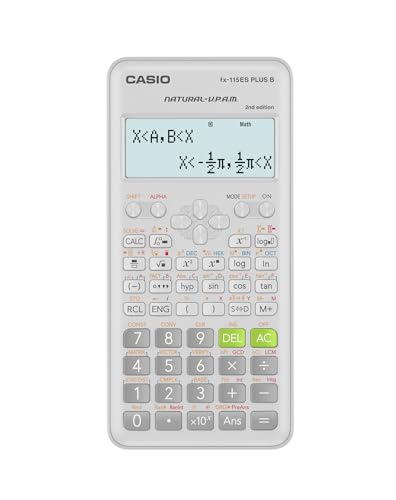
The Casio FX-115ESPLSB-WA-IT stands out for its Natural Textbook Display, which shows expressions in a textbook-like format. The manufacturer positions it for engineering, science and statistics coursework, making it a fit when expression readability matters more than a multi-line comparison screen. Its 7-inch length and 3.5-inch width give it a larger footprint than some compact scientific calculators in this group.
Bottom line: Choose this when textbook-style expression display is the main priority.
Texas Instruments TI-30XS MultiView

The TI-30XS MultiView is the only model here with a four-line display, useful for viewing multiple calculations together. It also displays textbook-style expressions and stacked fractions, and its table feature lets students explore (x,y) values for a function. Those features suit classes that move between arithmetic, fractions and function tables without needing graphing. The feature set does not identify its power source, so check that point if a course or exam setting requires a particular type. Its display advantage matters most when reviewing intermediate work on screen.
Bottom line: Pick this for coursework that benefits from seeing several lines and function values.
Texas Instruments TI-30XIIS

The TI-30XIIS combines a two-line display with solar and battery power, a useful distinction for buyers who want both power options. The display shows the entry and result at the same time, while its functions include statistics, fractions, conversions, and basic scientific and trigonometric operations. The manufacturer says the model is approved for SAT, ACT and AP exams, but students should still check their specific exam’s current calculator rules. Its two-line screen offers less room for simultaneous work than a four-line model, so students who regularly compare several calculations may prefer a larger display.
Bottom line: Choose this if two-line entry visibility and dual power options suit your coursework.
SC-216 Non-Graphing Scientific Calculator

The SC-216 distinguishes itself with a 240-function set and a 12-digit display. Its features include trigonometry, one- and two-variable statistics, three angle modes, and engineering modes, giving it a broad range for middle- and high-school work. The two-line display shows entries and results, and the calculator is non-programmable. Its 2 AAA batteries make it a battery-dependent choice, unlike a solar-and-battery model. The feature set also mentions SAT readiness, but it does not establish approval for every exam; verify exam rules before relying on it for a test.
Bottom line: Pick this for a broad stated function set and a 12-digit display.
How to Choose a Non-Graphing Scientific Calculator
Choose by the work you need to see and the functions your course uses. A two-line display can show an entry and result together, while a four-line screen can keep more calculations visible; textbook-style displays render expressions more like familiar written math. For a typical high-school science course, prioritize fractions, scientific notation and trigonometry; statistics coursework may also need one- or two-variable calculations. If you routinely compare multiple steps, favor a model with at least four display lines. Check allowed calculator models against the specific exam rules: permission for one test does not establish permission for another. A long function list is less useful if the calculator’s display and controls make the operations you use hard to follow.
Angle Modes and Trigonometry
Set the angle mode to match the problem before using sine, cosine or tangent. Degrees divide a circle into 360 units, while radians measure angles by arc length relative to radius; a full circle is 2π radians. A calculator in the wrong mode can produce a plausible-looking but incorrect result. For typical classroom problems, check whether the assignment uses degree symbols or radians, then confirm the mode indicator before calculating. Grads, also called gradians, divide a circle into 400 units and are less common in school math. When switching between problems, do not assume the previous setting resets. Entering parentheses around a multi-part angle expression can also make the intended order clearer.
Display Types and Function Sets
Display layout determines how much of a calculation stays visible, while function sets determine which operations are built in. Use this comparison to match a practical need with a feature shown among these models.
| Need | Useful feature | Why it matters |
|---|---|---|
| Review several calculations | Four-line display | Keeps more work visible at once |
| See expression structure | Textbook-style display | Shows expressions in a familiar layout |
| Statistics and trigonometry | Relevant named functions | Matches common coursework operations |
Scientific notation is useful for very large or very small values because it expresses a number as a coefficient multiplied by a power of ten. A function table, by contrast, helps inspect input-output pairs without producing a full graph. These tools support different tasks, so choose based on course work rather than the number of functions alone.
Common Calculator Mistakes
The most common scientific calculator errors come from settings and expression entry, not arithmetic. Check degree or radian mode before trigonometry, and use parentheses to group numerators, denominators and negative values. Scientific notation uses powers of ten: for example, 3 × 10⁴ equals 30,000, so verify whether an answer is in ordinary or scientific form before copying it. Rounding too early can change a later result; keep the calculator’s displayed precision through intermediate steps and round only as the assignment requires. For exams, confirm the exact calculator policy before test day, because allowed functions and models can vary by test. Keep the display readable and verify that the final value has the expected unit or scale.
Frequently Asked Questions
What is the difference between a scientific and graphing calculator?
A scientific calculator handles operations such as trigonometry, fractions and scientific notation, while a graphing calculator can plot functions. Choose a non-graphing scientific model when plotting is unnecessary or not allowed.
When should I use degree or radian mode?
Use the mode specified by the problem or course; a full circle is 360 degrees or 2π radians. Check the mode indicator before any trigonometric calculation, especially after switching topics.
How many display lines do students need?
A two-line screen can show an entry and result together, while a four-line screen keeps more calculations visible. If you compare multiple steps often, a four-line display is the more useful condition to prioritize.
Can I use a scientific calculator on every exam?
No, exam rules differ by test and may restrict calculator models or functions. Confirm the rules for your specific exam; an approval statement for one exam does not establish eligibility for another.
Why is my sine answer unexpectedly wrong?
An incorrect angle mode is a common cause: degrees and radians produce different results for the same numeral. Check the mode and confirm that the problem’s angle units match it.