
Best Router Sign Making Kits Compared by Fit and Features

For most woodworkers, Milescraft SignPro with Arrow and Symbol Templates is the best router sign making kit because it combines more than 200 letter and number templates with arrow and symbol options. Choose Milescraft 1206 Signcrafter instead for a sign range of 4 to 36 inches, or Rockler Script Font Interlock Templates for interlocking script lettering.
We earn a commission if you buy through links on this page. As an Amazon Associate I earn from qualifying purchases. Products are compared on manufacturer specifications, not hands-on testing.
- Best overall: Milescraft SignPro with Arrow and Symbol Templates – More than 200 letter and number templates plus 26 additional arrow and symbol templates.
- Best for larger signs: Milescraft 1206 Signcrafter – Its sign range runs from 4 to 36 inches.
- Best for script lettering: Rockler Script Font Interlock Templates – Interlocking templates are designed for flowing cursive lettering.
| Product | Best for | Template type | Router bit | Sign or letter size | Shop |
|---|---|---|---|---|---|
| Milescraft SignPro with Arrow and Symbol Templates | Versatile layouts | Letters, numbers, arrows, symbols | 1/4 in. and 3/8 in. | 1.5 in. and 2.5 in. arrows/symbols | Check Price on Amazon |
| Milescraft 1212 SignPRO | Standard lettering | Letters and numbers | 1/4 in. and 3/8 in. | 1.5 in. and 2.5 in. | Check Price on Amazon |
| Milescraft 1206 Signcrafter | Large sign range | 82 letters and numbers | 3/8 in. | 4–36 in. signs | Check Price on Amazon |
| Rockler State Park Font Template Set | Compact lettering | 99 letters, numbers, symbols, spacers | 3/16 in. bit required, separate | 1.5 in. letters | Check Price on Amazon |
| Rockler Script Font Interlock Templates | Cursive lettering | Interlocking script letters | — | 3.25–3.625 in. | Check Price on Amazon |
Router Sign Making Kits
Compare template styles and included routing components before choosing a kit for your sign layout.
Milescraft SignPro with Arrow and Symbol Templates
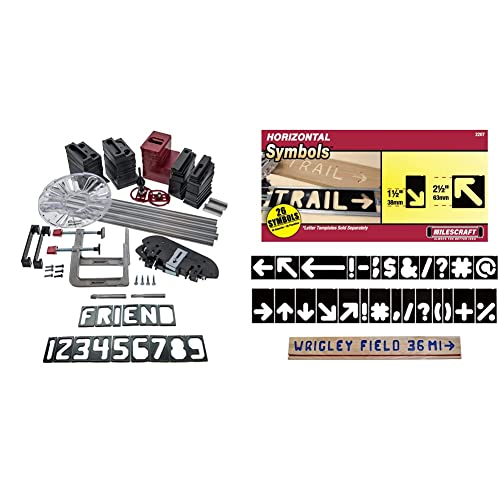
Milescraft SignPro with Arrow and Symbol Templates stands apart by pairing a large letter-and-number template collection with separate arrow and symbol templates. The SignPro set includes over 200 polymer-blend templates, two carbide-tipped core box bits, a turn-n-lock base plate, metal nose bushings and low-profile clamps. Its 26 arrow and symbol templates come in 1.5-inch and 2.5-inch sizes, giving sign makers more layout options than a lettering-only set. This is a strong fit for varied wood sign designs. The limitation is that the extra symbols do not provide the 4-to-36-inch sign range stated for Milescraft 1206 Signcrafter.
Bottom line: Choose it for varied signs that need more than standard letters and numbers.
Milescraft 1212 SignPRO
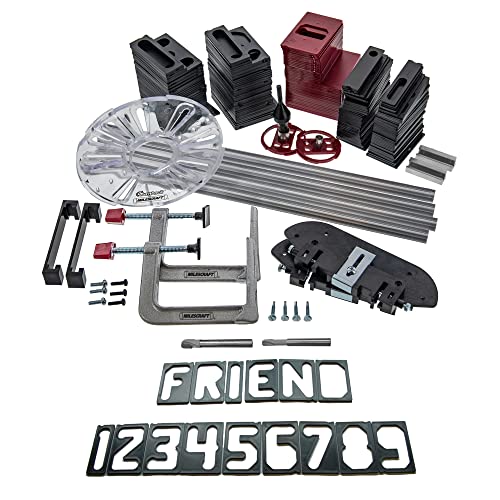
Milescraft 1212 SignPRO focuses on familiar horizontal lettering and vertical numbers, with over 200 self-spacing polymer templates in 1.5-inch and 2.5-inch sizes. The kit supplies 1/4-inch and 3/8-inch carbide-tipped core box bits, a turn-n-lock base plate, metal nose bushings, low-profile clamps and end frames. That makes it the straightforward choice for a woodworker whose sign plans center on standard characters rather than decorative script. One constraint is its reliance on guide bushings for routing; the set is not the script-oriented option that Rockler Script Font Interlock Templates provides.
Bottom line: Pick it for standard horizontal lettering and vertical numbers.
Milescraft 1206 Signcrafter

Milescraft 1206 Signcrafter is the clearest choice when the intended sign size matters more than maximizing template count: its range runs from 4 to 36 inches. It includes 82 self-spacing 2.5-inch letter and number templates, a 3/8-inch core box bit, a turn-n-lock baseplate, bushings, side bars, four metal rails and joiners. The self-spacing characters avoid manual measuring between letters, useful for repeatable layouts. Its limitation is the narrower set of 82 characters compared with the over-200-template collections in Milescraft SignPro with Arrow and Symbol Templates and Milescraft 1212 SignPRO.
Bottom line: Choose it when you need the 4-to-36-inch sign range.
Rockler State Park Font Template Set

Rockler State Park Font Template Set uses a State Park font and interlocking templates, with kerning spacers intended to help set even letter spacing. The 99-piece set includes letters, numbers, symbols, spacers and a brass guide bushing; its letters are 1.5 inches tall. It is a suitable pick for compact signs where consistent spacing and this particular font matter more than a larger character height. The key tradeoff is that the required 3/16-inch signmaker’s carbide bit is sold separately, unlike the kits that include router bits.
Bottom line: Pick it for 1.5-inch State Park lettering and spacing control.
Rockler Script Font Interlock Templates

Rockler Script Font Interlock Templates is distinct for its flowing script font: adjacent templates interlock to form a stable, aligned lettering layout. Its character size is 3.25 to 3.625 inches, much larger than the 1.5-inch characters in Rockler State Park Font Template Set. A guide bushing follows the templates, and the two-stage routing approach is designed to keep center-island letters whole. This suits decorative signs where cursive is the priority. The tradeoff is less layout flexibility for conventional lettering; choose a standard alphabet set such as Milescraft 1212 SignPRO for that use.
Bottom line: Choose it when larger cursive lettering is central to the design.
How to Choose a Router Sign Making Kit
Start with the character style and finished sign size, then compare bits and template support. Letter-and-number kits suit conventional layouts, while interlocking sets can handle specialized fonts such as cursive. A template height is not automatically the finished sign height: the design also needs room for margins and spacing. Router sign kits guide a bushing around a template, and the bit cuts the wood beneath it; confirm that the router base and bushing combination are compatible before starting. For a sign that needs a particular minimum or maximum size, choose only a kit whose range covers that dimension. Template count matters most when your planned message uses symbols or unusual characters, not simply because the number is higher.
| Need | Useful kit feature |
|---|---|
| More layout options | Letters, numbers and symbol templates |
| Oversized sign layouts | A 4-to-36-inch range |
| Script lettering | Interlocking cursive templates |
Router Bits and Guide Bushings
Match the bit to the template system rather than assuming router bits are interchangeable. Core box bits cut a rounded-bottom groove, and a guide bushing rides along the template edge to control the path. The compared kits include 1/4-inch and 3/8-inch bits, a 3/8-inch bit, or require a separate 3/16-inch signmaker’s carbide bit, depending on the set. Before routing, verify the bushing’s fit in the router base and check that the bit shank matches the router collet. Disconnect power while changing bits, keep hands clear of the cutter, and secure both the workpiece and templates; a shifting template can spoil a letter and bring hands closer to the bit.
Template Size, Spacing, and Sign Fit
Character height determines how large each letter appears, but the full layout also depends on the number of characters, spacing and margins. Self-spacing templates reduce the need to measure between characters, while kerning spacers address gaps in interlocking lettering. For a sign wider than 36 inches, do not infer that a kit’s range supports the layout; confirm the intended range before ordering. Make a paper or scrap-wood layout first, including margins, then check that the complete phrase fits the board. Keep the template sequence organized while laying out a long sign, and test the first character on scrap to confirm groove depth and letter scale before routing the finished board.
Common Router Sign Making Mistakes
The most common avoidable error is choosing a kit by template count without checking the font, character size or bit requirement. A 1.5-inch letter set and a 3.5-inch script set produce very different-looking signs even when both use a router and guide bushing. Another mistake is assuming the cutter is included: one compared set calls for a separate 3/16-inch bit. Secure the board on a stable surface, clamp the templates, and take controlled passes rather than forcing the router through the wood. A plunge router is recommended for the State Park set, and its base must accommodate the guide bushing. Clear the work area and wear eye and hearing protection while routing.
Frequently Asked Questions
What router bit cuts letters with sign templates?
A core box bit makes the rounded-bottom grooves used by many router sign kits. The compared sets call for 1/4-inch, 3/8-inch or 3/16-inch bits, so match the cutter size to the template system.
Do router sign making kits include the router?
The kits compared here are template and routing-accessory sets, not routers. Confirm that your router accepts the required guide bushing and bit shank before beginning.
How do I space letters on a routed sign?
Self-spacing templates position standard characters without measuring every gap. For an interlocking font, use its compatible spacers and lay out the full phrase with margins before routing.
Can I use a plunge router with letter templates?
A plunge router can be used with compatible templates and bushings, and the State Park set specifically recommends one with a perforated base. Check bushing clearance and secure the workpiece before making a cut.
How can I keep routed letters from splitting?
Use controlled routing passes and keep the template firmly clamped so the bushing follows its edge. For letters with center islands, the script kit uses a two-stage routing approach designed to leave those sections whole.