
Cables for Wii U: AV, Power and Sensor Options

For Wii U video and sound over red, white and yellow RCA inputs, choose Wii/Wii U Composite AV Cable, 6 ft or Wii/Wii U Composite AV Cable, 6 ft (Gray); both are 6-foot composite AV cords. Choose a power adapter or sensor bar instead when you need power or motion-control hardware, not a TV audio-video connection.
We earn a commission if you buy through links on this page. As an Amazon Associate I earn from qualifying purchases. Products are compared on manufacturer specifications, not hands-on testing.
- Best overall: Wii/Wii U Composite AV Cable, 6 ft – A 6-foot composite AV cord with red, white and yellow RCA connectors for compatible TV inputs.
- Best for console power: Xahpower Wii U Console AC Adapter – A Wii U console adapter with 15V/5A output and a 6.5-foot cable.
- Best for console and GamePad: PEGLY Wii U Console and GamePad Adapter Set – The package includes separate AC adapters for the Wii U console and GamePad.
| Product | Best for | Connection or purpose | Cable length | Included pieces | Shop |
|---|---|---|---|---|---|
| Wii/Wii U Composite AV Cable, 6 ft | RCA video and audio | Composite RCA AV | 6 ft | 1 cable | Check Price on Amazon |
| Wii/Wii U Composite AV Cable, 6 ft (Gray) | Color-coded RCA setup | Composite RCA AV | 6 ft | 1 cable | Check Price on Amazon |
| Xahpower Wii U Console AC Adapter | Console replacement power | Wii U console power | 6.5 ft | 1 adapter | Check Price on Amazon |
| PEGLY Wii U Console and GamePad Adapter Set | Two-device power | Console and GamePad power | — | 2 adapters | Check Price on Amazon |
| Wired Wii Sensor Bar with Stand | Remote tracking | Wired infrared sensor bar | 6.6 ft | Bar and stand | Check Price on Amazon |
Cables for Wii U by purpose
Match the accessory to the Wii U connection or function you need before choosing by length.
Wii/Wii U Composite AV Cable, 6 ft
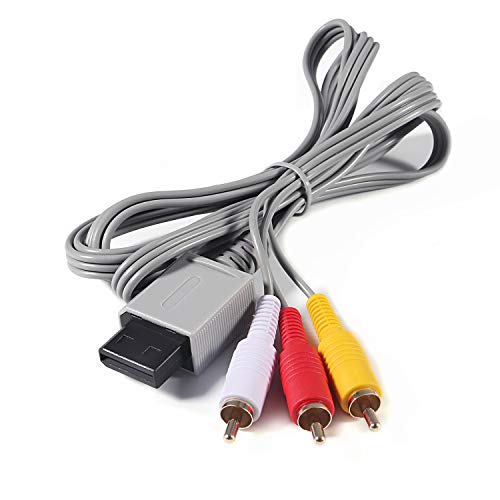
For a Wii U connected through a TV’s analog RCA inputs, this cord provides composite video and stereo audio through yellow, red and white plugs. It measures 6 feet (1.8 meters) and connects to the console’s Wii/Wii U port at the other end. The cord suits a setup that specifically needs RCA rather than HDMI. The limitation is the TV input: a display without composite audio-video sockets cannot use this connection directly, so check the back or side panel before choosing it.
Bottom line: Choose this when your TV has composite RCA inputs and you need a 6-foot lead.
Wii/Wii U Composite AV Cable, 6 ft (Gray)

This 6-foot replacement uses color-coded yellow, red and white RCA plugs, making it easy to match the TV’s composite video and audio jacks. Its console end is designed for Wii and Wii U, so it is a direct alternative to other composite leads rather than a power cord. Composite carries standard-definition video; it is not the right choice if your setup requires an HDMI connection for digital video. Confirm that the display has RCA inputs and that you want a composite connection before ordering.
Bottom line: Pick this for a color-coded composite connection to a TV with RCA inputs.
Xahpower Wii U Console AC Adapter

Unlike the AV leads, this accessory supplies power to the Wii U console; it is not a TV audio-video cable and is explicitly not compatible with the original Wii. The electrical ratings are 110–240V input and 15V/5A DC output, with a 6.5-foot cable. The maker says the adapter includes overheat, overcurrent and overcharge protection. It suits someone replacing or keeping a spare console supply, but it does not include a separate GamePad charger.
Bottom line: Choose this when you need a Wii U console power adapter, not an AV cord.
PEGLY Wii U Console and GamePad Adapter Set

This set differs from a single-console supply by including two pieces: one AC adapter for the Wii U console and one for the Wii U GamePad. It is meant to cover both power connections, rather than carry video or audio to a television. The package suits a setup missing both original power supplies or needing replacements for each device.
Bottom line: Pick this when you need separate power adapters for both the console and GamePad.
Wired Wii Sensor Bar with Stand
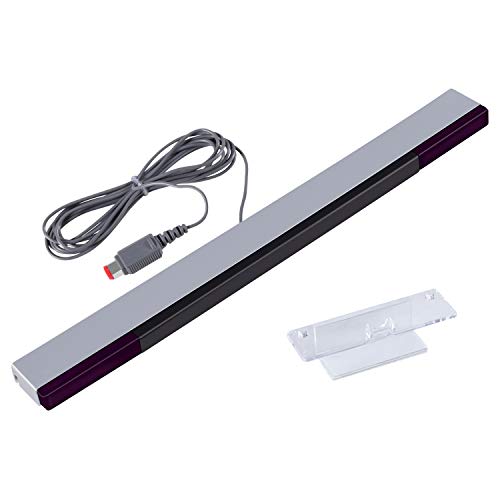
This is a wired infrared sensor bar, not a cord for connecting the console to a television. The bar is 9.5 inches long and has a 6.6-foot cable; a clear stand with adhesive is included for positioning on a smooth surface. Its purpose is to support Wii Remote and Wii Remote Plus tracking with Wii and Wii U consoles. Choose it when the missing part is the sensor bar. It will not replace an AV cable or provide console power.
Bottom line: Choose this when your Wii U setup needs a wired infrared sensor bar.
How to choose a Wii U cable
Choose by the job first: video and sound, console power, GamePad power, or remote tracking require different accessories. Composite AV uses three RCA plugs—yellow for video and red and white for audio—while an AC adapter powers a device and a sensor bar supports infrared remote tracking. The Wii U also has HDMI output, so if you want a digital TV connection, use an HDMI cable rather than a composite cord. For a TV with only HDMI inputs, a bare RCA lead will not connect directly; check the TV’s available inputs before choosing an AV cord.
For a quick match, use this purpose chart:
| Need | Accessory type | Key check |
|---|---|---|
| Analog TV picture and sound | Composite AV cord | Yellow, red and white RCA inputs |
| Console or GamePad power | AC adapter | Device and electrical compatibility |
| Wii Remote tracking | Sensor bar | Placement and cable reach |
Wii U AV cable inputs and picture quality
Composite video is a standard-definition analog connection, while HDMI carries digital audio and video and is the simpler fit for an HDMI-equipped HDTV. A composite cord’s yellow plug carries video; the red and white plugs carry right and left audio. Keep the plugs matched to the corresponding TV jacks, and select the TV’s composite input after connecting. If the screen has no RCA jacks, do not assume an AV cord can plug into HDMI; a compatible converter would be a separate device and may add setup requirements.
Composite is useful for older displays and compatible input hardware, but it is not a high-definition connection. Choose HDMI when digital output is the goal and the television accepts HDMI.
Wii U power adapters and sensor bars
Console and GamePad power supplies serve different devices, so a Wii U console adapter is not a substitute for a GamePad charger. Check the device label and connector before using a replacement; electrical ratings and plug fit both matter. A two-adapter set is useful only if both included supplies match the console and GamePad.
A wired sensor bar is a separate motion-control accessory, not a power or display cable. Position it centered above or below the screen with a clear view of the play area, and leave enough cable slack to reach the console without pulling the bar loose. Keep cords away from walkways to reduce trip risk, and disconnect power adapters before inspecting damaged plugs or cables.
Common Wii U cable matching mistakes
The most common mismatch is buying a composite cord for a screen that has HDMI but no RCA inputs. Another is confusing a sensor bar’s wire with a console connection: the bar supports remote tracking but does not carry the game picture. Also distinguish the Wii U console’s power supply from the GamePad charger, since the devices use separate power adapters.
Measure the route before selecting a cable: a 6-foot lead reaches only about 6 feet along its actual path, and bends or routing around furniture use some of that distance. Leave slack at connectors rather than stretching a cable taut. Before powering a replacement adapter, compare its device compatibility and output rating with the original supply’s label.
Frequently Asked Questions
Can a Wii U connect to a TV with HDMI?
Yes, the Wii U has HDMI output for compatible TVs. Use HDMI when you want a digital connection; composite AV instead requires yellow, red and white RCA inputs.
What do the red, white, and yellow plugs do?
Yellow carries composite video, while red and white carry the two audio channels. Match each plug to the same-colored RCA jack on the TV, then select its composite input.
Can a Wii AV cable work with a Wii U?
A compatible Wii/Wii U composite cord uses the console AV connection and the three RCA plugs. Check that the television has composite inputs, since the cord does not connect directly to HDMI-only displays.
Are Wii U console and GamePad chargers interchangeable?
No, the console and GamePad use separate power adapters. Match each replacement to its device and compare the electrical output and connector with the original supply label.
Where should a Wii U sensor bar be placed?
Place the bar centered above or below the screen with a clear view of the play area. Keep the wired lead slack but out of walkways, where it could become a trip hazard.