
Dashboard Pad Mounting Disk: 5 Options Compared

For a mix of flat and curved dashboards, the DIGFAD 3.23-inch disk stands out because its flexible construction is designed to follow curves and its steel reinforcement resists suction-cup pull. Choose a smaller disk when your suction cup is 3 inches or less, or a larger one when it needs a 95 mm surface.
A dashboard mounting disk provides a smooth, flat sealing surface for a suction cup; it does not replace checking that the cup fits the disk and that the adhesive base suits the dashboard surface.
We earn a commission if you buy through links on this page. As an Amazon Associate I earn from qualifying purchases. Products are compared on manufacturer specifications, not hands-on testing.
- Best overall: DIGFAD 3.23-Inch Reinforced Disk – Flexible layers suit curved or textured dashboards, while a thin steel core resists suction-cup pull.
- Best for flat dashboards: APPS2Car 3-Inch VHB Disk, 3-Pack – A 3-inch disk is specified for flat dashboards and suction cups up to 3 inches.
- Best for larger cups: 95 mm Adhesive Disk, 3-Pack – Its 95 mm (3.74-inch) diameter accommodates a larger suction-cup footprint.
| Product | Best for | Disk diameter | Pack size | Dashboard fit | Shop |
|---|---|---|---|---|---|
| DIGFAD 3.23-Inch Reinforced Disk | Curved dashboards | 3.23 in | 2 disks | Flat or curved | Check Price on Amazon |
| APPS2Car 3-Inch VHB Disk, 3-Pack | Flat dashboards | 3 in | 3 disks | Flat only | Check Price on Amazon |
| 3.15-Inch VHB Disk, 3-Pack | Textured dashboards | 3.15 in | 3 disks | Curved or textured | Check Price on Amazon |
| 95 mm Adhesive Disk, 3-Pack | Large suction cups | 3.74 in | 3 disks | Various surfaces | Check Price on Amazon |
| eSamcore 3.1-Inch Flexible Pad, 2-Pack | Temperature range | 3.1 in | 2 pads | — | Check Price on Amazon |
Dashboard Pad Mounting Disks
Match the disk diameter to the suction cup, then choose a surface and adhesive style that suits your dashboard.
DIGFAD 3.23-Inch Reinforced Disk

The DIGFAD disk is the only option here with a thin stainless-steel core, intended to resist upward pull from the suction cup while flexible layers follow dashboard curves. Its smooth top creates a continuous sealing surface, and the 3.23-inch diameter suits mounts whose cups fit within that footprint. The two-disk pack is a fit for buyers who need a surface that can flex over a curve rather than a disk specified only for flat dashboards. The tradeoff is its 3.23-inch size: measure the cup first, because a larger cup will extend beyond the disk.
Bottom line: Choose this if your dashboard curves and your suction cup fits within 3.23 inches.
APPS2Car 3-Inch VHB Disk, 3-Pack

The APPS2Car disk is the most explicit fit for a flat dashboard: its use excludes windshield mounting. Each 2.9-inch-wide disk uses single-sided 3M VHB GPH-160 adhesive and is intended for suction cups up to 3 inches across. Three disks give you replacements or pads for multiple vehicles. This is a focused choice for a flat dash and a cup within the size, not for buyers trying to bridge a dashboard curve or texture. Measure the actual suction-cup diameter; a cup larger than 3 inches falls outside the compatibility.
Bottom line: Pick this for a flat dashboard and a suction cup no wider than 3 inches.
3.15-Inch VHB Disk, 3-Pack

This 3.15-inch disk is positioned for curved or textured dashboards, making it a distinct choice when the APPS2Car flat-dashboard restriction does not fit your surface. The three-pack uses VHB adhesive and is compatible with suction-cup accessories up to 80 mm (3.15 inches), including phone holders, GPS navigators and dash cams. Its larger footprint than a 3-inch pad gives a little more coverage, but it cannot accommodate a cup wider than 80 mm. Check that the dashboard area is large enough to place the full disk flat against the intended surface.
Bottom line: Choose this for a curved or textured dash and a cup up to 80 mm wide.
95 mm Adhesive Disk, 3-Pack
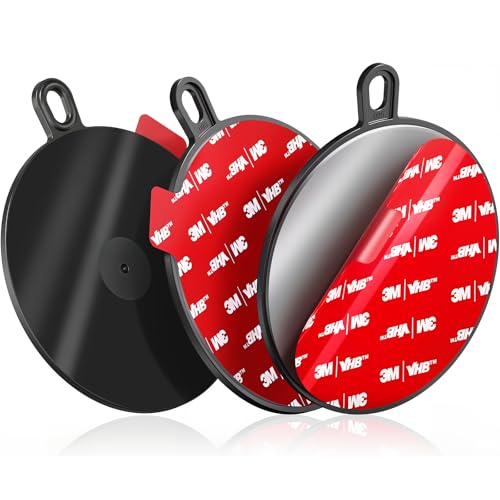
The 95 mm (3.74-inch) diameter makes this the largest disk in the group, for a suction cup that needs more surface area than the 3- to 3.23-inch options provide. The plastic disk is described for dashboard surfaces as well as windshields or windows, and its three-pack is suited to mounts such as phone cradles, GPS devices and tablets. The larger footprint is also the main limitation: confirm you have a clear, level area large enough to place it. The maker specifies heat resistance up to 120°C; that is an adhesive claim, not a guarantee about dashboard materials.
Bottom line: Pick this when your cup needs a 95 mm surface and the mounting area can fit it.
eSamcore 3.1-Inch Flexible Pad, 2-Pack

The eSamcore pad gives an operating temperature range of -4°F to 176°F, setting it apart for buyers comparing temperature limits. Its suction-facing pad is 3.1 inches in diameter, while the adhesive base measures 3.5 inches; both dimensions matter when planning placement. The two-pack is intended to create a smooth, flat base for a dashboard suction mount, and the maker gives a maximum weight capacity of 65 pounds. That capacity does not establish whether a particular dashboard or suction cup is suitable, so this option is best for matching a known fit rather than relying on a weight figure alone.
Bottom line: Choose this if its 3.1-inch pad fits your cup and its temperature range meets your needs.
How to Choose a Dashboard Pad Mounting Disk
Start with the suction cup diameter: the disk must provide a continuous, flat sealing area beneath the cup. Most car suction mounts use cups in the roughly 2- to 3-inch range, but larger tablet or camera mounts can need more; measure the cup itself rather than the mount arm. Then match the dashboard shape: a rigid flat disk needs a level contact area, while a flexible pad can follow a modest curve. For example, if your cup is 3.1 inches wide, a 3-inch disk is too small; choose a disk that fully covers the cup’s footprint. Clean and dry the dash before adhesion, and avoid placing a pad over seams, vents, airbags, or controls.
Dashboard Shape and Adhesive Placement
A disk only works when its adhesive base bonds to the dash and its top seals evenly against the suction cup. Textured dashboards can leave air channels beneath an adhesive pad, while a pronounced curve can prevent a rigid disk from lying flat. Flexible construction may conform to shallow curves, but it cannot make every contour suitable. Avoid soft-touch coatings and areas exposed to repeated direct sun unless the pad maker and vehicle guidance support that placement; heat and surface coatings can affect adhesion. Press the whole adhesive footprint onto a clean, dry, stable area, not just its center. Keep the mount out of the airbag deployment path and where it cannot obstruct the driver’s view.
Mounting Disk Sizes Compared
Diameter determines which suction cups a disk can support, while pack count determines how many mounting surfaces are included. Use the table to narrow the size before considering surface fit; a disk that is wide enough may still be unsuitable for a curved or textured dash. Allow room around the disk so its edge does not cross a dashboard seam or raised ridge.
| Disk diameter | Typical choice | Check before mounting |
|---|---|---|
| About 3 inches | Compact phone or GPS cup | Cup fits fully within the surface |
| About 3.1 to 3.23 inches | Mid-size cup or more coverage | Dash curve and texture |
| About 3.74 inches | Larger suction cup | Clear area for the full disk |
Common Installation Mistakes
The most common mistake is bonding the adhesive pad to a dusty, oily, wet, or uneven surface, which can weaken contact. Clean the mounting spot with a method compatible with the dashboard finish and let it dry fully; do not use a solvent that can damage the dash. A second mistake is loading the disk immediately after sticking it down. Pressure-sensitive adhesives generally benefit from firm, even application pressure and time to develop their bond; use the pad maker’s cure guidance before attaching a heavy device. Finally, do not treat an adhesive temperature rating as a rating for the dashboard, suction cup, or full mount assembly. Remove or reposition the setup if the pad edge lifts.
Frequently Asked Questions
How large should a dashboard mounting disk be?
Choose a disk at least as wide as the suction cup so the cup seals entirely on a smooth surface. A 3-inch cup needs a disk of 3 inches or more, with enough clear dashboard area for the full pad.
Can a suction cup mount work on a textured dashboard?
A disk can create a smoother top surface, but its adhesive underside still has to bond to the dashboard texture. Deep grain or raised ridges can leave gaps, so choose a flexible pad intended for textured surfaces and check for lifting before relying on the mount.
How should I prepare a dashboard before sticking on a pad?
Remove dust and grease, then let the mounting area dry completely before applying the adhesive. Avoid cleaners or solvents that can damage the dashboard finish, and keep the pad away from seams, vents, and airbag covers.
How long should I wait before using a dashboard adhesive pad?
Give pressure-sensitive adhesive time to build its bond before attaching a device; 24 hours is a common waiting period for VHB-style tape, though the pad maker’s guidance should take precedence. Heat, surface condition, and application pressure affect the bond.
Where should I avoid placing a dashboard mount?
Keep the mount out of the driver’s sightline and outside airbag deployment zones. Do not cover vents, controls, or dashboard seams, and avoid a spot where the device could interfere with steering or safe vehicle operation.