
DJI Mini 2 Range Extenders: 4 Options Compared

For a DJI Mini 2 range extender, the Anbee 5.8GHz Yagi pair is the option that explicitly names Mini 2 compatibility; controller fit and frequency are the deciding checks. Choose another only if its controller and drone compatibility match your setup, since newer DJI RC controllers may not fit older-style antenna boosters.
We earn a commission if you buy through links on this page. As an Amazon Associate I earn from qualifying purchases. Products are compared on manufacturer specifications, not hands-on testing.
- Best overall: Anbee 5.8GHz Yagi Antenna 2-Pack – Names the Mini 2 among compatible models and includes a pair of 5.8 GHz Yagi antennas.
- Best for a parabolic option: JOYSOG Yagi and Parabolic Set – Combines Yagi antennas with parabolic mirror extenders and names Mavic Mini compatibility.
- Best for newer RC 2 drones: RC 2 5.8GHz Antenna Booster – Designed for select newer drone models with an RC 2 controller and specifies 5.8 GHz operation.
| Product | Best for | Compatible fit | Antenna type | Frequency | Shop |
|---|---|---|---|---|---|
| Anbee 5.8GHz Yagi Antenna 2-Pack | Mini 2 owners | Mini 2; multiple controllers | Yagi pair | 5.8 GHz | Check Price on Amazon |
| JOYSOG Yagi and Parabolic Set | Parabolic reflector users | Mavic Mini; multiple Mavic models | Yagi and parabolic mirrors | — | Check Price on Amazon |
| RC 2 5.8GHz Antenna Booster | Newer RC 2 setups | Mini 5 Pro, Mini 4 Pro, Air 3S, Flip | Antenna booster | 5.8 GHz | Check Price on Amazon |
| Taoke RC 2/RC Pro Antenna Extender | RC 2 or RC Pro | Air 3, Mini 4 Pro, Mavic 3 Pro Cine | Antenna amplifier | — | Check Price on Amazon |
DJI Mini 2 Range Extenders
Compare the drone and controller compatibility before choosing an antenna booster.
Anbee 5.8GHz Yagi Antenna 2-Pack
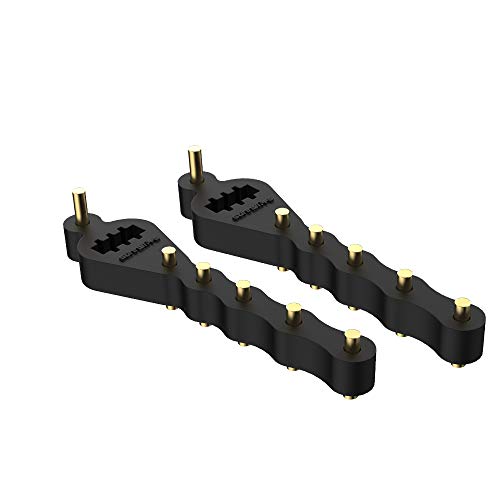
Among these options, this is the one that explicitly names the DJI Mini 2. The 2-pack uses 5.8 GHz Yagi antennas, which are directional rather than all-around boosters; aim the controller antennas toward the aircraft for the intended orientation. The maker says the antennas enhance controller antenna sensitivity and recommends pairing them with a booster cover for the best range effect. Each pack weighs 28 g and uses silicone and copper. This is the clearest fit for a Mini 2 owner, but it only addresses 5.8 GHz, so it may not help when the controller is using 2.4 GHz.
Bottom line: Choose this pair if you have a Mini 2 and want a 5.8 GHz Yagi option.
JOYSOG Yagi and Parabolic Set
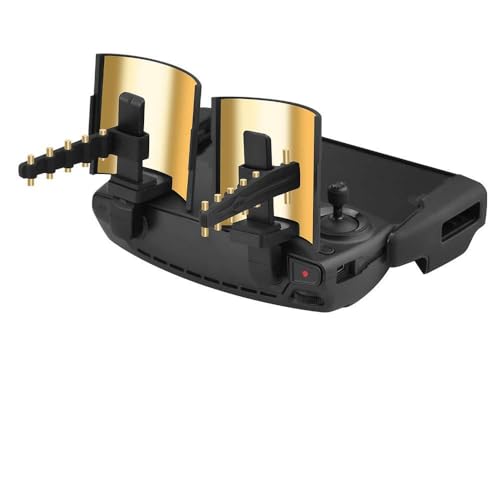
Unlike the other options, this set combines Yagi antennas with parabolic mirror extenders. It names Mavic Mini, Mavic 2, Mavic Pro and Mavic Air, but not Mini 2, so confirm compatibility with your exact controller and drone before choosing it. The maker says the two components can be used together to extend remote-control distance, and the Yagi antennas use copper.
Bottom line: Consider it only if the model list and your controller match.
RC 2 5.8GHz Antenna Booster

This booster targets a different generation of equipment: its named drones include Mini 5 Pro, Mini 4 Pro, Air 3S, Flip and Mavic 4 Pro, rather than Mini 2. It is designed for the RC 2 remote controller and amplifies 5.8 GHz only. The maker notes that DJI controllers can use either 2.4 GHz or 5.8 GHz depending on the environment, so this accessory may offer little benefit when the connection is on 2.4 GHz. Consider it only for a compatible newer setup, not as a Mini 2 fit.
Bottom line: Pick it for a named newer drone and RC 2, not a Mini 2.
Taoke RC 2/RC Pro Antenna Extender

This amplifier is listed for RC 2 and RC Pro controllers paired with Air 3, Mini 4 Pro or Mavic 3 Pro Cine, not the Mini 2. Its brass, aluminum and plastic construction sets it apart from the Yagi-focused options. The maker reports a 30%–50% effective-distance increase in the antenna direction under ideal conditions with little nearby signal interference; actual conditions matter, and that claim is not a Mini 2 performance figure. The antenna should face the aircraft, and the maker recommends open flying areas away from buildings and other interference sources.
Bottom line: Choose it for one of its named RC 2 or RC Pro combinations.
How to choose a DJI Mini 2 range extender
Start with the drone and controller model, then check the frequency and antenna style. The Mini 2 is explicitly named only by the Anbee option here; the other choices name different aircraft or omit Mini 2. A Yagi antenna is directional, so orientation matters more than with an omnidirectional antenna. Many consumer drone control links use 2.4 GHz and 5.8 GHz bands, and this set includes boosters that specify 5.8 GHz only. If your priority is a direct Mini 2 match, select the option that actually names it; if the controller is not the one specified, confirm fit before ordering.
What 2.4 GHz and 5.8 GHz mean for signal boosters
A 5.8 GHz booster can affect only the 5.8 GHz connection, not a link operating at 2.4 GHz. The Mini 2 option here specifies 5.8 GHz, while some other choices do not identify a band, so do not assume all boosters work across both frequencies. In general, 2.4 GHz signals tend to travel farther around obstacles than 5.8 GHz, while 5.8 GHz can offer more channels and less congestion in some environments. Walls, trees, other radio traffic and antenna direction can all change the result. If your controller switches bands automatically, a single-band accessory cannot strengthen both simultaneously.
How to aim a directional drone antenna
Keep the controller antenna oriented toward the aircraft, since a directional Yagi or reflector has a preferred signal direction. The Taoke maker likewise says to face its antenna toward the aircraft. Maintain a clear line of sight: buildings and terrain block radio paths, and a booster does not make obstructed flying safe or legal. In the United States, recreational drone pilots generally must keep the aircraft within visual line of sight; an accessory does not extend that rule. Avoid flying farther just because a signal accessory is attached, and land or return while control remains reliable if signal quality drops.
Compatibility checks before choosing a booster
Match both ends of the connection: the drone model and the remote controller. A product naming Mini 2 compatibility may still require the particular controller shape or antenna arrangement it was designed around. Use the compatibility list as a gate: if your exact drone or controller is absent, do not infer fit from a similar model name. Also compare the band with the link your controller is using; 5.8 GHz-only accessories cannot boost 2.4 GHz. For an unclear controller match, confirm that fit before ordering rather than relying on a broad phrase such as “DJI compatible.”
Frequently Asked Questions
Does a range extender increase DJI Mini 2 battery life?
No, an antenna accessory does not increase the Mini 2 battery’s capacity. Flight duration still depends on the aircraft battery and conditions, so plan the return with reserve rather than using any claimed signal extension as extra flight time.
Can a 5.8 GHz booster strengthen a 2.4 GHz signal?
No, a 5.8 GHz-only booster does not amplify a 2.4 GHz connection. DJI controllers may use either band depending on the environment, so the accessory’s frequency must match the active link.
Do directional Yagi antennas need to face the drone?
Yes, aim a directional Yagi toward the aircraft for its intended signal direction. Keep a clear visual line of sight and do not use a stronger link as a reason to fly beyond safe or legal limits.
Will a Mini 2 booster fit every DJI controller?
No, drone compatibility does not guarantee controller fit. Check the exact controller model as well as Mini 2 compatibility, since newer RC 2 designs are different from older controller setups.
Can a signal booster let me fly beyond visual line of sight?
No, an antenna booster does not change flight rules. Recreational pilots in the United States generally must keep the drone within visual line of sight, regardless of signal range.