
Extension Cord for Firestick: HDMI and Power Cords

For most Firestick setups, ZeniKon 3.3-Foot HDMI Extender is the clearest fit because its 3.3-foot HDMI extension is made to position streaming sticks away from a wall-mounted TV. Choose VCE 0.4-Foot HDMI Extender for a shorter HDMI reach, or Replacement Fire TV Stick 10W Charger only if you need a replacement power adapter for one of its compatible 4K models.
An HDMI extender changes where the stick connects to the TV; a charger supplies power, so check which connection you need before choosing.
We earn a commission if you buy through links on this page. As an Amazon Associate I earn from qualifying purchases. Products are compared on manufacturer specifications, not hands-on testing.
- Best overall: ZeniKon 3.3-Foot HDMI Extender – Its 3.3-foot HDMI extension is designed for TV sticks and wall-mounted TVs.
- Best for short reach: VCE 0.4-Foot HDMI Extender – The 0.4-foot HDMI adapter extends a hard-to-reach port with less extra cable.
- Best for replacement power: Replacement Fire TV Stick 10W Charger – It includes a 10W USB-A charger and 5-foot Micro USB cable for select Fire TV Stick 4K models.
| Product | Best for | Connection | Length | Video support | Shop |
|---|---|---|---|---|---|
| ZeniKon 3.3-Foot HDMI Extender | TV stick placement | HDMI male to female | 3.3 ft | 4K at 60 Hz | Check Price on Amazon |
| VCE 0.4-Foot HDMI Extender | Tight port clearance | HDMI male to female | 0.4 ft | 4K at 60 Hz | Check Price on Amazon |
| Replacement Fire TV Stick 10W Charger | Select 4K power | USB-A to Micro USB | 5 ft cable | 10W | Check Price on Amazon |
Extension Cords for Firestick
Choose an HDMI extension for connection reach or a replacement charger for power.
ZeniKon 3.3-Foot HDMI Extender

For a Fire TV Stick that needs more room behind a wall-mounted television, this 3.3-foot HDMI extender offers more reach than the 0.4-foot adapter. The male-to-female cable supports 18 Gbps bandwidth and resolutions up to 4K at 60 Hz, along with HDR, ARC, and 3D. Its longer run can help reposition a stick away from the TV, though cable length alone does not guarantee a stronger wireless connection. Choose it when the HDMI port is awkward to reach or the stick sits too close to the wall; its longer cable may be unnecessary for a nearby port.
Bottom line: Choose this when a wall-mounted TV leaves too little room for direct stick placement.
VCE 0.4-Foot HDMI Extender

For a tight space behind the TV, this short HDMI adapter adds less reach than the 3.3-foot option and keeps excess cable to a minimum. Its 0.4-foot male-to-female connection supports HDMI 2.0, 18 Gbps bandwidth, 4K at 60 Hz, HDR, 3D, Dolby Atmos, and ARC. The specifications cite compatibility with standard HDMI interfaces rather than naming Fire TV Stick models, so confirm the connection fits your setup before choosing it. Its very short length is useful for a nearby port, but it will not solve a larger distance gap.
Bottom line: Choose this for a nearby HDMI port that needs only a little extra clearance.
Replacement Fire TV Stick 10W Charger
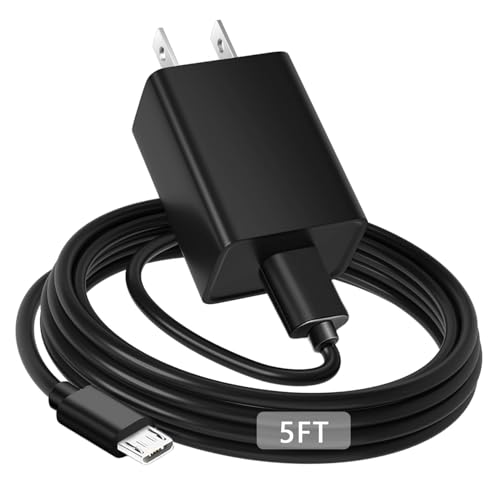
Unlike the HDMI extenders, this product supplies power rather than extending the TV connection. It pairs a 10W charger with a 5-foot USB-A to Micro USB cable and is specified for Fire TV Stick 4K Plus, 4K Max, and 4K Select; it does not fit Fire TV Stick HD. The output is up to 2A, with safeguards for electrical faults and overheating. Choose it only when replacing a compatible model’s power setup. It will not move a stick’s HDMI connection farther from the television.
Bottom line: Choose this only when you need power for one of the compatible 4K models.
Choose between HDMI reach and power
Start by identifying whether the Fire TV Stick needs a longer path to the TV or a replacement power supply. HDMI extenders connect a device to the television through an HDMI male-to-female link; a USB power cord and adapter feed electricity instead. A cable that fits one connection cannot substitute for the other. For a TV port that is blocked or too close to a wall, use an HDMI extension; for a damaged or missing power adapter, use a compatible charger. HDMI carries digital audio and video, while the stick still needs power to operate. Match the connector and purpose before comparing cable length or video support.
| Need | Choose |
|---|---|
| Move the stick’s HDMI connection | HDMI male-to-female extender |
| Replace a compatible stick’s power supply | USB power adapter and cable |
Match HDMI extender length to the TV
Choose the shortest cable that reaches the intended position without bending or pinching it. A 0.4-foot adapter suits a port that is hard to reach but already close to the stick; a 3.3-foot extension provides substantially more placement room. Measure the path from the HDMI port to the desired stick position, allowing slack for the connector and the TV’s movement. HDMI cables carry digital signals, and longer runs can be more sensitive to cable quality and signal demands. For 4K at 60 Hz, the extender needs to support the source’s video format; the products here cite 18 Gbps bandwidth for that capability.
Check video support and wireless placement
For a 4K television, match the extender’s supported resolution and refresh rate to the streaming device and content. A 4K-at-60-Hz rating identifies a supported format, but the entire signal path—including the source, cable, and display—must also support it. HDMI extension can create space between a streaming stick and the TV, which may help avoid crowding around the port; it does not guarantee improved Wi-Fi reception. Keep the stick and cable clear of sharp bends, hot surfaces, and pinched gaps behind the television. If a format fails to display, test the connection directly before assuming the extender is suitable.
Replace a Fire TV Stick power cord carefully
A replacement charger must match the device’s connector and power requirements; a USB-A to Micro USB cord is not interchangeable with every stick or other USB device. The charger here is specified for Fire TV Stick 4K Plus, 4K Max, and 4K Select, and excludes Fire TV Stick HD. Check the model name before connecting a replacement, since similar product generations can use different ports or power arrangements. Keep cords away from heat and avoid damaged cables or adapters. If the stick loses power, distinguish a power problem from an HDMI connection issue before replacing either cable.
Frequently Asked Questions
Does a Firestick HDMI extender need to support 4K?
It needs 4K support if the streaming device and television are being used for 4K video. A 4K-at-60-Hz rating is a useful match for that format, but the source and display must support it too.
How long should a Firestick HDMI extension cable be?
Use the shortest length that reaches the desired position without pulling on the HDMI port. A 0.4-foot adapter suits close clearance needs, while a 3.3-foot cable offers more placement distance.
Can an HDMI extender power a Fire TV Stick?
No, an HDMI extender extends the TV connection and does not replace the stick’s power supply. Fire TV Sticks need a compatible power source as well as an HDMI connection.
Will an HDMI extension improve Firestick Wi-Fi?
Not necessarily; an HDMI extension changes the stick’s position, but it does not boost Wi-Fi by itself. If reception is weak, placement, distance from the router, and obstacles between the router and device can matter.
Can I use a 4K Fire TV Stick charger with HD?
The replacement charger described here is specifically excluded from Fire TV Stick HD compatibility. Check the exact model and connector before using a replacement power adapter.