
External CD Player for Car: 5 Options Compared

For an external CD player for a car, choose POSSPO Jupiter USB CD Player if your stereo has a USB port, because its setup specifically requires that connection. If you need AUX as an alternative, compare Portable Car CD Player with Remote, ENVYCLOUD Portable Car CD Player, Portable External Car CD Player with Remote or DDup External Car CD Player instead; compatibility depends on the stereo’s ports and how they handle audio.
These portable disc players connect to a car stereo rather than installing inside the dashboard. Check that your stereo accepts audio through the connection you plan to use before ordering.
We earn a commission if you buy through links on this page. As an Amazon Associate I earn from qualifying purchases. Products are compared on manufacturer specifications, not hands-on testing.
- Best overall: POSSPO Jupiter USB CD Player – Its USB connection and stereo requirements are clearly defined, and it includes an extension cable for placement flexibility.
- Best for format support: Portable Car CD Player with Remote – It supports CD, CD-R, CD-RW, MP3, WMA and WAV playback.
- Best for USB-C setups: DDup External Car CD Player – It includes a USB-C adapter and extension cable along with USB and AUX connectivity.
| Product | Best for | Connection | Supported formats | Playback feature | Shop |
|---|---|---|---|---|---|
| POSSPO Jupiter USB CD Player | USB stereo owners | USB; AUX with decoder | — | Anti-skip; resume | Check Price on Amazon |
| Portable Car CD Player with Remote | Format flexibility | USB and AUX | CD, CD-R, CD-RW, MP3, WMA, WAV | Touchscreen and steering-wheel control | Check Price on Amazon |
| DDup External Car CD Player | USB-C adapters | USB and AUX; USB-C adapter | CD, CD-R, CD-RW, MP3, WMA, WAV | Anti-skip; remote | Check Price on Amazon |
| ENVYCLOUD Portable Car CD Player | Compact placement | USB and AUX | — | Touchscreen and steering-wheel control | Check Price on Amazon |
| Portable External Car CD Player with Remote | Remote control | USB and AUX | — | Anti-skip; remote | Check Price on Amazon |
External CD Players for Car
Compare the connection requirements and playback features before choosing a portable player for your stereo.
POSSPO Jupiter USB CD Player

Unlike models presented as USB-and-AUX options, the POSSPO Jupiter is built around a USB connection to the car stereo; the maker says AUX requires a decoder for louder, clearer sound. The player can sit in the center console, dashboard or glove box using its included USB extension cable. The maker says the stereo recognizes a disc as a USB drive and displays its tracks. This is the clearest fit when your stereo has a USB port. Its USB requirement matters if your car stereo has no USB port or its port does not accept audio data.
Bottom line: Choose this if your stereo has a USB port and you want an extension cable.
Portable Car CD Player with Remote

The broadest format range among these options belongs to this USB-powered player: it supports CD, CD-R, CD-RW, MP3, WMA and WAV, but not DVD. It connects through USB or AUX, and the maker says it supports touchscreen and steering-wheel control after connection. That combination suits drivers with a mixed disc collection and a stereo offering either port. The control feature depends on the vehicle and stereo recognizing the player; check control compatibility before relying on steering-wheel operation.
Bottom line: Pick this for the widest disc and audio-file format range.
DDup External Car CD Player

A USB-C adapter sets this model apart from the other dual-connection choices. It also includes an extension cable, has USB and AUX ports, and supports CD, CD-R/RW, MP3, WMA and WAV; DVD playback is not supported. Four rubber feet are intended to stabilize the unit, while a magnetic cover and internal locking mechanism secure the disc. This is a useful match if your setup calls for the included adapter or extra cable. The anti-skip and shockproof claims are the maker’s, so do not treat them as a guarantee against interruptions on every road.
Bottom line: Choose this if the USB-C adapter or extension cable fits your setup.
ENVYCLOUD Portable Car CD Player
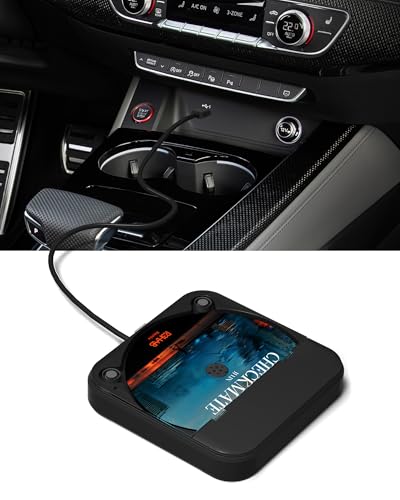
At 4.5 × 4.5 × 0.85 inches, this is the only option here with all three dimensions provided, which helps when space around the console is tight. It connects to a car’s USB or AUX port and can also connect to a laptop, TV or computer. The maker says touchscreen and steering-wheel controls work after connection. Those controls are not a substitute for checking your stereo’s compatibility, and the product’s playback formats are not established here, so choose it for fit and connection rather than a particular file type.
Bottom line: Consider this when its measured footprint suits your available console space.
Portable External Car CD Player with Remote

The included remote distinguishes this white external player, which is described as connecting through USB and AUX and working with laptops as well as cars. The maker says it has anti-skip protection for playback on the road. Its portable design is intended for storage and everyday vehicle use, but the supported disc and audio-file formats are not established here. That limitation matters if you need CD-R, MP3 or other specific playback support; confirm the format compatibility and stereo connection before choosing it for a particular collection.
Bottom line: Pick this if an included remote is a priority and your stereo supports its connection.
How to Choose an External CD Player for a Car
Start with the stereo’s input, because a car USB port may charge devices without reading audio data. A USB connection is suitable only when the stereo accepts audio playback through USB; an AUX input carries analog audio and can be a simpler route when available. Some stereos require a separate decoder or adapter for a particular hookup. Match the player’s supported formats to your collection: CD-R and CD-RW are recordable discs, while MP3, WMA and WAV are audio-file formats. If your stereo has AUX but no usable USB audio, prefer a player with AUX support; if the stereo has only USB, verify USB audio compatibility first.
Set up the player and select a track before driving. Handling discs or controls while moving can distract the driver.
USB and AUX Connections for Car CD Players
USB and AUX are not interchangeable inputs: USB can carry digital data, while AUX passes an analog audio signal. A USB socket that charges a phone may still fail to read a CD player, so confirm the stereo supports USB audio or USB media devices before relying on it. AUX generally requires a 3.5 mm audio input on the stereo and a compatible cable path from the player. A decoder may be needed for some setups. Use this quick connection guide before choosing:
| Stereo setup | What to verify | Suitable player trait |
|---|---|---|
| USB port only | USB audio or media playback support | USB connection |
| AUX input available | Compatible audio input and cable | AUX support |
| Both ports available | Which input the stereo recognizes | USB and AUX options |
Test the intended input while parked before depending on it during a trip.
Disc and Audio Formats to Check
Standard audio CDs, CD-R and CD-RW are different disc types, and support for one does not guarantee support for the others. MP3, WMA and WAV refer to audio-file formats; a player must support the format actually stored on the disc. DVD is a separate disc format and should not be assumed to work in a CD player. If your collection includes burned discs, confirm CD-R or CD-RW support specifically; if it includes data discs with files, match the file format too. Labels such as “CD player” alone do not tell you which writable discs or audio files a unit can read.
Keep the disc clean and free of scratches, and avoid forcing it into a player that does not accept the disc type.
Where to Place and Operate a Portable CD Player
Choose a stable location that does not block the driver’s view, pedals, airbag areas or access to essential controls. A USB extension cable can give more placement flexibility, but loose cable should not cross a footwell or interfere with shifting. Measure the intended storage spot before buying: a player around 4.5 inches wide may fit a console compartment that cannot accommodate a larger unit, but check depth and cable clearance too. Start playback while parked and secure the player so it cannot slide under braking. Anti-skip features are not a substitute for safe placement or attentive driving.
Frequently Asked Questions
Will a car USB port power a CD player and play its audio?
Not necessarily: some car USB ports provide power but do not accept USB audio devices. Confirm that the stereo supports audio playback over USB, not just charging, before choosing a USB-connected player.
Can an external car CD player read DVD discs?
A CD player should not be assumed to read DVDs; CD and DVD use different disc formats. Choose a device that explicitly supports the disc type in your collection.
Do car CD players support burned CD-R discs?
Only when CD-R support is included for that player. Check CD-R and CD-RW separately if your collection uses recordable discs.
Can I control a car CD player from the steering wheel?
Only when the player and the specific car stereo support that control path. Set up and verify the controls while parked, and do not handle the player while driving.
Where should I place a portable CD player in my car?
Use a stable spot that leaves the driver’s view, pedals and airbag areas clear. Keep extension cables out of the footwell and measure the compartment before choosing a player.