
Fiber to Cat6 Converter: 5 Options Compared

For fiber-to-Cat6 conversion, Single-Mode LC Gigabit Converter is the closest match because it includes an LC single-mode SFP and identifies Cat6 cable in the set. Choose a different option if you need a pair of converters, want multimode fiber, or already have an SFP module; the other models differ in those ways.
We earn a commission if you buy through links on this page. As an Amazon Associate I earn from qualifying purchases. Products are compared on manufacturer specifications, not hands-on testing.
- Best overall: Single-Mode LC Gigabit Converter – The package identifies Cat6 cable and includes a fitted 1310 nm single-mode LC SFP.
- Best for a paired single-mode link: Single-Mode LC Pair, 20 km – It includes two converters and two 1000BASE-LX single-mode SFP modules for runs up to 20 km.
- Best for SFP flexibility: Omada MC220L SFP Converter – Its SFP slot supports single-mode or multimode modules, which you select for the fiber run.
- Best for multimode reach: BiDi Multimode Converter Pair – The included BiDi transceivers are specified for multimode links up to 550 m.
| Product | Best for | Fiber type and reach | Optics included | Shop |
|---|---|---|---|---|
| Single-Mode LC Gigabit Converter | Cat6-ready kit | Single-mode, 20 km | LC SFP included | Check Price on Amazon |
| Single-Mode LC Pair, 20 km | Two-end setup | Single-mode, 20 km | Two LX SFPs included | Check Price on Amazon |
| Omada MC220L SFP Converter | SFP choice | SFP-dependent, up to 20 km | SFP not included | Check Price on Amazon |
| BiDi Multimode Converter Pair | Multimode runs | Multimode, 550 m | Two BiDi SFPs included | Check Price on Amazon |
| 10Gtek Single-Mode Converter Pair | Single-mode pair | Single-mode, 20 km | — | Check Price on Amazon |
Fiber to Cat6 Converters
Compare the included optics, fiber reach and RJ45 speeds before matching a converter to your cable run.
Single-Mode LC Gigabit Converter

Unlike the other options, this converter specifically identifies Cat6 cable in the set and arrives with an LC single-mode SFP installed. The maker says the 1310 nm optic supports a 20 km link over duplex OS2 fiber; the RJ45 port auto-senses 10, 100 or 1000 Mbps and supports auto MDI/MDI-X. Its features also describe a DIP switch for selecting fiber speed. This suits a buyer wanting a single-mode unit ready to pair with copper Ethernet. The key limitation is that the fiber reach and rate depend on a compatible far-end optic and fiber path.
Bottom line: Choose this if you want an included single-mode LC optic and Cat6 identified in the set.
Single-Mode LC Pair, 20 km

This is the only option here supplied as a complete pair with two single-mode LX SFPs, making it suited to connecting two RJ45 segments across a fiber span. The maker specifies 1310 nm optics, up to 20 km, and a gigabit RJ45 port that also supports 10/100 Mbps, half or full duplex, and 9K-byte jumbo frames. Two external power supplies are included. Choose it when both fiber endpoints need converters and matched optics. The package is specifically single-mode, so it is not the fit for an existing multimode fiber run.
Bottom line: Pick this for a two-end single-mode link with both converters and optics included.
Omada MC220L SFP Converter
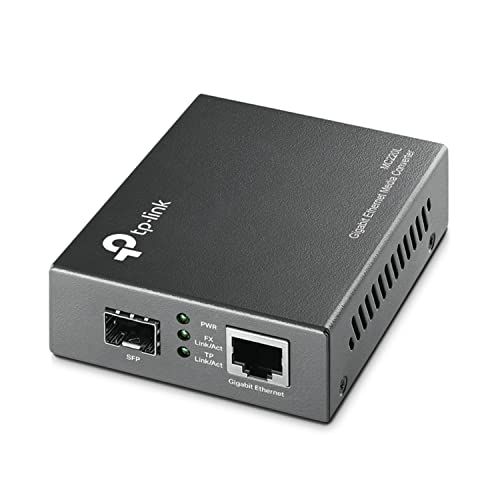
Unlike the kits with optics included, this converter has an SFP slot so you can choose a compatible single-mode or multimode module for the fiber path. The maker specifies conversion between 1000BASE-SX/LX fiber and 1000BASE-T copper, with RJ45 auto-negotiation, half/full duplex and auto MDI/MDIX. With the appropriate module, its reach is up to 20 km on single-mode fiber or 550 m on multimode fiber. Plug-and-play operation is claimed. This is a useful choice when you already have an SFP or need to select one for the fiber type; the SFP must be sourced separately.
Bottom line: Choose this when you want to select an SFP to match your existing fiber.
BiDi Multimode Converter Pair

This pair is the multimode-specific choice, unlike the single-mode kits in this comparison. It includes two BiDi LC transceivers and two converters; the maker specifies a fiber distance up to 550 m and Cat5e UTP/STP copper cabling up to 100 m. The RJ45 ports auto-negotiate 10/100/1000 Mbps and support full or half duplex and auto MDI/MDIX. The wide-voltage power supplies are rated 100–240 V. Choose it for a short multimode span between copper Ethernet points. Its optics are intended for multimode fiber, not a single-mode run.
Bottom line: Pick this for a paired multimode link within the specified 550 m reach.
10Gtek Single-Mode Converter Pair

This two-pack differs from the single-unit option by supplying converters for both ends of a link, while targeting single-mode fiber. The maker specifies 1000BASE-LX at 1310 nm with reach up to 20 km, plus a 10/100/1000 Mbps RJ45 port with auto-negotiation and auto MDI/MDIX. It also identifies an RTL8213B chip and IEEE compatibility. This suits a user building a gigabit single-mode connection who wants two converter units.
Bottom line: Choose this if you need two single-mode converters and can confirm the required optics.
How to choose a fiber to Cat6 converter
Match the fiber port and optic to your existing fiber first, then check the RJ45 speed. Single-mode LC optics and multimode optics use different fiber types; an SFP slot alone does not mean an optic is included. For copper Ethernet, 1000BASE-T normally runs over four-pair Cat5e or better twisted-pair cable, with a maximum channel length of 100 m. Cat6 cable can support gigabit Ethernet within that limit, but a converter cannot make a 10/100/1000 port faster than 1 Gbps. If a fiber run is over 100 m, use fiber for the long span and copper only for the short final leg. Confirm both ends use compatible optics and fiber before selecting a model.
Fiber reach, cable type and SFP fit
Fiber reach is set by the transceiver and fiber combination, not by the Cat6 segment. The products here specify single-mode reach up to 20 km or multimode reach up to 550 m, but those limits apply only with compatible optics and fiber. Duplex LC connectors use separate transmit and receive paths; BiDi optics send and receive over one strand, so the two ends must be a compatible pair. Check whether the converter includes an SFP or only provides an SFP slot. For the copper side, stay within 100 m for the full 1000BASE-T channel, including patch leads. If your copper connection needs only 10 or 100 Mbps, confirm the converter supports that rate rather than assuming every fiber port negotiates at gigabit.
This table maps common requirements to the relevant converter type.
| Need | Converter approach |
|---|---|
| Both ends need hardware and single-mode reach | Pair with matched single-mode optics |
| Existing fiber type is known, optics chosen separately | SFP-slot converter |
| Short multimode run using BiDi optics | Matched BiDi pair for multimode fiber |
How to connect fiber to Cat6 Ethernet
A fiber media converter changes the physical link from an optical fiber port to an RJ45 Ethernet port; it does not convert an Ethernet network into a different protocol. Connect the optical side to a compatible fiber link and the RJ45 side to a switch, router, camera or other copper Ethernet device. A normal 1000BASE-T copper segment uses four twisted pairs and is limited to 100 m for the channel. The RJ45 port may negotiate at 10, 100 or 1000 Mbps, but the two connected devices and cable must support the negotiated rate. For a link between two copper networks, converters are needed at both fiber endpoints unless one endpoint already has a matching optical port.
Common fiber converter matching mistakes
The most common mismatch is choosing a single-mode optic for multimode cable, or the reverse; verify the fiber type before connecting. A second mistake is assuming the SFP is bundled because a converter has an SFP cage: some units include optics and others are sold as slots only. BiDi is another compatibility constraint; each end needs an optic designed to pair with the other end, rather than two arbitrary modules. Also distinguish the fiber reach from the copper limit: a 20 km optical reach does not extend the RJ45 100 m channel. For an installation relying on a specific Cat6 cable being included, check that the package actually contains it before ordering.
Frequently Asked Questions
How far can Cat6 Ethernet run from a converter?
A 1000BASE-T Cat6 copper channel is limited to 100 m, including patch leads. Longer distances require fiber for the extended span, with copper used only for the final segment.
Can a fiber converter work with Cat6 cable?
Yes, when its copper port is RJ45 Ethernet and the Cat6 cable connects it to an Ethernet device. Cat6 does not determine optical compatibility; the fiber type and SFP must match the fiber link.
Do both ends of a fiber link need converters?
A link between two copper-only Ethernet devices generally needs an optical endpoint at each end, such as a converter at both ends. A switch or other device with a compatible fiber port can serve as one endpoint instead.
Do fiber media converters include SFP modules?
Some are sold with SFP modules, while an SFP-slot model may require a separately selected optic. Check the kit contents and match the optic type, wavelength, connector and fiber to the opposite end.
Can multimode and single-mode fiber connect directly?
No, the link needs compatible fiber at both ends. Match the transceiver type to the installed fiber; multimode and single-mode optics are not interchangeable just because both use LC connectors.