
Floppy to USB Converter: 3 Drives Compared by Fit

For moving files from standard 3.5-inch disks to a computer, choose External USB Floppy Drive, Frosted first because it is an external USB reader with a USB-A/C connector; GoTEK SFR1M44-U100 Emulator instead emulates an internal drive for equipment with a 34-pin interface. Choose the emulator for compatible machinery, not for directly reading loose disks on a computer.
A floppy drive emulator makes compatible equipment treat USB flash storage like a floppy drive, while an external reader accesses physical diskettes.
We earn a commission if you buy through links on this page. As an Amazon Associate I earn from qualifying purchases. Products are compared on manufacturer specifications, not hands-on testing.
- Best overall: External USB Floppy Drive, Frosted – External 3.5-inch drive reads and writes 1.44 MB disks through USB-A/C.
- Best for equipment: GoTEK SFR1M44-U100 Emulator – Internal 34-pin emulator is designed for compatible embroidery and industrial control equipment.
- Best for compact carry: RAAYOO External USB Floppy Drive – External reader is 0.63 inch thick and weighs 0.52 pound.
| Product | Best for | Connection | Dimensions | Shop |
|---|---|---|---|---|
| External USB Floppy Drive, Frosted | Computer disk retrieval | USB-A/C | 5.46 × 3.9 × 0.78 in | Check Price on Amazon |
| GoTEK SFR1M44-U100 Emulator | Machine drive replacement | 34-pin interface; USB media | 4.8 × 3.94 × 0.98 in | Check Price on Amazon |
| RAAYOO External USB Floppy Drive | Slim portable reader | USB-A/C | 5.5 × 4 × 0.65 in | Check Price on Amazon |
Floppy to USB Converter Drives
Choose an external reader for physical disks or an internal emulator for compatible equipment.
External USB Floppy Drive, Frosted
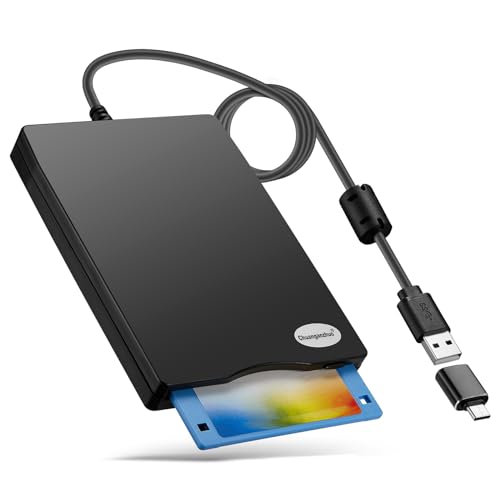
For reading physical floppy disks on a computer, this external USB drive is the direct match; its USB-A/C connector is intended to connect to a PC or laptop. The 3.5-inch drive reads and writes 1.44 MB disks, and the maker says it is plug and play with Windows 11, 10, 8, 7, 2000, and XP. It suits someone retrieving files from standard diskettes. The maker excludes Mac and Chrome compatibility, so buyers using those systems should choose another route.
Bottom line: Pick this for physical 3.5-inch disk access on a supported Windows computer.
GoTEK SFR1M44-U100 Emulator

Unlike an external disk reader, this GoTEK unit replaces a compatible internal floppy drive and uses USB flash storage as its medium. Its 34-pin interface and 5-volt DC supply are aimed at equipment such as embroidery machines and industrial controls that use a 1.44 MB floppy drive. The maker specifies 80 cylinders, 160 tracks, and 18 sectors per track, with support for 1,000 partitions on a flash drive. Installation is the limitation: the cable must be oriented correctly, and the USB drive needs FAT12 formatting at 1.44 MB, so this is not a plug-in reader for loose diskettes.
Bottom line: Choose this only when replacing equipment with a compatible 34-pin floppy interface.
RAAYOO External USB Floppy Drive

The RAAYOO reader stands out for its slim 0.65-inch profile and 0.52-pound weight, making it the more portable of the two external disk readers. It reads and writes physical 3.5-inch, 1.44 MB diskettes and connects to a PC through USB Type A/C. The maker lists support for Windows 11, 10, 8, 7, XP, and 2000. It fits file retrieval on a compatible Windows computer; unlike the internal emulator, it does not replace a drive inside a machine.
Bottom line: Pick this when a thinner, lighter external reader matters more than an internal equipment retrofit.
How to choose a floppy to USB converter
Choose by what holds the data: physical 3.5-inch diskettes require an external USB reader, while a machine that expects a floppy drive needs an emulator. A standard high-density 3.5-inch disk stores 1.44 MB, and its familiar square shell is not a guarantee that the disk is readable; the drive and disk format must match. The products here include two external readers and one internal emulator, so interface is a decisive distinction. For a computer file transfer, select an external reader; for a machine retrofit, verify that the host has a 34-pin floppy connection and compatible power before selecting an emulator.
External readers versus drive emulators
An external reader accesses a diskette directly, while an emulator presents USB storage to equipment as if it were a floppy drive. This difference affects setup: external drives use a computer USB port, while an emulator mounts internally and requires the host’s floppy cable and power. A USB flash drive formatted as FAT32 is not interchangeable with the emulator’s 1.44 MB FAT12 requirement. Use this comparison to match the device to the task.
| Need | Device type | Fit check |
|---|---|---|
| Read or write physical 3.5-inch disks | External USB reader | Computer and operating-system compatibility |
| Replace a built-in floppy drive | Internal emulator | 34-pin interface, power, and media format |
Floppy disk capacity and formats
Most 3.5-inch high-density PC diskettes hold 1.44 MB, the capacity supported by all three products here. Older 720 KB double-density disks use a different format, so confirm disk type and drive support rather than assuming every 3.5-inch disk behaves alike. Capacity labels also refer to formatted storage, not necessarily the amount of user files that fits. For the emulator, the maker calls for a 1.44 MB FAT12-formatted USB drive; selecting another format can prevent the host machine from recognizing the emulated disk.
Installation and safe disk handling
External USB readers avoid opening a machine, but an internal emulator involves wiring and mounting. Disconnect equipment power before removing or attaching internal floppy connectors, and avoid forcing the cable because its orientation matters. A bent or misaligned connector can damage the drive or host hardware. Keep diskettes away from magnets, heat, dust, and moisture; store them upright in sleeves and copy important files to more than one modern storage device. Magnetic media can deteriorate, so successful access should be treated as a chance to preserve files, not as long-term storage assurance.
Frequently Asked Questions
Can a USB floppy drive read 720 KB disks?
Not every 1.44 MB USB drive supports 720 KB media. Check that the drive and computer support double-density formatting before relying on it; 1.44 MB high-density disks are the capacity for these products.
What does a floppy drive emulator connect to?
An internal floppy emulator connects to the equipment’s floppy drive interface, not simply to a computer USB port. This GoTEK model uses a 34-pin connection and 5-volt DC power, so confirm both on the host before installation.
What format should USB storage use in an emulator?
This GoTEK emulator requires a 1.44 MB FAT12 format according to its maker. A typical modern flash drive may use a different filesystem, so confirm compatibility and formatting capability before preparing the media.
How much data fits on a 3.5-inch floppy disk?
A standard high-density 3.5-inch floppy holds 1.44 MB. Older double-density 3.5-inch disks commonly hold 720 KB, and the reader must support that disk type to access it.
How should old floppy disks be stored?
Store diskettes in sleeves in a cool, dry place away from magnetic fields, dust, and direct heat. Because magnetic media can become unreadable over time, make multiple copies of files after a successful read.