
Gigabyte WiFi 6E GC-WBAX210: PCIe Cards Compared

The GIGABYTE WiFi 6E GC-WBAX210 suits most desktop buyers seeking a standard PCIe card with tri-band Wi-Fi and Bluetooth 5.2. Choose a different adapter if you want a magnetic antenna base, Bluetooth 5.3, or Wi-Fi 7.
Wi-Fi 6E adds the 6 GHz band to 2.4 and 5 GHz, but using that band requires a compatible router and, for the TP-Link options here, Windows 11.
We earn a commission if you buy through links on this page. As an Amazon Associate I earn from qualifying purchases. Products are compared on manufacturer specifications, not hands-on testing.
- Best overall: GIGABYTE GC-WBAX210 – The Intel AX210-based card combines 2.4, 5 and 6 GHz Wi-Fi with Bluetooth 5.2.
- Best for simpler antenna setup: TP-Link Archer TXE72E – Two high-gain antennas extend from this card’s adapter setup.
- Best for Wi-Fi 7: TP-Link AXE5400 with Magnetic Base – It supports 320 MHz channels, 4K-QAM and Multi-Link Operation.
| Product | Best for | Wi-Fi generation | Bluetooth | Peak speed | Shop |
|---|---|---|---|---|---|
| GIGABYTE GC-WBAX210 | AX210 desktop upgrade | Wi-Fi 6E, tri-band | 5.2 | Up to 2,400 Mbps | Check Price on Amazon |
| TP-Link Archer TXE72E | Extended antenna reach | Wi-Fi 6E, tri-band | 5.3 | Up to 2,402 Mbps | Check Price on Amazon |
| TP-Link AXE5400 with Magnetic Base | Flexible antenna placement | Wi-Fi 6E, tri-band | 5.3 | Up to 2,402 Mbps | Check Price on Amazon |
| DTK AX210NGW Kit | Bracket and cable options | Wi-Fi 6E, tri-band | 5.3 | Up to 2,400 Mbps | Check Price on Amazon |
| GIGABYTE GC-WIFI7 | Wi-Fi 7 upgrade | Wi-Fi 7, tri-band | 5.3 | Up to 5,800 Mbps | Check Price on Amazon |
Gigabyte WiFi 6E GC-WBAX210 and alternatives
Compare these PCIe adapters by wireless generation, Bluetooth version and maximum advertised speed.
GIGABYTE GC-WBAX210
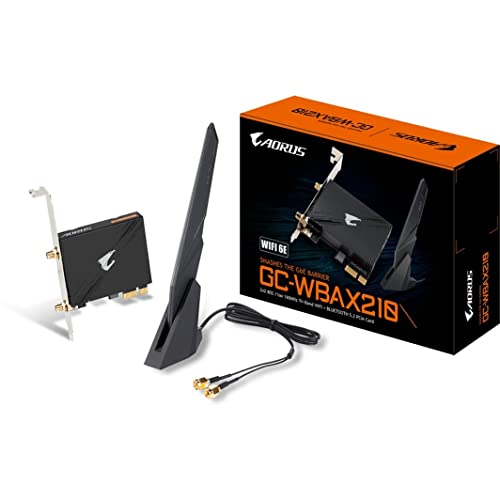
The GIGABYTE card is the direct match for the GC-WBAX210 search: it uses an Intel AX210 module and supports dual-stream Wi-Fi across 2.4, 5 and 6 GHz. GIGABYTE advertises connections up to 2,400 Mbps, and Bluetooth 5.2 is included. It suits a desktop build where the requested model matters more than newer Bluetooth or Wi-Fi 7 features. The product name identifies it as a PCIe expansion card; buyers who want a separately positioned magnetic antenna base should compare the TP-Link alternatives instead.
Bottom line: Pick this for the specific GC-WBAX210 model and its tri-band AX210 wireless.
TP-Link Archer TXE72E

Compared with the GIGABYTE card, the Archer TXE72E specifies Bluetooth 5.3 and two high-gain antennas intended to extend coverage. TP-Link gives per-band maximums of 2,402 Mbps at 5 or 6 GHz and 574 Mbps at 2.4 GHz. The card is a fit for a desktop whose owner values antenna reach and updated Bluetooth over matching the exact GIGABYTE model. To use 6 GHz Wi-Fi, TP-Link says the PC must run Windows 11; a Windows 10 setup should not be chosen on the assumption that it will use that band.
Bottom line: Choose it for the high-gain antenna setup and Bluetooth 5.3.
TP-Link AXE5400 with Magnetic Base
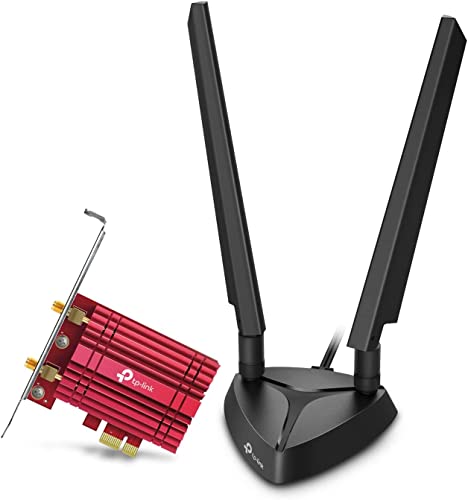
The magnetic base is the distinguishing feature of this AXE5400 variant: its two multidirectional antennas can be positioned apart from the PCIe card for reception. Like the other TP-Link option, its band maximums are 2,402 Mbps on 5 or 6 GHz and 574 Mbps on 2.4 GHz, with Bluetooth 5.3. It suits towers tucked under a desk or near obstructions where antenna placement is useful. The 6 GHz band requires Windows 11 according to TP-Link, and a magnetic mount does not replace a compatible 6 GHz router.
Bottom line: Pick this when the magnetic antenna base offers useful placement flexibility.
DTK AX210NGW Kit
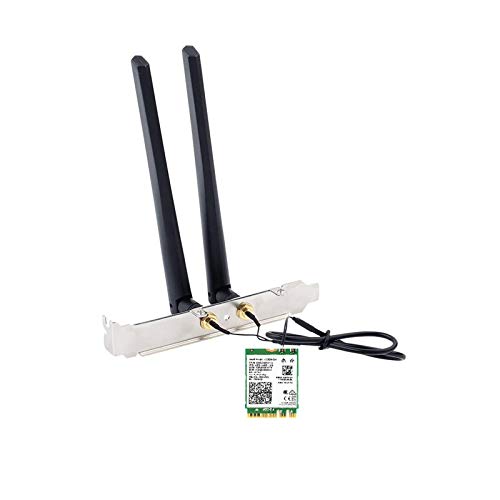
Unlike the named GIGABYTE model, the DTK AX210NGW package calls out an 11-inch RF cable, 5 dBi antennas and low-profile brackets. Its Intel AX210-based kit supports 2.4, 5 and 6 GHz, with maximums of 574 Mbps, 2,400 Mbps and 2,400 Mbps respectively, plus Bluetooth 5.3. This is the alternative for a build where bracket height and antenna cable routing are the key constraints. The package includes several mounting parts, so it is less suitable if you simply want the closest match to the specifically named GIGABYTE card.
Bottom line: Choose it when low-profile brackets and a cable are useful for the build.
GIGABYTE GC-WIFI7

The GC-WIFI7 is the forward-looking alternative rather than another AX210 card: GIGABYTE specifies Wi-Fi 7 and a maximum connection speed of 5,800 Mbps. It also supports 320 MHz bandwidth, 4K-QAM and Multi-Link Operation, which can connect on two bands simultaneously. This card suits a system being upgraded for a Wi-Fi 7 network, not a buyer who specifically needs the GC-WBAX210. Its higher generation features require a compatible network and equipment to be useful; the product facts do not establish the host compatibility details.
Bottom line: Pick it for a Wi-Fi 7 upgrade rather than an AX210 replacement.
How to choose a Wi-Fi 6E PCIe card
Choose by band support, antenna arrangement and host compatibility before comparing peak rates. Wi-Fi 6E extends Wi-Fi 6 into 6 GHz; it does not increase the speed of a 2.4 GHz-only router. For 6 GHz service, the router must broadcast that band, and TP-Link specifies Windows 11 for its two AXE5400 adapters. A useful decision rule is to choose the magnetic-base model when the desktop sits under a desk or against a wall and the antenna can be moved into a clearer position; choose a fixed card when the antenna arrangement already suits the case. Also check that the motherboard has an available PCIe slot and that the case bracket matches the card.
What the 6 GHz band changes
The 6 GHz band provides additional Wi-Fi spectrum, but its practical benefit depends on the router and where the PC is located. 6 GHz signals generally have less reach through walls than 2.4 GHz signals, so a clear path matters more than peak-rate claims in a distant room. Wi-Fi 6E devices can still use 2.4 and 5 GHz networks when 6 GHz is unavailable. TP-Link lists 2,402 Mbps maximum on 5 or 6 GHz and 574 Mbps on 2.4 GHz for its AXE5400 cards; these band figures are not a single guaranteed internet speed. Put the desktop closer to the router if 6 GHz stability is the priority.
PCIe card antenna placement and fit
A PCIe wireless card depends on its antenna position, not just the slot where the adapter is installed. External antenna bases can be placed above or beside a metal case, while attached antennas have fewer placement options; metal panels and furniture can obstruct radio signals. Low-profile brackets help a card fit a shorter expansion opening, but the case must have the matching slot height and clearance. The DTK kit specifies low-profile brackets and an 11-inch RF cable, while one TP-Link variant includes a magnetic antenna base. Measure case clearance and identify whether the antenna mount can sit outside the case before choosing between a compact installation and flexible positioning.
Wi-Fi card speed claims and compatibility
Advertised wireless rates are theoretical link maxima, not expected file-transfer or internet speeds. A 2×2 adapter needs a compatible router and suitable signal conditions to approach its top band rate, and the internet connection itself can be the bottleneck. Wi-Fi 7 features such as 320 MHz channels and Multi-Link Operation require compatible Wi-Fi 7 equipment; an older router will not provide those capabilities. Bluetooth also uses a host connection in many PCIe card designs, so confirm the required internal USB connection before ordering if Bluetooth is essential. Compare generation and band rates as ceiling specifications, then base the choice on router, operating system and physical fit.
Frequently Asked Questions
Does the GC-WBAX210 use 6 GHz Wi-Fi?
Yes, its Intel AX210 module supports the 2.4, 5 and 6 GHz bands. A 6 GHz-capable router is also needed to use that band.
Can Wi-Fi 6E work with a 5 GHz router?
Yes, a Wi-Fi 6E adapter can connect on 5 GHz when the router lacks 6 GHz. It cannot access the 6 GHz band without a router that broadcasts it.
Will a magnetic antenna base improve desktop reception?
It can help when it lets the antennas sit away from the metal PC case or a wall. Moving the base a few feet to a clearer position can matter more than the adapter’s peak rate.
What is the difference between Wi-Fi 6E and Wi-Fi 7?
Wi-Fi 6E adds 6 GHz support to Wi-Fi 6, while Wi-Fi 7 adds features including wider 320 MHz bandwidth and Multi-Link Operation. Those Wi-Fi 7 features require compatible Wi-Fi 7 network equipment.
Do PCIe Wi-Fi cards need a motherboard USB connection for Bluetooth?
Many PCIe Wi-Fi cards use an internal USB header for Bluetooth even though Wi-Fi uses PCIe. Check the card’s installation requirements and reserve a compatible motherboard header when Bluetooth is needed.