
HDMI Capture Card for iPad: 4 USB-C Options Compared

Guermok USB-C Capture Card is the closest match for most iPad users here because it combines a USB-C connection with capture up to 1080p at 60 fps. Choose WARRKY Capture Card with 100W PD instead if charging the iPad during capture matters, or check that your iPad and capture app support USB-C video capture before choosing any of these HDMI-to-USB devices.
We earn a commission if you buy through links on this page. As an Amazon Associate I earn from qualifying purchases. Products are compared on manufacturer specifications, not hands-on testing.
- Best overall: Guermok USB-C Capture Card – USB-C connectivity and capture up to 1080p at 60 fps suit common streaming and recording needs.
- Best for charging while capturing: WARRKY Capture Card with 100W PD – Its USB-C design includes up to 100W power delivery.
- Best for 2K capture: UGREEN 2K Capture Card – It supports 2K at 30 fps as well as 1080p at 60 fps.
| Product | Best for | Capture output | Host connection | Shop |
|---|---|---|---|---|
| Guermok USB-C Capture Card | Everyday capture | 1080p 60 fps; 2K 30 fps | USB-C and USB | Check Price on Amazon |
| USB-C 4K Input Capture Card | Dual-channel audio | 1080p 60 fps; 2K 30 fps | USB-C | Check Price on Amazon |
| UGREEN 2K Capture Card | 2K recording | 2K 30 fps; 1080p 60 fps | USB 3.0 / USB-C | Check Price on Amazon |
| WARRKY Capture Card with 100W PD | Charging during capture | 1080p 60 fps | Right-angle USB-C | Check Price on Amazon |
HDMI Capture Cards for iPad
Compare capture resolution, connection style and charging support before pairing a card with an iPad.
Guermok USB-C Capture Card
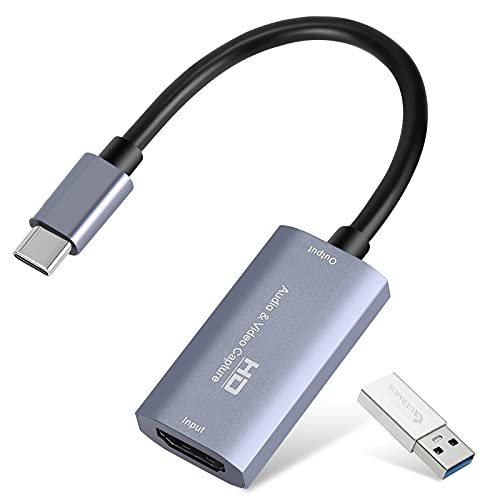
Guermok USB-C Capture Card pairs a USB-C connection with capture output up to 1080p at 60 fps or 2K at 30 fps, making it a straightforward fit for an iPad-based recording setup. The card accepts HDMI input up to 4K at 30 Hz, but that input figure is not the recording output resolution. Brand says it is designed for capture software rather than direct screen casting to a TV or monitor. Choose it for a compact capture workflow; look elsewhere if you need power delivery while capturing, since this option does not give a charging figure.
Bottom line: Pick it for USB-C capture at 1080p 60 fps without a need for pass-through charging.
USB-C 4K Input Capture Card

USB-C 4K Input Capture Card is distinguished by its dual-channel audio capture alongside video output up to 2K at 30 Hz or 1080p at 60 fps. Its USB-C connector and USB 3.0 interface are suited to an iPad setup that uses compatible capture software. Brand says the card needs no driver or external power, which can simplify connections, but that does not establish that every iPad app will recognize it. Its limitation is the same output ceiling as a 1080p/60 workflow at the higher frame rate; choose another format if 2K at 60 fps is essential.
Bottom line: Choose it when dual-channel audio capture is a priority and 1080p 60 fps is sufficient.
UGREEN 2K Capture Card
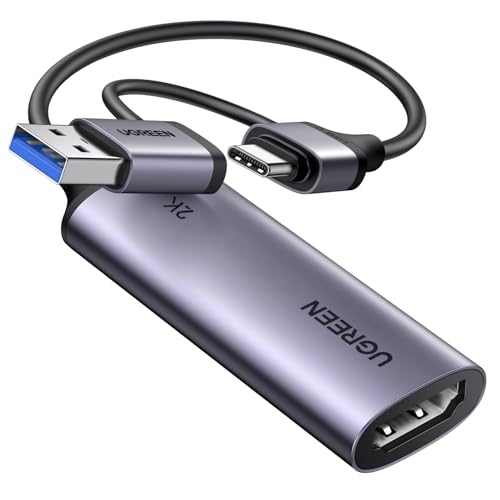
UGREEN 2K Capture Card makes the resolution trade-off explicit: capture output reaches 2K at 30 fps, while 1080p capture supports 60 fps. That split helps when deciding between sharper output and smoother motion; the source and capture setup must also support the selected resolution. The card uses USB 3.0 and is described as compatible with USB-C, but its product name does not specifically identify an iPad fit. Verify that your iPad and chosen app accept its connection before selecting it. This is the option to consider when 2K output matters more than 60 fps.
Bottom line: Pick it for 2K at 30 fps when your iPad and capture app support the connection.
WARRKY Capture Card with 100W PD

WARRKY Capture Card with 100W PD stands apart with up to 100W power delivery while capturing, plus a right-angle USB-C connector intended for iPad and Quest 3 use. It accepts HDMI input up to 4K at 30 fps and records at 1080p at 60 fps, so it is a Full HD option rather than a 2K-output choice. Brand says its YUY2 format provides richer color than MJPEG. Choose it when charging support and connector orientation are useful; skip it if 2K capture output is a must. Confirm the iPad’s power and app compatibility for your setup.
Bottom line: Choose it when pass-through charging and a right-angle USB-C plug matter more than 2K output.
How to Choose an HDMI Capture Card for iPad
Choose by the capture output you need, not only the HDMI input maximum. These cards accept input up to 4K at 30 Hz, but their outputs are 1080p at 60 fps or 2K at 30 fps; input and recorded output are different limits. For smoother motion, select 1080p/60; for more output detail at a lower frame rate, look for 2K/30. A USB-C plug alone does not guarantee that an iPad app can use a capture device. Confirm the iPad has the needed port and that the app supports external video capture before committing to a setup.
Use this quick rule: if charging while recording is essential, prioritize an explicit power-delivery feature; among these options, only WARRKY Capture Card with 100W PD gives a wattage figure.
iPad Connection and App Compatibility
An HDMI capture card converts an HDMI source into a USB video feed that capture software can use; it does not send a direct HDMI picture to an iPad display. These cards require capture software, and the app must recognize the capture device as an input. USB-C iPads are the simplest physical match for the USB-C models here, but connector fit and app support are separate questions. Some iPad models use Lightning rather than USB-C, so check the tablet’s port before choosing an adapter path.
HDMI-protected video can be blocked from capture, even when a console or camera works. For a reliable setup, test with an unprotected camera or game source, connect the capture card, then select it as the app’s video source. Do not expect a capture-only device to function as a monitor output.
Capture Resolution and Frame Rate
Resolution and frame rate are separate capture limits: 1080p at 60 fps favors motion, while 2K at 30 fps favors detail. The four cards here offer those output combinations in different ways, and WARRKY Capture Card with 100W PD lists 1080p at 60 fps without a 2K output mode. A 4K HDMI input rating does not mean the recording is 4K; verify the capture output mode instead. Your source device, capture card and app must all support the chosen mode for it to work.
Use this comparison to match a goal to the relevant output or feature.
| Need | Choice | Condition |
|---|---|---|
| Smoother motion | 1080p at 60 fps | Source and app support 60 fps |
| Higher output detail | 2K at 30 fps | Source and setup support 2K |
| Charging during capture | WARRKY Capture Card with 100W PD | Up to 100W power delivery |
Common iPad Capture Setup Mistakes
The most common setup mistake is assuming an HDMI capture card will mirror the iPad screen to a television; these are capture-input devices, not display adapters. Another is choosing a card by its HDMI input number while overlooking its lower recording output. Check the output resolution and frame rate against the intended stream or recording, then confirm app compatibility before setting up the source.
Power and cables also matter. A card without a power-delivery feature should not be treated as a charging solution, while a power-delivery rating is a maximum rather than a promise that every iPad draws that wattage. Keep the source’s HDMI output, capture device connection and iPad app configuration aligned to avoid troubleshooting the wrong link in the chain.
Frequently Asked Questions
Can an iPad record HDMI input directly?
An iPad needs a compatible HDMI capture device and an app that can accept its video feed; an HDMI cable alone does not turn the tablet into a monitor. Check that the iPad has a compatible port and that the app recognizes the capture device.
Does 4K input mean 4K recording on an iPad?
No, the input maximum and capture output are different limits. The options here pair up to 4K input at 30 Hz with outputs such as 1080p at 60 fps or 2K at 30 fps.
Why might a capture card show a black screen?
HDCP-protected HDMI content may block capture, and an app that does not recognize the card can also fail to show video. Test with an unprotected camera or game source and verify that the selected app supports external capture.
Can an HDMI capture card charge an iPad?
Only a model with power delivery offers an explicit charging feature; WARRKY Capture Card with 100W PD specifies up to 100W. Actual charging depends on the connected iPad, power source and cable.
Can these capture cards display video on a TV?
These products are intended to capture HDMI video into software, not to act as direct screen-casting adapters. Use a separate HDMI display adapter when the goal is sending an iPad picture to a TV.