
HDMI to ATSC Modulators: 4 Models Compared

StarMax MX-100R is a strong starting point because it combines ATSC and J.83B QAM output with an LCD menu and LAN-based web configuration. Choose another model if you need additional RF formats or a smaller unit; an HDMI-to-ATSC modulator encodes an HDMI source as a TV channel sent over coax.
We earn a commission if you buy through links on this page. As an Amazon Associate I earn from qualifying purchases. Products are compared on manufacturer specifications, not hands-on testing.
- Best overall: StarMax MX-100R – Offers ATSC and J.83B QAM with both an LCD menu and web configuration over LAN.
- Best for multiple formats: Thor Broadcast HDMI RF Modulator – Supports ATSC, QAM, DVB-C/T, and ISDB-T output.
- Best for network control: 1-Channel HDMI RF Petit Modulator, 2-Pack – Provides an Ethernet NMS port for setup, control, and monitoring.
| Product | Best for | RF formats | Setup and control | Source resolution | Shop |
|---|---|---|---|---|---|
| StarMax MX-100R | Flexible configuration | ATSC, J.83B QAM | 2-inch LCD, LAN web interface | 1080p | Check Price on Amazon |
| SatLink ST-7000 | ATSC and QAM output | ATSC, J.83B QAM | — | 1080p | Check Price on Amazon |
| Thor Broadcast HDMI RF Modulator | More RF standards | ATSC, QAM, DVB-C/T, ISDB-T | PC GUI | 1080p | Check Price on Amazon |
| 1-Channel HDMI RF Petit Modulator, 2-Pack | Ethernet management | ATSC, QAM, DVB-T, ISDB-T | 10/100 Ethernet NMS | — | Check Price on Amazon |
HDMI to ATSC Modulators
Compare the supported RF standards and configuration options before choosing a modulator for your coax distribution system.
StarMax MX-100R

The StarMax MX-100R stands apart for offering both a 2-inch LCD menu and web-based configuration through its LAN port. StarMax says the unit distributes HDMI video from sources such as a set-top box, camera, computer, DVD player, or streaming device to TVs over coax, with ATSC and J.83B QAM formats for North American systems. An optional antenna or cable signal can be combined with the HDMI channel, and channel selection uses a preloaded plan. The 10-inch-long chassis may matter where rack or shelf space is limited.
Bottom line: Choose it if you want local menu access and LAN configuration in one unit.
SatLink ST-7000

The SatLink ST-7000 is identified as an HDMI-to-RF digital modulator and encoder for delivering 1080p video as an HD ATSC or J.83B QAM channel over coax. That dual-format output is the key reason to consider it for a distribution system that may use either broadcast-style ATSC tuning or QAM tuning. The maker gives a 10-inch length and 6-inch width, but do not give a control method to compare with units that explicitly offer an LCD or network interface. Confirm the control workflow and channel plan fit your installation before choosing it.
Bottom line: Pick it when the required output is ATSC or J.83B QAM at up to 1080p.
Thor Broadcast HDMI RF Modulator
The Thor Broadcast unit supports more RF standards than the ATSC/QAM-focused options: its formats include DVB-C/T and ISDB-T as well as ATSC and QAM. Thor says it combines MPEG-2 encoding, AC3 Dolby audio, and digital modulation, and supports 720p, 1080i, and 1080p input resolutions. Configuration uses the maker’s proprietary GUI on a PC. Its compact stated dimensions—about 4.1 inches long, 2.5 inches wide, and 0.9 inch high—are useful where space is tight. Choose it only if its GUI-based setup and required RF format suit the system.
Bottom line: Choose it when you need format flexibility and a compact chassis.
1-Channel HDMI RF Petit Modulator, 2-Pack

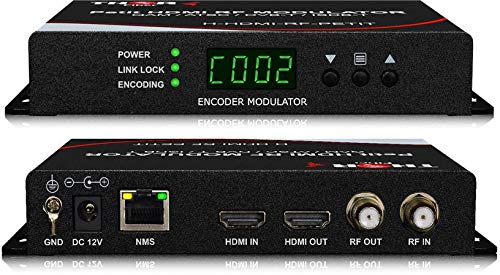
The 1-Channel HDMI RF Petit Modulator distinguishes itself with a 10/100 Ethernet NMS port for setup, control, and monitoring, and the package contains two units. Its RF output can be set to CATV formats including QAM, ATSC, DVB-T, or ISDB-T; the encoding is MPEG-2 video with AC3 audio, and RF power can be controlled through the proprietary network interface. The material does not establish a supported source resolution, so buyers with a specific HD-resolution requirement should confirm that capability before ordering. The two-unit format suits installations that need separate HDMI channels.
Bottom line: Pick it when Ethernet management and two separate channels are priorities.
How to choose an HDMI to ATSC modulator
Start with the tuner format your TVs can receive, then match the modulator output to that format. ATSC 1.0 terrestrial channels occupy 6 MHz RF channels in North America; J.83B QAM is a cable-TV modulation standard also commonly organized in 6 MHz channels. A TV that can tune ATSC does not necessarily tune QAM, so check the tuner menu or manual for both standards rather than assuming compatibility. Next, decide how you will set the RF channel and channel name: front-panel controls work without a computer, while network interfaces can be easier to manage from a central location. If the system must pass other regional formats, verify the exact standard, not just the phrase “digital modulator.”
Match the RF channel and coax network
Choose an unused RF channel that every connected TV can tune, and avoid channels already occupied by antenna or cable programming. In a 6 MHz channel plan, adjacent assignments need careful planning because nearby RF energy and distribution equipment can cause interference. When combining an antenna or cable feed with a modulator, the combined signal must remain within the televisions’ tuning range and the distribution system’s usable level. A channel scan is usually needed after adding or changing a channel; rescanning may replace a TV’s stored channel list. For a system with multiple modulators, map each source to a distinct channel before installation and confirm that no two outputs collide.
This format guide helps distinguish the main RF choices.
| Format | Typical use | Buyer check |
|---|---|---|
| ATSC | Over-the-air digital TV tuning | TV supports ATSC tuning |
| J.83B QAM | Digital cable channel distribution | TV supports clear QAM tuning |
| DVB or ISDB variants | Other regional TV systems | Match the exact regional standard |
Set expectations for HDMI resolution and encoding
A modulator’s supported HDMI input resolution and its RF output format are separate compatibility questions. A unit that accepts 1080p does not make every connected television display 1080p; the TV’s tuner and screen capabilities still determine what can be shown. MPEG-2 and AC3 are encoding terms, while ATSC or QAM describes how the resulting channel is transmitted over RF. Source devices may also restrict HDMI output through HDCP content protection, so verify compatibility when using a protected set-top box or streaming device. For surveillance or computer sources, check whether the source can be set to a resolution and refresh rate the modulator accepts before relying on a channel plan.
Plan installation and channel scans
Keep coax runs and splitters in mind when planning a distribution system: each splitter divides signal power, and long cable runs add loss, so a channel that works at one TV may be unreliable at a distant outlet. Use a distribution amplifier only when the system needs it, and avoid overdriving tuner inputs. Label the source and RF channel at the headend, then rescan televisions after adding or changing a channel. For a mixed antenna-and-modulator feed, confirm that the combination does not place two services on the same RF channel. Before installation, check the required channel range and tuner support at the farthest or most restrictive TV.
Frequently Asked Questions
Does an ATSC TV receive QAM channels automatically?
No; ATSC and QAM are different tuning modes, and some TVs support only one of them. Look for a clear-QAM or cable digital tuner setting in the television specifications or channel menu before selecting a QAM output.
How wide is a North American ATSC channel?
A North American ATSC 1.0 RF channel occupies 6 MHz. Leave channel-plan space for existing broadcasts and cable services, since overlapping assignments can prevent reliable tuning.
Will a 1080p HDMI source look 1080p on every TV?
No; the source resolution does not guarantee the television can display that resolution. Check both the modulator’s accepted input modes and the TV’s tuner and display capabilities.
Why do televisions need a channel rescan?
A rescan updates the TV’s stored channel map after a modulator is added or its RF channel changes. Run it on each connected TV, since a scan on one set does not update another.
Can I combine an antenna feed with an HDMI modulator?
Yes, when the modulator and distribution setup support combining the signals and their channel assignments do not conflict. Reserve an unused RF channel and confirm the combined signal remains within the TVs’ tuning range.