
HyperX SoloCast Pop Filters Compared by Design and Fit

The SUNMON three-layer pop filter is the most versatile HyperX SoloCast choice because its flexible gooseneck lets you adjust screen position. Choose a fitted foam cover instead if you want a compact sleeve that also covers the microphone capsule.
We earn a commission if you buy through links on this page. As an Amazon Associate I earn from qualifying purchases. Products are compared on manufacturer specifications, not hands-on testing.
- Best overall: SUNMON SoloCast 3-Layer Pop Filter – Its flexible gooseneck adjusts the three-layer screen’s position relative to the microphone.
- Best for stand mounting: YOUSHARES SoloCast 3-Layer Pop Filter – Its 360-degree gooseneck and flat clamp are designed to attach to the microphone stand.
- Best for a foam cover: SUNMON SoloCast Foam Cover – The elastic foam cover fits SoloCast and SoloCast 2 microphones.
| Product | Best for | Design | Attachment | Microphone fit | Shop |
|---|---|---|---|---|---|
| SUNMON SoloCast 3-Layer Pop Filter | Adjustable screening | 3-layer mesh and foam | 360° gooseneck clip | HyperX SoloCast | Check Price on Amazon |
| YOUSHARES SoloCast 3-Layer Pop Filter | Stand attachment | 3-layer mesh and foam | 360° gooseneck; flat clamp | HyperX SoloCast | Check Price on Amazon |
| SUNMON SoloCast Foam Cover | Foam coverage | High-density foam cover | Fits over microphone | SoloCast and SoloCast 2 | Check Price on Amazon |
| YOUSHARES SoloCast Foam Cover | SoloCast 2 coverage | High-density foam cover | Fits over microphone | SoloCast and SoloCast 2 | Check Price on Amazon |
HyperX SoloCast Pop Filters
These options differ mainly in whether they cover the microphone or position a screen in front of it.
SUNMON SoloCast 3-Layer Pop Filter

The adjustable screen sets this filter apart from foam covers: a flexible 360-degree gooseneck lets you position it in front of a SoloCast microphone. SUNMON says its design combines two outer steel mesh layers with a foam layer to diffuse airflow and suppress popping sounds. That makes it a fit for a recording setup where you want to reposition the screen without covering the microphone. The tradeoff is that the arm and screen occupy space around the mic, so a compact desk setup may be better served by a fitted cover.
Bottom line: Choose this if you want a repositionable screen between your voice and the microphone.
YOUSHARES SoloCast 3-Layer Pop Filter

The flat clamp distinguishes this screen from the other adjustable option, making it a useful match for a stand-mounted SoloCast setup. YOUSHARES says the filter uses two steel mesh layers with foam in the middle, and its flexible gooseneck swivels 360 degrees for placement changes. The clamp is designed to grip the included stand without damaging it. This is a practical choice when the microphone already has a stand to attach to; buyers who need a cover that goes directly over the mic should choose a foam sleeve instead.
Bottom line: Pick this when you want a screen that clamps to the microphone stand.
SUNMON SoloCast Foam Cover

The foam sleeve covers the microphone itself rather than placing a separate screen in front, and SUNMON says it fits both SoloCast and SoloCast 2. Its high-density foam has some elasticity, and the maker says the cover helps reduce noise while keeping dust and saliva off the mic. The sleeve is suited to a simple, low-profile setup without a gooseneck arm. It arrives vacuum packed, so allow time for the foam to regain its shape before fitting it; it does not offer the adjustable spacing of a stand-mounted screen.
Bottom line: Choose this if you prefer a fitted foam cover over an adjustable screen.
YOUSHARES SoloCast Foam Cover
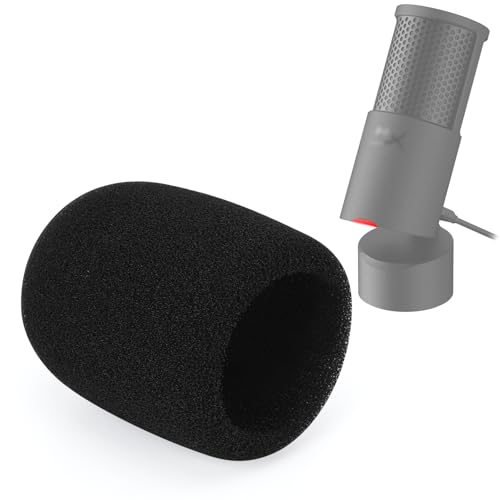
This cover is presented as a SoloCast 2 design that also fits the original SoloCast, making it a foam alternative to the adjustable screens. YOUSHARES says its high-density foam reduces unwanted noise and wind interference and helps protect the microphone capsule from saliva and dirt. The covering style suits indoor or outdoor recording where a sleeve is preferable to a separate arm. Foam coverage does not provide a repositionable barrier in front of the mic, so choose a gooseneck screen if you want to change the distance and angle independently.
Bottom line: Pick this for a foam sleeve that fits either SoloCast generation.
How to choose a SoloCast pop filter
A separate mesh screen is the better fit when you need to adjust the barrier’s position; a foam cover fits over the microphone for a more compact setup. Plosives are short air bursts from consonants such as “p” and “b,” which can create low thumps when directed at a microphone capsule. Start with a screen about 2 to 4 inches from the mic and speak another few inches back, then adjust if bursts remain. A gooseneck is useful when the mic or speaker position changes; foam avoids a separate arm but stays on the capsule. Neither style fixes room echo, which comes from reflected sound rather than airflow.
Positioning a pop filter for clear speech
Put a separate screen between your mouth and the SoloCast, beginning roughly 2 to 4 inches from the capsule. Keep the microphone aimed toward your voice, and angle your speech slightly across it if direct airflow still causes pops. The speaker’s distance, speaking volume, and angle all affect how much air reaches the mic, so change one position at a time and check a short recording. Avoid letting a rigid screen touch the microphone; contact can transmit handling noise. If you use a foam cover, seat it evenly over the microphone rather than stretching it tightly, and confirm the capsule openings remain covered only as the cover is designed to fit.
Foam covers versus mesh screens
Foam covers and mesh screens differ in mounting and positioning: foam sits over the mic, while a screen stands between the speaker and capsule. A foam cover uses little space, but cannot be moved independently from the microphone; a gooseneck screen can be repositioned, but needs room for its arm and clamp. Pop filters address plosive airflow, not room reflections, electrical hum, or background noise. For echo, reduce hard reflective surfaces or move closer to the mic rather than adding more filter layers. A screen’s layers do not replace sensible mic technique: a distance of a few inches is a practical starting point for close speech, adjusted to avoid clipping and preserve a natural voice.
Keeping a SoloCast filter clean
Keep removable foam and mesh clean and fully dry before reinstalling them, because moisture and residue can collect around a microphone’s front openings. Dust can be removed gently with a soft, dry brush; avoid soaking foam or using liquid near the microphone capsule. Foam sleeves can compress during shipping or storage, so let a vacuum-packed cover regain its shape before fitting it. Do not force an ill-fitting cover over the mic, since excessive stretching can tear foam or obstruct a snug fit. For a screen, periodically check that the clamp remains secure and the flexible arm holds its position; a loose mount can shift the barrier away from the airflow path.
Frequently Asked Questions
How far should a pop filter be from a SoloCast?
Start with a separate screen about 2 to 4 inches from the microphone. Adjust the distance and speaking angle if “p” and “b” sounds still produce strong bursts.
Does a foam cover work like a mesh pop filter?
Both can diffuse airflow, but they mount differently: foam covers the microphone, while a mesh screen sits in front of it. Pick foam for a compact sleeve or mesh when you want independently adjustable placement.
What causes popping sounds in microphone recordings?
Plosive consonants such as “p” and “b” send bursts of air toward the capsule, creating low-frequency thumps. A screen between the speaker and microphone helps diffuse those bursts.
Can a pop filter reduce room echo?
No; a pop filter is intended to address airflow and plosives, not room reflections. Move closer to the microphone and reduce reflective surfaces nearby if echo is the issue.
Should I angle the microphone when using a pop filter?
A slight off-axis angle can reduce direct airflow from speech while keeping the microphone aimed toward your voice. Keep the screen between your mouth and the capsule, then adjust by checking a short recording.