
ION Pics 2 SD Scanner: Photo and Film Formats Compared

The ION Pics 2 SD is the best match for scanning both paper prints and 35mm slides or negatives, since it supports prints up to 5×7 inches as well as film. Choose a film-only model instead if your originals are exclusively 35mm slides and negatives.
A standalone scanner transfers images to an SD card without needing a computer during scanning; the ION Pics 2 SD also includes image-transfer and editing software.
We earn a commission if you buy through links on this page. As an Amazon Associate I earn from qualifying purchases. Products are compared on manufacturer specifications, not hands-on testing.
- Best overall: ION Pics 2 SD – Handles 35mm slides and negatives plus 3×5, 4×6, and 5×7-inch prints.
- Best for other film formats: ClearClick QuickConvert 2.0 – Supports 35mm, 110, and 126 film, as well as photos up to 4×6 inches.
- Best for higher-resolution film scans: ION Film 2 SD Plus – A film-only option with a 14-megapixel sensor.
| Product | Best for | Supported media | Resolution | Shop |
|---|---|---|---|---|
| ION Pics 2 SD | Prints and film | 35mm film; 3×5, 4×6, 5×7-inch prints | 5.1 MP; up to 2500 DPI | Check Price on Amazon |
| ClearClick QuickConvert 2.0 | More film formats | 35mm, 110, 126 film; photos up to 4×6 inches | 14 MP; 22 MP interpolated | Check Price on Amazon |
| ION Film 2 SD | 35mm film only | 35mm slides and negatives | 5 MP | Check Price on Amazon |
| ION Film 2 SD Plus | High-res 35mm film | 35mm slides and negatives | 14 MP | Check Price on Amazon |
ION Pics 2 SD and Related Scanners
Choose by the originals you need to digitize: the models differ in supported print sizes, film formats, and resolution.
ION Pics 2 SD
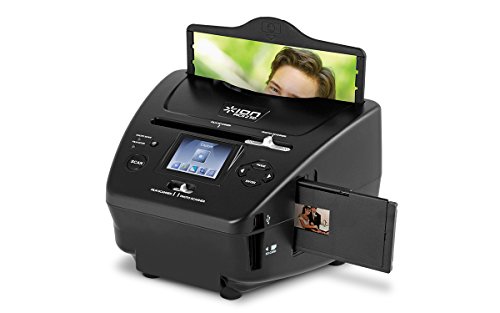
Unlike film-only models, the ION Pics 2 SD handles both 35mm slides and negatives and paper prints measuring 3×5, 4×6, or 5×7 inches. It scans to the included SD card as a standalone unit, and a color screen lets you view pictures. ION describes the scanner as 5.1 MP with up to 2500 DPI; included software supports image transfer and editing. This is the broadest match here for a mixed box of prints and 35mm film. It does not cover the 110 and 126 film formats supported by the ClearClick alternative.
Bottom line: Choose this if you want one scanner for 35mm film and prints up to 5×7 inches.
ClearClick QuickConvert 2.0
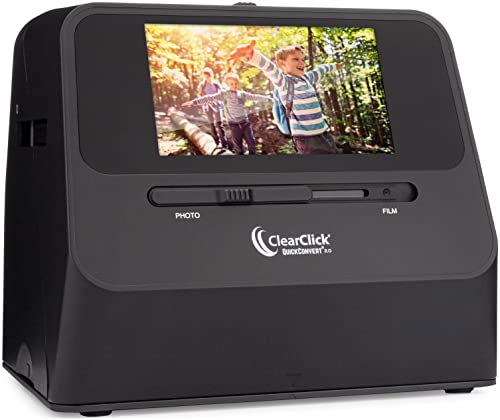
The ClearClick QuickConvert 2.0 is the only option here that supports 110 and 126 film alongside 35mm, making it a better fit for mixed-format film collections. It also scans photos up to 4×6 inches, saves JPEG files to an SD card, and has a rechargeable battery and 5-inch preview screen. The manufacturer says a scan takes 2–3 seconds and gives 14 MP native resolution, with 22 MP interpolated. Scans are one item at a time because this model has no autofeeder; it also tops out at 4×6-inch photos.
Bottom line: Choose this for 110 or 126 film, or for cord-free scanning of smaller prints.
ION Film 2 SD

The ION Film 2 SD focuses on 35mm slides and negatives rather than paper prints. Its 5-megapixel sensor scans color or black-and-white film directly to the included SD card, and a color screen provides a preview. Video output can connect it to an external video monitor; USB also allows connection to a Mac or PC, and iPad use requires a separately sold Apple iPad Camera Connection Kit. It suits a collection made up entirely of 35mm film, but it is not the choice for digitizing prints.
Bottom line: Choose this when your scanning job is limited to 35mm slides and negatives.
ION Film 2 SD Plus

The ION Film 2 SD Plus pairs a 14-megapixel sensor with a film-only workflow, unlike the print-capable ION Pics 2 SD. It transfers slides and negatives directly to the included SD card and operates without a computer; a USB port and included cable provide an optional computer connection. The model also supports iPad connection with an Apple iPad Camera Connection Kit, sold separately. It is a fit for 35mm film when sensor resolution is a priority, but it does not support paper prints or other film formats in the specifications.
Bottom line: Choose this for 35mm film if you prioritize its 14-megapixel sensor.
How to Choose a Photo and Film Scanner
Start with the largest print and every film format in your collection, because supported media is a hard limit, not a quality setting. The ION Pics 2 SD covers prints through 5×7 inches and 35mm film; the ClearClick model adds 110 and 126 film but supports photos only through 4×6 inches. Film-only units make sense when paper prints are not part of the job. Resolution is a separate decision: a 4×6-inch print scanned at 300 pixels per inch produces a 1200 × 1800-pixel file, while 600 ppi produces 2400 × 3600 pixels before cropping. Choose a higher scanning resolution for substantial enlargements, but remember that more output pixels cannot restore detail missing from a small or soft original.
A practical rule: if any paper print is larger than 4×6 inches, eliminate models with a 4×6-inch maximum before comparing sensor megapixels.
What Scanner Resolution Means for Prints and Film
Resolution figures describe different things: pixels per inch (PPI) is useful for planning print scans, while a sensor megapixel figure is the total pixel count. A 5×7-inch print scanned at 300 PPI yields 1500 × 2100 pixels, or about 3.15 megapixels before cropping. Scanning the same print at 600 PPI yields about 12.6 megapixels, though the source image may not contain that much usable detail. For film, the frame is much smaller than a print, so a high pixel count can help when enlarging; focus, film condition, and dust also affect the result. Interpolated resolution adds calculated pixels rather than capturing equivalent new optical detail.
Do not compare an interpolated megapixel figure directly with a sensor’s native megapixel count as though both guarantee the same detail. Keep a high-quality master file and make smaller copies for sharing when future editing matters.
How to Prepare Prints, Slides, and Negatives
Clean originals gently before scanning: loose dust and fingerprints can become visible in every digital copy, and rubbing film can scratch its image surface. Handle film by its edges with clean, dry hands; cotton or nitrile gloves can reduce fingerprints when handling many frames. Keep slides and negatives in their mounts or sleeves until ready, then check orientation and preview the scan before moving on. A scanner’s preview screen helps catch a rotated image or a misplaced print, but it does not replace checking the saved file on a larger display.
For paper prints, scan flat and avoid forcing curled or fragile photographs against a surface. Save files with names that identify the event or approximate date, and make a second copy on a separate storage device. SD-card capture avoids needing a computer during scanning, but the card itself should not be the only copy of irreplaceable family images.
Scanner Types and Supported Media
Standalone scanners write image files to removable storage, while computer-connected scanners rely on a cable and software for capture or transfer. The models here include SD-card scanning, but their media coverage differs: some accept paper prints, while others are limited to 35mm film. The comparison below is a quick compatibility check, not a claim that a sensor figure alone predicts scan quality.
| Scanner type | Good fit | Check before choosing |
|---|---|---|
| Print and film | Mixed collection of prints and 35mm film | Largest print size and film formats |
| 35mm film-only | Slides and negatives in 35mm format | Whether paper prints are part of the task |
| Multi-format film | Collections that include 110 or 126 film | Supported print size and whether scanning is one item at a time |
Match the scanner to the originals you own rather than choosing by the broadest-sounding resolution figure. A film-only scanner cannot substitute for a model that accepts paper prints.
Frequently Asked Questions
Can the ION Pics 2 SD scan paper photographs?
Yes, it supports 3×5, 4×6, and 5×7-inch prints as well as 35mm slides and negatives. It scans to an included SD card without requiring a computer during scanning.
What does 2500 DPI mean for a 4×6 print scan?
At 300 PPI, a 4×6-inch scan is 1200 × 1800 pixels; at 600 PPI, it is 2400 × 3600 pixels. The ION scanner’s maximum of 2500 DPI is not the same as a guaranteed amount of usable image detail.
Can these scanners read 110 or 126 film?
The ClearClick QuickConvert 2.0 supports 110 and 126 film, in addition to 35mm. The ION models described here are limited to 35mm slides and negatives.
Should I scan photos at 300 or 600 PPI?
A 300 PPI scan is often sufficient for a same-size reprint, while 600 PPI creates four times as many pixels for cropping or enlargement. Choose based on the output size and available source detail; higher sampling cannot recover detail the original does not contain.
How should I store digital scans after using an SD card?
Keep at least two copies on separate storage devices instead of treating the SD card as the only archive. Use clear filenames and preserve an unedited master before making smaller sharing copies.