
iPhone 11 Pro Max Charging Port Parts Compared by Fit

The charging port replacement with the clearest repair-kit details is Olivechard Gray Charging Dock Flex, which includes an IC-equipped flex cable, frame seal adhesive and tools. These parts are intended for iPhone 11 Pro Max models A2218, A2161 and A2220; choose a different option if you need a repair guide or have not confirmed your phone model.
A charging port replacement is a lower dock connector flex assembly, not an external adapter. Before opening the phone, rule out a damaged cable or debris in the Lightning port.
We earn a commission if you buy through links on this page. As an Amazon Associate I earn from qualifying purchases. Products are compared on manufacturer specifications, not hands-on testing.
- Best overall: Olivechard Gray Charging Dock Flex – Its included IC-equipped flex cable, frame seal adhesive and tools are specified alongside all three compatible model numbers.
- Best for basic repair: iPhone 11 Pro Max Dock Connector Flex – It names the compatible models and includes repair tools, though no installation guide is included.
- Best for connected functions: Risidamoy Dock Connector Assembly – Its flex assembly is described as including a headphone jack, microphone and cellular antenna.
| Product | Best for | Compatible models | Included components | Color | Shop |
|---|---|---|---|---|---|
| Olivechard Gray Charging Dock Flex | Repair kit extras | A2218, A2161, A2220 | IC flex, frame seal adhesive, tools | Matte Space Gray | Check Price on Amazon |
| iPhone 11 Pro Max Dock Connector Flex | Basic replacement | A2218, A2161, A2220 | Flex cable, repair tools | Black | Check Price on Amazon |
| Risidamoy Dock Connector Assembly | Multi-function repair | A2161, A2220, A2218 | Dock flex, headphone jack, microphone | — | Check Price on Amazon |
iPhone 11 Pro Max charging port replacements
Compare the model compatibility and repair components before selecting a replacement flex assembly.
Olivechard Gray Charging Dock Flex
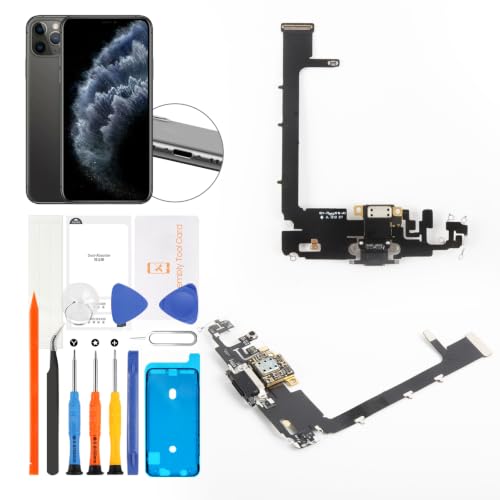
The Olivechard part stands out for including an IC-equipped flex cable, frame seal adhesive and tools. It is made for iPhone 11 Pro Max models A2218, A2161 and A2220, and its selected visible trim color is Matte Space Gray. The maker says the assembly addresses faults such as slow charging, a loose cable fit or cable detection problems when the lower port is damaged. This is the most complete set of named repair components here, but the color is a limitation: choose it only if Space Gray trim suits your phone.
Bottom line: Choose this if you want the specified adhesive and tools and have a Space Gray phone.
iPhone 11 Pro Max Dock Connector Flex

The first replacement keeps the package focused on a black dock connector flex cable and repair tools. Its compatibility is iPhone 11 Pro Max models A2218, A2161 and A2220, and the maker identifies charging, slow charging and USB data-port faults as repair targets. The maker also says the cable is intended to replace a damaged part. This option may suit a repairer who already knows the installation process; an instruction guide is not included, so it is a poor fit for anyone who needs step-by-step guidance.
Bottom line: Pick this for a compatible model if you have the repair know-how and need a basic flex assembly.
Risidamoy Dock Connector Assembly
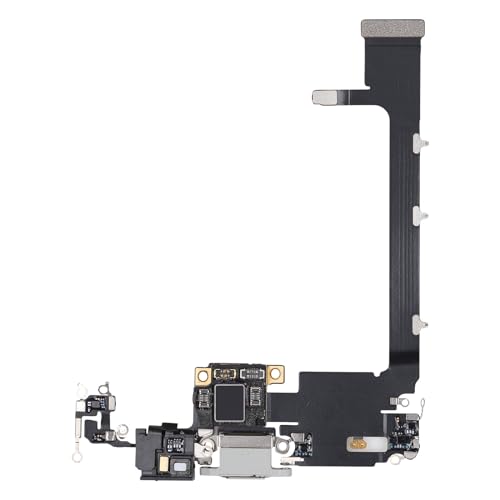
The Risidamoy assembly is the only option here that specifically calls out a headphone jack, microphone and cellular antenna alongside the charging-port flex. It is compatible with iPhone 11 Pro Max models A2161, A2220 and A2218. The maker says it addresses charging problems, unstable charging and difficulty connecting the phone to a computer by USB. Those additional functions make it relevant when a repair involves more than charging, but the package components are not as fully itemized as the Olivechard option; confirm that the parts you need are included before starting.
Bottom line: Choose this when the repair may involve the headphone jack, microphone or antenna assembly too.
How to choose an iPhone 11 Pro Max charging port
Match the model number before comparing repair extras: the products here identify A2161, A2218 and A2220 as compatible. An iPhone 11 Pro Max uses a Lightning connector, so a replacement dock assembly for a different iPhone generation or a USB-C port is not the right type. Compare what is included only after confirming fit: a flex cable is the core part, while tools and frame seal adhesive are separate repair aids. If your cable charges only when held at an angle after you have checked for debris and tried a known-good cable, a damaged port assembly is a more plausible repair target than an incompatible adapter. Do not treat a parts kit as a beginner guide; opening the phone involves delicate internal connectors.
What the charging-port flex assembly does
The lower dock connector flex assembly links the external Lightning port to internal phone components, and some replacement assemblies combine other functions on the same flex. That is why the Risidamoy part names a headphone jack, microphone and cellular antenna in addition to charging. Lightning carries both power and wired data, so a port fault can affect charging and USB computer connection. A slow or intermittent charge does not prove the flex is faulty: lint, a damaged cable or a power source can cause similar symptoms. Inspect the port gently with the phone powered off, and avoid metal picks or liquid cleaners that can damage contacts. If the phone still fails with a clean port and known-good cable, consider a repair assessment before ordering a part.
Repair preparation and port safety
Disconnect power before opening an iPhone, and avoid puncturing or bending the battery; lithium-ion cells can ignite if damaged. Use a nonconductive work surface and organize screws, since small internal fasteners can be easy to mix up. The products do not establish the exact repair steps, so use a model-specific service procedure rather than improvising around the battery or flex connectors. A replacement frame seal adhesive can help restore the perimeter seal, but opening a phone compromises its original water resistance; a new adhesive strip alone does not verify a restored water-resistance rating. Stop if the battery is swollen, the phone is unusually hot, or a connector is damaged, and have the device assessed by a qualified repairer.
Charging-port replacement needs by repair goal
The right assembly depends on the fault you are addressing and what repair materials you already have. A charging-only symptom calls for first checking the cable and port for debris, while a failure that also affects wired computer connection may point toward the dock flex. A loose connection or cable-detection failure is another reason to investigate the lower assembly, but software and cable faults can resemble hardware trouble. Use the table to match the described repair goal to the assembly’s named features; verify model fit independently before disassembly.
| Repair need | Relevant named feature | Choice |
|---|---|---|
| Charging or data-port fault | Dock connector flex | All three products |
| Headphone jack, microphone or antenna also involved | Those components are named with the flex assembly | Risidamoy Dock Connector Assembly |
| Adhesive and tools wanted with the part | Frame seal adhesive and tools included | Olivechard Gray Charging Dock Flex |
Frequently Asked Questions
How can I tell if an iPhone charging port is dirty?
Look for visible lint or debris in the Lightning port and check whether a Lightning plug seats fully without force. Power the phone off before gentle cleaning, and do not use metal tools or liquid; debris can damage the contacts if pushed farther inside.
Will an iPhone 11 Pro Max port fit an iPhone 11?
These replacement parts are specifically described for iPhone 11 Pro Max models A2161, A2218 and A2220, not the standard iPhone 11. Confirm the model number in the phone settings or on the device before ordering.
Can a bad charging cable look like a broken port?
Yes, a damaged Lightning cable or power source can cause intermittent or absent charging even when the port is intact. Test with a known-good compatible cable and power source before treating the port assembly as the fault.
Does replacing the charging port restore water resistance?
Opening an iPhone compromises its original water-resistance seal, and installing replacement adhesive alone does not establish a restored rating. Keep the phone away from liquids after repair unless the seal has been properly serviced and verified.
What should I do if the phone gets hot while charging?
Stop charging and unplug the phone if it becomes unusually hot, then let it cool on a nonflammable surface. Do not open or continue charging a phone with a swollen or damaged battery; have it assessed by a qualified repairer.