
Lenovo Yoga 7i Case: 4 Sleeves Compared by Fit

For a 16-inch Lenovo Yoga 7i Gen 8, Smatree X8289T Hard EVA Case is the clearest match because its 15.0-by-10.4-inch interior is model-specific and only 0.6 inch thick. Choose a different option if you have another generation or want a slimmer fabric sleeve; the alternatives vary in fit certainty and padding.
We earn a commission if you buy through links on this page. As an Amazon Associate I earn from qualifying purchases. Products are compared on manufacturer specifications, not hands-on testing.
- Best overall: Smatree X8289T Hard EVA Case – Names the 16-inch Yoga 7i/7 Gen 8 and has a 15.0-by-10.4-inch interior.
- Best for thicker fit: Smatree X8289 Hard EVA Case – Its interior is 0.9 inch thick and it also names the 15.6-inch ThinkPad T15p/P15v Gen 3.
- Best for a front pocket: MOSISO 16-Inch Polyester Sleeve – Has a front vertical pocket and a 15.55-by-11.42-inch interior.
| Product | Best for | Compatible fit | Interior dimensions | Construction | Shop |
|---|---|---|---|---|---|
| Smatree X8289T Hard EVA Case | Gen 8 protection | 16-inch Yoga 7i/7 Gen 8 | 15.0 × 10.4 × 0.6 in | EVA, nylon Lycra | Check Price on Amazon |
| Smatree X8289 Hard EVA Case | Thicker Gen 8 fit | 16-inch Yoga 7i/7 Gen 8; select ThinkPad | 15.0 × 10.4 × 0.9 in | EVA, nylon Lycra | Check Price on Amazon |
| Green 15–16-Inch Laptop Sleeve | Slim carry option | Yoga 7i named; verify dimensions | 14.7 × 10.4 × 0.78 in | Water-resistant canvas | Check Price on Amazon |
| MOSISO 16-Inch Polyester Sleeve | Pocket storage | Broad Lenovo compatibility | 15.55 × 11.42 × 0.79 in | Polyester | Check Price on Amazon |
Lenovo Yoga 7i Cases
Match your exact Yoga generation and closed-laptop dimensions before choosing a sleeve.
Smatree X8289T Hard EVA Case
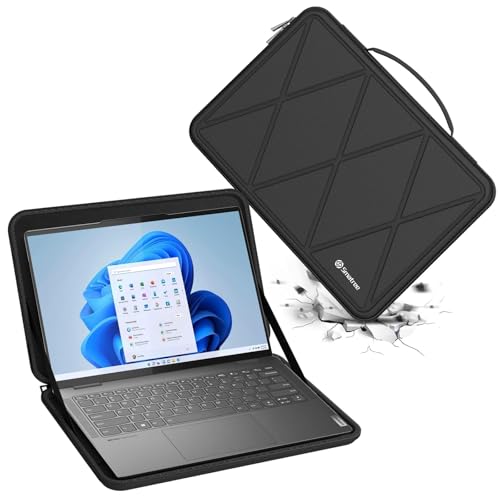
Smatree X8289T Hard EVA Case is the model-specific hard case among these options, with a 0.6-inch interior thickness and a rigid EVA shell. Its interior measures 15.0 by 10.4 inches, and the case weighs 748 grams. The maker says its padding helps guard against bumps and scratches, and its nylon Lycra exterior obstructs splashes. It suits owners of the named 16-inch Gen 8 models who want a case to carry inside a larger bag. The limitation is generation fit: owners of other Yoga 7i versions should compare their laptop’s closed dimensions before choosing it.
Bottom line: Choose it for the named 16-inch Gen 8 models when a rigid shell matters.
Smatree X8289 Hard EVA Case

Smatree X8289 Hard EVA Case has the same 15.0-by-10.4-inch footprint as Smatree X8289T Hard EVA Case but allows 0.9 inch of interior thickness, making thickness the main distinction between the two hard cases. It weighs 748 grams and names 16-inch Yoga 7i/7 Gen 8 models as well as select 15.6-inch ThinkPad models. The maker says the EVA shell and inner padding help protect against impacts and scratches, while the nylon Lycra exterior obstructs water. Pick it if your laptop needs that extra interior depth; the added thickness makes it less suitable when a slimmer packed case is the priority.
Bottom line: Choose it when the Gen 8 fit and deeper interior suit your laptop.
Green 15–16-Inch Laptop Sleeve

Green 15–16-Inch Laptop Sleeve is a slim canvas sleeve with a front accessory pocket, but its maximum laptop size is 14.3 by 10 by 0.78 inches. That maximum is the key fit constraint despite the product name mentioning a 16-inch Yoga 7i. The sleeve’s own interior is 14.7 by 10.4 by 0.78 inches, and the maker describes its fabric as water-resistant. It may suit a smaller laptop within those maximum dimensions or a buyer who has verified an exact fit. It is not a safe choice based on the 16-inch label alone.
Bottom line: Choose it only if your closed laptop fits within the maximum dimensions.
MOSISO 16-Inch Polyester Sleeve

MOSISO 16-Inch Polyester Sleeve offers the broadest compatibility, including Lenovo, and pairs a 15.55-by-11.42-inch interior with a large vertical front pocket. Its polyester construction and top zipper make it a straightforward soft sleeve for carrying a laptop and small accessories. This is a less model-specific choice than either hard case: the specifications give general brand compatibility rather than a Yoga 7i generation. Measure your closed device against all three interior dimensions before selecting it, especially if the laptop is thicker than 0.79 inch.
Bottom line: Choose it for pocket storage if your laptop dimensions fit the sleeve.
How to choose a Lenovo Yoga 7i case
Start with the exact Yoga 7i generation, then compare the laptop’s closed dimensions with the case interior. Screen size is a diagonal measurement, so two 16-inch laptops can have different width, depth and thickness. Measure the laptop at its widest points, including any feet or protrusions, and use the case’s interior—not its exterior—as the fit limit. For a practical fit, aim for roughly 0.2 to 0.5 inch of extra room in length and width; too much space lets a laptop shift, while too little can make insertion difficult. Select a hard EVA case for a rigid shell, or a soft sleeve when lower bulk and a pocket matter more.
Check dimensions before choosing a sleeve
Interior length, width and thickness all need to accommodate the closed laptop; a case that matches only two dimensions can still bind at the zipper or fail to close. A 16-inch label is not a reliable substitute for those measurements, particularly when a maker also gives a smaller maximum laptop size. Use the smallest fit limit when a product’s name and measurements differ. Measure the laptop without accessories attached, then compare it to the sleeve’s interior measurements and any maximum-fit dimensions. Leave a little clearance rather than forcing a tight fit, and account for any protective skin that remains on the laptop.
Hard cases and fabric sleeves compared
Hard-shell EVA sleeves add a structured outer layer and padding, while fabric sleeves are flexible and commonly take less room in a backpack. Neither construction makes a laptop waterproof: water-resistant or splash-obstructing fabric is not a guarantee against immersion or heavy rain. The table compares the styles and the main tradeoff.
| Type | Useful when | Fit tradeoff |
|---|---|---|
| Hard EVA case | A rigid shell and padding are priorities | Bulkier; confirm exact model and thickness |
| Soft fabric sleeve | Low-profile carry or a pocket is wanted | Flexible fit; verify interior measurements |
For either style, keep liquids in a separate sealed container rather than relying on the case fabric to protect electronics.
Pack and care for a laptop sleeve
Place the laptop fully inside the sleeve before putting the sleeve into a backpack, and keep hard objects such as chargers away from the display side. A front pocket is useful for flat accessories, but avoid packing bulky items where they can press against the laptop. Close zippers gently and check that fabric or padding is not caught in the teeth. For cleaning, remove the laptop first and use care appropriate to the sleeve material; the hard EVA options here specify washable nylon Lycra, but that does not establish that every component can be submerged. Let a damp sleeve dry fully before enclosing electronics.
Frequently Asked Questions
How do I measure a laptop for a sleeve?
Measure the closed laptop’s length, width and thickness at the widest points, in inches. Compare each measurement with the sleeve’s interior and maximum laptop dimensions, allowing about 0.2 to 0.5 inch of clearance in length and width.
Does a 16-inch sleeve fit every 16-inch laptop?
No; 16 inches refers to screen diagonal, not the laptop’s outer width or depth. Compare the laptop’s three closed dimensions with the sleeve interior before buying.
Is a water-resistant laptop sleeve waterproof?
No; water-resistant fabric can help with splashes, but it does not guarantee protection from immersion or sustained rain. Keep the laptop away from standing water and seal liquids separately.
Should a laptop fit tightly inside its case?
A sleeve should hold the laptop without forcing it past the zipper or leaving enough space for it to slide substantially. Around 0.2 to 0.5 inch of extra room in length and width is a useful fit target.
Can I carry a charger in a laptop sleeve pocket?
Yes, if the pocket has room, but keep bulky chargers away from the laptop’s display side. Pressure from hard accessories can press into a closed laptop during transport.