
M.2 to USB Adapter: 5 NVMe Enclosures Compared

For most NVMe SSD owners, the SABRENT USB-C enclosure is the strongest fit because it supports four common M.2 lengths and adds an aluminum body with a thermal pad. An M.2-to-USB adapter puts an internal SSD in an external enclosure for connection to a computer.
Choose another option if you prefer a transparent case, sandwich-style installation, or need to verify a cable or system compatibility before ordering.
We earn a commission if you buy through links on this page. As an Amazon Associate I earn from qualifying purchases. Products are compared on manufacturer specifications, not hands-on testing.
- Best overall: SABRENT USB-C NVMe Enclosure EC-PNVO – Supports 2230–2280 NVMe drives and uses an aluminum body with a thermal pad.
- Best for broad key support: UGREEN USB-C NVMe Enclosure – Supports M and B&M keys across four SSD lengths, with capacity support up to 8TB.
- Best for a visible drive: Transparent M.2 NVMe Enclosure – Its transparent casing displays the installed SSD and includes a C-to-A cable.
| Product | Best for | Distinctive feature | Shop |
|---|---|---|---|
| SABRENT USB-C NVMe Enclosure EC-PNVO | Cooling-focused use | Aluminum, thermal pad | Check Price on Amazon |
| UGREEN USB-C NVMe Enclosure | Broad key support | Up to 8TB | Check Price on Amazon |
| FIDECO Sandwich-Style NVMe Enclosure | Simple installation | UASP and TRIM | Check Price on Amazon |
| Transparent M.2 NVMe Enclosure | Visible drive case | Transparent case | Check Price on Amazon |
| Xiaobi M.2 NVMe Enclosure | Multi-port compatibility | UASP and TRIM | Check Price on Amazon |
M.2 to USB Adapters
These NVMe enclosures differ in their cooling, installation style and stated compatibility, while each supports common M.2 drive lengths.
SABRENT USB-C NVMe Enclosure EC-PNVO

The SABRENT enclosure is the cooling-focused choice in this group, with an aluminum case and thermal pad that presses against the SSD. It accepts NVMe drives in 2230, 2242, 2260 and 2280 lengths, and its flip-open design secures the drive without screws. The maker says USB-C connectivity reaches up to 10Gbps without external power or drivers. This suits users who expect long transfers and want heat transfer built into the case. It does not support M.2 SATA drives, so owners of SATA-based M.2 SSDs need a different enclosure.
Bottom line: Pick this if your drive is NVMe and you want an aluminum enclosure with a thermal pad.
UGREEN USB-C NVMe Enclosure
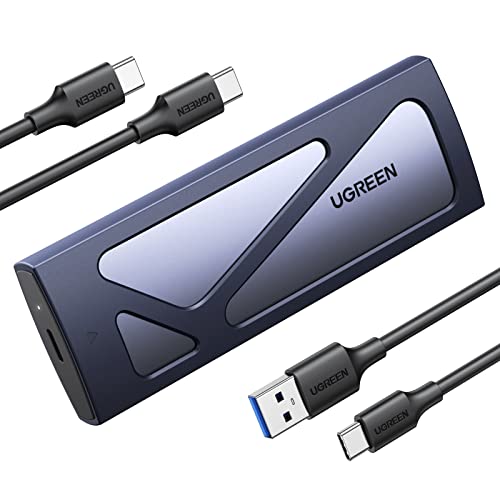
The UGREEN enclosure stands out for its support for NVMe M and B&M keys and drives up to 8TB. It handles 2230, 2242, 2260 and 2280 lengths, and uses a tool-free buckle design for installation. The maker says USB 3.2 Gen 2 can reach 10Gbps, but that speed requires a USB-C 3.2 Gen 2 data cable. This model is a good match when capacity and key compatibility are the deciding factors. The specifications describes NVMe support, not SATA support, so SATA M.2 owners should select an enclosure built for their drive protocol.
Bottom line: Choose this if you need support for M or B&M keys and an SSD capacity up to 8TB.
FIDECO Sandwich-Style NVMe Enclosure

The FIDECO uses a sandwich-style, tool-free case rather than a flip-open or buckle design. It supports M-key and M+B-key NVMe SSDs in four lengths, from 2230 to 2280, and lists UASP and TRIM support. Its USB 3.2 Gen 2 interface is rated for a theoretical maximum of 10Gbps. That combination suits someone who wants to install drives of different lengths without tools and values those protocol features. It is NVMe-only; the maker explicitly excludes M.2 SATA drives, so check the drive’s protocol before choosing it.
Bottom line: Pick this for tool-free sandwich-style installation and listed UASP and TRIM support.
Transparent M.2 NVMe Enclosure

The transparent enclosure makes the installed SSD visible, setting it apart from the opaque cases here. It supports NVMe drives with M-key or B+M-key interfaces in 2230, 2242, 2260 and 2280 lengths, and its tool-free design is intended for quick installation. The maker says USB 3.2 Gen 2 reaches up to 10Gbps and mentions UASP acceleration; a C-to-A cable is included. This is a fit for users who want to see the drive and need that cable type. It does not support SATA-based M.2 drives, despite their similar shape.
Bottom line: Choose this if a transparent enclosure and included C-to-A cable suit your setup.
Xiaobi M.2 NVMe Enclosure
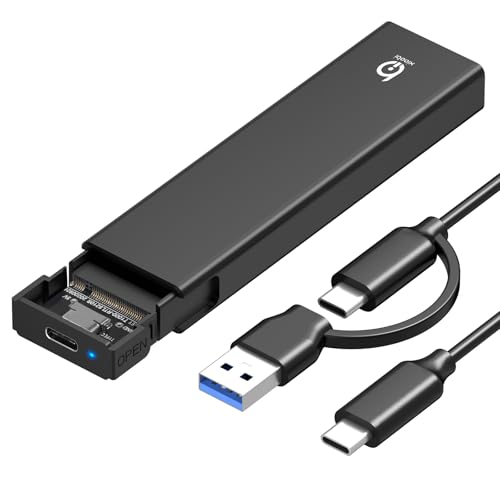
The Xiaobi is the option whose compatibility notes specifically cover USB 2.0 as well as USB 3.0 and 3.1, alongside USB 3.2 Gen 2. It accepts NVMe M-key or B+M-key drives in 2230, 2242, 2260 and 2280 sizes, and lists UASP and TRIM support. The maker says transfer speed depends on the SSD, USB port, system and NVMe type, so the 10Gbps maximum is not guaranteed in every setup. That caveat matters when comparing real transfer expectations. M.2 SATA and mSATA drives are excluded.
Bottom line: Pick this if backward compatibility with USB 2.0 ports matters for your setup.
How to choose an M.2 to USB adapter
Start with the SSD protocol, then check its key and length; M.2 describes a form factor, not whether a drive uses SATA or NVMe. NVMe drives communicate over PCIe, while SATA M.2 drives use the SATA protocol, and an NVMe-only enclosure will not work with a SATA drive. M-key and B+M-key describe connector notches, but the key alone is not a guarantee of protocol compatibility. Next, match the SSD’s four-digit size: 2280 is 22 mm wide and 80 mm long, while 2230 is 22 mm by 30 mm. If you cannot confirm the drive protocol and key from its label or documentation, verify them before ordering.
What 10Gbps USB speed means
A 10Gbps USB 3.2 Gen 2 rating is a link’s theoretical signaling rate, not a promise that files will transfer at 10 gigabits per second. Actual throughput is lower because of encoding and protocol overhead, and it also depends on the SSD, host port and cable. For example, the UGREEN feature notes specify a USB-C 3.2 Gen 2 data cable for the full stated link speed; a slower port or cable can reduce the connection rate. Use a direct, matching port and cable when speed matters, and expect the slowest component in the chain to limit transfer performance.
NVMe enclosure features compared
Choose case features based on how you plan to install and use the drive; these do not change whether the SSD protocol is compatible. Tool-free latches and sandwich-style shells avoid small screws, while an aluminum enclosure with a thermal pad provides a direct path for heat from the drive to the case. UASP is a USB storage protocol that can improve command handling when the host and enclosure support it; TRIM support can help an SSD manage unused blocks when the operating system and connection pass the command through. A transparent shell makes the installed drive visible, but does not itself indicate better cooling or speed.
| Need | Feature to look for | Why it matters |
|---|---|---|
| Long transfer sessions | Aluminum case and thermal pad | Transfers heat from the SSD to the enclosure |
| Tool-free drive swaps | Latch, buckle or sandwich design | Avoids handling small mounting screws |
| Drive status visibility | Transparent case | Shows the installed SSD |
Common M.2 adapter compatibility mistakes
The most common mistake is matching the physical M.2 shape but overlooking the drive protocol: NVMe and SATA are not interchangeable just because both use M.2 connectors. A second mistake is assuming that an advertised 10Gbps rate works through any USB port or cable; USB 3.0 and USB 2.0 connections operate below USB 3.2 Gen 2’s 10Gbps signaling rate. Check all three points before buying: NVMe versus SATA, the SSD’s supported length and key, and the host’s USB port and cable. A 2230 drive is shorter than 2280, but both are 22 mm wide, so length support matters for proper physical retention.
Frequently Asked Questions
Can an NVMe enclosure work with an M.2 SATA SSD?
No, an NVMe-only enclosure does not support an M.2 SATA drive. M.2 is the physical format; NVMe and SATA are different drive protocols, so confirm the protocol before choosing an adapter.
What do the 2230 and 2280 numbers mean?
The four digits give the drive’s width and length in millimeters: 2230 is 22 by 30 mm, and 2280 is 22 by 80 mm. The enclosure must physically support the drive’s length.
Will a 10Gbps enclosure transfer at 10Gbps?
No, 10Gbps is the maximum signaling rate, not guaranteed file throughput. The SSD, USB port, cable and protocol overhead all affect the actual transfer rate.
Does an M-key SSD always mean NVMe?
No, connector keying alone does not establish the drive protocol. Check the SSD’s model specifications for NVMe or SATA compatibility, since an NVMe-only enclosure will reject an M.2 SATA drive.
Can I use a 2280 SSD in an enclosure for 2230 drives?
Only if the enclosure supports 2280 length; 2280 is 22 mm wide and 80 mm long, compared with 2230 at 22 by 30 mm. A shorter-drive-only case may not retain a longer SSD correctly.