
Maxone External Hard Drive: Models and Alternatives

Maxone 1TB Portable HDD is the better fit for most people choosing a Maxone external hard drive because it provides 1TB and includes a USB-C adapter; choose Maxone 500GB Ultra Slim HDD if 500GB is enough and you prefer its compact metal design.
For more storage, Seagate 2TB Portable HDD and WD My Passport 6TB are larger-capacity alternatives, while SanDisk 1TB Portable Drive is a pocket-sized portable drive with a different storage design.
We earn a commission if you buy through links on this page. As an Amazon Associate I earn from qualifying purchases. Products are compared on manufacturer specifications, not hands-on testing.
- Best overall: Maxone 1TB Portable HDD – Its 1TB capacity and included USB-C adapter offer a flexible connection setup.
- Best for compact metal design: Maxone 500GB Ultra Slim HDD – The 500GB drive is 0.4 inches thick and has an aluminum enclosure.
- Best for large capacity: WD My Passport 6TB – Its 6TB capacity is the largest among these options.
| Product | Best for | Capacity | Connection | Thickness | Shop |
|---|---|---|---|---|---|
| Maxone 1TB Portable HDD | USB-C flexibility | 1TB | USB 3.0; USB-C adapter | 0.39 in | Check Price on Amazon |
| Maxone 500GB Ultra Slim HDD | Compact metal design | 500GB | USB 3.0 | 0.4 in | Check Price on Amazon |
| Seagate 2TB Portable HDD | Mac and Windows | 2TB | USB 3.0 | 0.58 in | Check Price on Amazon |
| WD My Passport 6TB | Large file archives | 6TB | USB 3.1 / USB 3.0 | 0.81 in | Check Price on Amazon |
| SanDisk 1TB Portable Drive | Pocket-sized portability | 1TB | USB Type-C | 0.39 in | Check Price on Amazon |
Maxone external hard drives and alternatives
Compare storage capacity, connection options, and physical size before choosing a portable drive.
Maxone 1TB Portable HDD

Unlike the 500GB Maxone, this 1TB model includes a USB-C adapter alongside its USB 3.0 cable. Its aluminum enclosure measures 4.7 by 3.39 inches and is 0.39 inches thick. USB-powered plug-and-play operation suits everyday file storage and manual backups on compatible computers; reformatting may be needed for some operating systems or backup applications. Choose it when the extra capacity and adapter fit your setup. Buyers who need a confirmed backup-app workflow should check compatibility before ordering.
Bottom line: Pick this when you want 1TB and an included USB-C adapter.
Maxone 500GB Ultra Slim HDD

This is the smaller-capacity Maxone, with a 500GB drive in an aluminum enclosure that is 0.4 inches thick. It connects over USB 3.0, works with Windows 7, 8, and 10, and needs neither a separate power supply nor software for plug-and-play use. The maker gives a maximum interface rate of 5 Gbit/s, but that is not a promise of sustained file-transfer speed: the drive and computer affect actual performance. Choose it for basic extra storage on a compatible Windows PC; its 500GB capacity is less suited to large media collections.
Bottom line: Choose this for 500GB of plug-and-play storage in a slim metal case.
Seagate 2TB Portable HDD

For twice the capacity of the 1TB Maxone, this Seagate portable hard drive offers 2TB and works with Windows or Mac computers. The 4.6-by-3.15-inch drive connects with an included 18-inch USB 3.0 cable, and its setup is drag-and-drop without software. The maker says stated capacity may vary, so leave room for the operating system’s reported usable space and your backup files. Choose it when 2TB and stated Windows/macOS compatibility matter more than a USB-C adapter; the connection is USB 3.0.
Bottom line: Choose this for 2TB of straightforward Windows or Mac storage.
WD My Passport 6TB
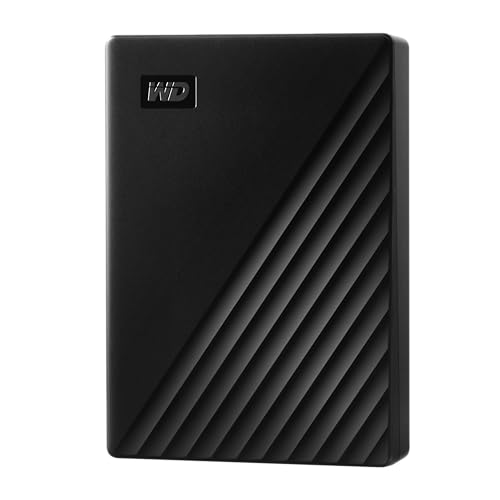
At 6TB, this WD My Passport has the largest capacity here and adds password protection, hardware encryption, and included device-management software with ransomware defense. It is a portable hard drive with USB 3.1/USB 3.0 compatibility; its measurements are 4.21 by 0.81 by 2.95 inches. Those security and management features distinguish it from the simpler Maxone drives, but they may be unnecessary for someone who only wants extra plug-and-play space. Choose it for a large archive or when its included security features suit your workflow.
Bottom line: Choose this for the largest capacity and included security features.
SanDisk 1TB Portable Drive

Unlike the HDD options, this SanDisk portable drive is described as having no moving parts and gives a claimed read speed of up to 600 MB/s. It holds 1TB, measures 2.95 by 1.77 inches, and is designed for pocket-sized carry; the maker also claims up to 2-meter drop protection. USB Type-C readiness makes it a different choice from the USB 3.0 Maxone models. Choose it when compact size and faster stated reads matter more than matching the Maxone hard-drive type; the speed is a maximum read figure, not a guaranteed transfer rate.
Bottom line: Choose this for pocket-sized 1TB storage and a high read speed.
How to choose a Maxone external hard drive
Choose capacity first, then match the connector and computer. The two Maxone options here are 500GB and 1TB; if you store photos, videos, or repeated backups, the larger drive leaves more room before you need to rotate files. USB 3.0 has a theoretical signaling rate of 5 Gbit/s, but the hard drive and host connection limit actual transfers. The 1TB Maxone includes a USB-C adapter, while the 500GB option is specified for USB 3.0. A USB connector fitting physically does not guarantee that a backup app or operating system will use the drive without setup. For a computer that needs USB-C, select the adapter or confirm the port and cable arrangement first.
Portable HDD, larger HDD, or solid-state drive
A portable HDD is a sensible match for bulk storage and manual backups, while a solid-state drive is the better fit when small size and higher read performance matter. Both Maxone options are portable HDDs; the other choices here range from 2TB and 6TB HDDs to a 1TB SanDisk drive described as having no moving parts. Use this simple rule: choose an HDD when capacity per device is the main priority, and consider the SanDisk when pocket size and its claimed read speed are more important. USB interface figures are not the same as real-world copy speeds. Keep a second copy of important files on a separate device or backup location; a single portable drive is not a complete backup plan.
| Need | Choice | Reason |
|---|---|---|
| Everyday Maxone storage | Maxone 1TB Portable HDD | 1TB and a USB-C adapter |
| Lower-capacity Maxone | Maxone 500GB Ultra Slim HDD | 500GB with USB 3.0 |
| Large archive | WD My Passport 6TB | 6TB capacity |
| Pocket-sized portable storage | SanDisk 1TB Portable Drive | Compact body and claimed read speed |
Check capacity and file-system compatibility
Advertised drive capacity and usable space shown by a computer are not identical because operating systems report storage differently and formatting uses some space. A 1TB drive is roughly 1,000GB by decimal measurement, while computer storage displays may use a different convention. The 1TB Maxone notes that reformatting may be needed for some operating systems or backup apps. Formatting can erase existing files, so copy anything important elsewhere before changing a drive’s file system. If moving the drive between Windows and macOS, exFAT is commonly used for cross-platform file exchange, but a backup application may require its own supported format. Confirm that requirement before formatting.
Use portable hard drives safely
Portable HDDs contain moving parts, so avoid unplugging a drive while files are being written and eject it through the operating system when available. Keep the drive still during transfers; jolts can interrupt work and may damage a spinning HDD. USB-powered drives also draw power from the host, so connect directly to a computer port if a hub causes disconnects. Store the drive in a dry place and avoid pressure on its enclosure while carrying it. The SanDisk drive is described as having no moving parts and up to 2-meter drop protection, but that maker claim is not a reason to treat any storage device as impact-proof. Maintain a second backup copy for important files.
Frequently Asked Questions
Does the Maxone 1TB drive work with a USB-C port?
The 1TB Maxone includes a USB-C adapter along with its USB 3.0 cable. Confirm that the computer’s port and the adapter match your connection needs.
Can I use a portable hard drive on Windows and Mac?
The Seagate 2TB model is specified for Windows and Mac computers. Some operating systems or backup applications may require reformatting, which erases existing files, so back up the drive before changing its format.
Why does my computer show less space than 1TB?
Drive makers and operating systems can use different conventions for measuring storage, and formatting also uses some space. A nominal 1TB is about 1,000GB using decimal units, so the displayed capacity can be lower.
Is USB 3.0 speed the same as file copy speed?
No. USB 3.0 has a theoretical signaling rate of 5 Gbit/s, but the drive, computer, file sizes, and connection affect actual transfer performance.
Should I unplug a hard drive during a file transfer?
No. Wait for copying to finish and eject the drive through the operating system when available; disconnecting during a write can interrupt files. Keep portable HDDs still while they are transferring data.