
Mouse With Left Hand: 4 Ergonomic Models Compared

For a left-handed mouse, SANWA Left-Handed Vertical Mouse suits most people who want a compact shape and the choice of 2.4 GHz wireless or Bluetooth 5.2. Choose a different model if you need silent clicks, a simpler receiver-based setup, or a mouse with side buttons.
Left-handed vertical mice angle the hand rather than using a flat, right-handed shape; check that the mouse is designed for the left hand before choosing by appearance alone.
We earn a commission if you buy through links on this page. As an Amazon Associate I earn from qualifying purchases. Products are compared on manufacturer specifications, not hands-on testing.
- Best overall: SANWA Left-Handed Vertical Mouse – Its 4.12-inch length and three-device connection options combine a compact fit with flexible pairing.
- Best for quiet spaces: Perixx Perimice-719L – Its buttons are described as silent-click, and its dimensions suit small hands.
- Best for side buttons: Left-Handed Vertical Mouse with Side Buttons – It has forward and back thumb buttons plus six total buttons.
| Product | Best for | Connection | DPI settings | Dimensions (in.) | Shop |
|---|---|---|---|---|---|
| SANWA Left-Handed Vertical Mouse | Multiple devices | 2.4 GHz, Bluetooth 5.2 | 800–1600 | 4.12 × 2.64 × 2.28 | Check Price on Amazon |
| Perixx Perimice-719L | Quiet workspaces | 2.4 GHz, nano receiver | 800 / 1200 / 1600 | 4.13 × 2.64 × 2.28 | Check Price on Amazon |
| SUNGI Left-Handed Vertical Mouse | Simple setup | 2.4 GHz, USB receiver | 800 / 1200 / 1600 | 4.13 × 3.15 × 2.75 | Check Price on Amazon |
| Left-Handed Vertical Mouse with Side Buttons | Browser navigation | Wireless, type not given | 800 / 1200 / 1600 | 4.8 × 2.5 × 3.2 | Check Price on Amazon |
Left-handed mouse options
Compare each model’s shape, connection, sensitivity settings, and dimensions to find a left-handed fit.
SANWA Left-Handed Vertical Mouse

For switching among computers or tablets, this model offers three connection options: 2.4 GHz wireless and two Bluetooth 5.2 connections. Its 54-degree tilt, thumb rest, and 4.12 × 2.64 × 2.28-inch dimensions are designed for small to medium left hands. DPI ranges from 800 to 1600, and the mouse is rechargeable with programmable buttons. The maker says its wireless range reaches 32 feet. This is the most flexible connection choice here, but buyers who want silent clicks should consider the Perixx instead; silent buttons are not among this model’s features.
Bottom line: Pick this if you want to connect with a receiver or Bluetooth and switch among as many as three devices.
Perixx Perimice-719L
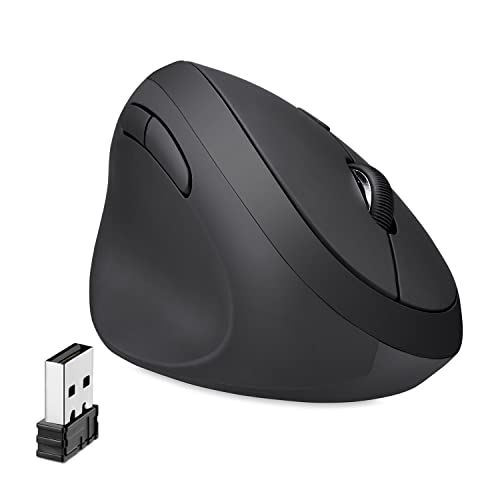
The Perixx stands out for its silent-click buttons, a useful distinction for shared offices, libraries, or other quiet rooms. This wireless vertical mouse measures 4.13 × 2.64 × 2.28 inches and is designed especially for small hands. A built-in switch selects among 800, 1200, and 1600 DPI, and the nano USB receiver provides a plug-and-play 2.4 GHz connection. The maker gives a 10-meter operating range. Its system requirements cover Windows 7, 8, and 10, so anyone using another operating system should verify compatibility before ordering.
Bottom line: Choose this for silent clicks and a small-hand fit, especially with a supported Windows computer.
SUNGI Left-Handed Vertical Mouse

The SUNGI uses a straightforward 2.4 GHz USB receiver connection and a left-handed vertical shape with a thumb rest. Its 4.13 × 3.15 × 2.75-inch dimensions make it wider and taller than the other models compared here, a consideration for smaller desks or hands. DPI settings are 800, 1200, and 1600. The maker says its handshake-style grip is intended to support a natural hand position. This model suits buyers who prefer a broader shape and do not need Bluetooth; the maker describes it as receiver-based rather than Bluetooth.
Bottom line: Pick this if you prefer the broader dimensions and a basic receiver connection.
Left-Handed Vertical Mouse with Side Buttons

Forward and back thumb buttons distinguish this left-handed vertical mouse, making those controls available without relying only on the main buttons. It has six buttons total and three DPI settings: 800, 1200, and 1600. At 4.8 × 2.5 × 3.2 inches, its length and height are greater than those of the other models here, so compare the dimensions with your available desk space and hand. The maker describes its optical tracking as adjustable for different surfaces.
Bottom line: Choose this if forward and back thumb controls matter more than a compact size.
How to choose a left-handed mouse
Start with handedness, then compare shape, size, controls, and connection. A left-handed vertical mouse is molded for the left hand; a right-handed ergonomic mouse does not become a left-hand fit simply by changing a software setting. Vertical designs rotate the hand into a more upright grip, while DPI describes how far the pointer moves relative to mouse movement: a higher DPI moves the pointer farther at the same physical motion. These models offer settings from 800 to 1600 DPI. If you prefer slower, more controlled cursor movement, start at 800; if you need the pointer to cross a wide screen with less hand travel, try a higher setting. A USB receiver and Bluetooth are different connection methods, so choose based on the ports and devices you use.
Compare the mouse sizes and fit
Use the published length, width, and height as a first screen for fit, then compare the shape with your hand and desk space. The models here range from 4.12 to 4.8 inches long and 2.28 to 3.2 inches tall, so the differences are noticeable even though each is designed for left-handed use. Measure an existing mouse that feels comfortable and compare its dimensions; this gives a more useful starting point than labels such as small or ergonomic. Thumb-rest position and the amount of room beside the mouse also affect comfort. A mouse that is too large can make the thumb controls harder to reach, while a taller vertical design may need more clearance beneath shelves or monitor stands.
The measurements below give a quick dimension check in inches.
| Model | Length | Width | Height |
|---|---|---|---|
| SUNGI Left-Handed Vertical Mouse | 4.13 in. | 3.15 in. | 2.75 in. |
| Perixx Perimice-719L | 4.13 in. | 2.64 in. | 2.28 in. |
| Left-Handed Vertical Mouse with Side Buttons | 4.8 in. | 2.5 in. | 3.2 in. |
| SANWA Left-Handed Vertical Mouse | 4.12 in. | 2.64 in. | 2.28 in. |
Wireless receiver or Bluetooth
Choose a receiver-based mouse if a USB port is available and you want a simple plug-in setup; choose Bluetooth when you want to pair without using a USB receiver. The Perixx and SUNGI use 2.4 GHz wireless with a receiver, while the SANWA adds two Bluetooth 5.2 connections and can connect to as many as three devices. Left-Handed Vertical Mouse with Side Buttons is described as wireless, but the connection type is not given, so confirm the required method before choosing it. A receiver can occupy a computer’s USB port, while Bluetooth pairing depends on the device supporting Bluetooth. For a multi-device setup, the SANWA is the only model here with switching between three connections.
DPI settings and extra mouse controls
Use DPI settings to tune pointer speed, not as a guarantee of better accuracy. All four mice include settings from 800 to 1600 DPI, so their sensitivity ranges overlap. A DPI button lets you adjust speed without relying only on computer settings; start at the lowest level and increase it until pointer travel feels manageable. Button layout matters just as much: Left-Handed Vertical Mouse with Side Buttons has forward and back thumb buttons, while the Perixx emphasizes quiet clicks. Before choosing extra controls, consider whether you regularly use browser navigation or need low-noise clicking. More buttons do not automatically make a mouse easier to use; they help only when their placement and functions suit your routine.
Frequently Asked Questions
What does DPI mean on a computer mouse?
DPI is a mouse sensitivity setting: at a higher DPI, the pointer travels farther for the same physical movement. These models offer settings between 800 and 1600 DPI, so begin at 800 for slower movement and raise it if you need more pointer travel.
Can I use a left-handed mouse with my right hand?
A left-handed vertical mouse is shaped for the left hand, so the buttons and thumb rest may be awkward for right-hand use. Choose a symmetrical mouse if you need one shape to work comfortably in either hand.
Is a 2.4 GHz mouse the same as Bluetooth?
No. A 2.4 GHz receiver-based mouse connects through its USB dongle, while Bluetooth pairs directly with a compatible device. Confirm the computer has the required port or Bluetooth support before choosing a connection type.
How do I choose a mouse size for my hand?
Compare the mouse’s length, width, and height with a mouse that already feels comfortable in your hand. These left-handed models range from 4.12 to 4.8 inches long, so dimensions can help rule out a shape that feels too large.
Do vertical mice work on every surface?
Optical mice use a sensor to track movement, and surface texture or reflectivity can affect tracking. A plain, opaque mouse pad is a practical choice if the pointer skips on a glossy or transparent surface.