
MyPin 4K Media Player: Models Compared by Playback

The 4K@60Hz networkable model is the closest match for buyers who prioritize smoother high-frame-rate video, while the MyPin 4K player supports 4K at 30Hz and removable storage. Choose another model if you need a confirmed 14TB drive capacity or a no-network plug-and-play setup.
We earn a commission if you buy through links on this page. As an Amazon Associate I earn from qualifying purchases. Products are compared on manufacturer specifications, not hands-on testing.
- Best overall: MyPin 4K@60Hz Networkable Media Player – Supports 4K@60Hz video and network connections through cable or Wi-Fi.
- Best for surround sound: MyPin 4K@30Hz Media Player – Supports HDMI audio up to 7.1 surround and optical output.
- Best for large drives: 4K@30Hz Media Player, 14TB Support – Supports external hard drives up to 14TB.
| Product | Best for | Maximum video frame rate | Drive support | Video output | Shop |
|---|---|---|---|---|---|
| MyPin 4K@60Hz Networkable Media Player | High-frame-rate video | 60 fps | 8TB HDD | HDMI, AV | Check Price on Amazon |
| MyPin 4K@30Hz Media Player | Surround audio | 30 fps | 8TB HDD | HDMI, AV, optical | Check Price on Amazon |
| 4K@30Hz Media Player, 14TB Support | Large hard drives | 30 fps | 14TB HDD | HDMI, AV | Check Price on Amazon |
| Micca 4K USB and microSD Media Player | Compact signage | 30 fps | USB hard drive | HDMI, analog AV | Check Price on Amazon |
| 4K USB and microSD Digital Media Player | Offline playback | 30 fps | USB storage | HDMI, analog AV, optical | Check Price on Amazon |
MyPin 4K media player options
Compare the supported video rates, storage, and connection types before choosing a player for your display.
MyPin 4K@60Hz Networkable Media Player
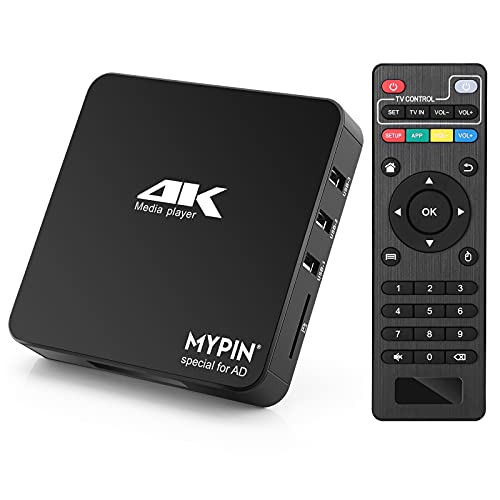
The networkable 4K@60Hz model is the only option here that specifies playback at 4096×2304 and 60 fps. It supports H.265/HEVC video, common image and audio formats, and can connect by Ethernet cable or Wi-Fi. Automatic playback, repeat, and shuffle modes suit displays that need scheduled or continuous media playback. Choose it when 60 fps output or network access matters; the storage ceiling is lower than the 14TB capacity supported by 4K@30Hz Media Player, 14TB Support.
Bottom line: Pick this for 4K video up to 60 fps or network access.
MyPin 4K@30Hz Media Player
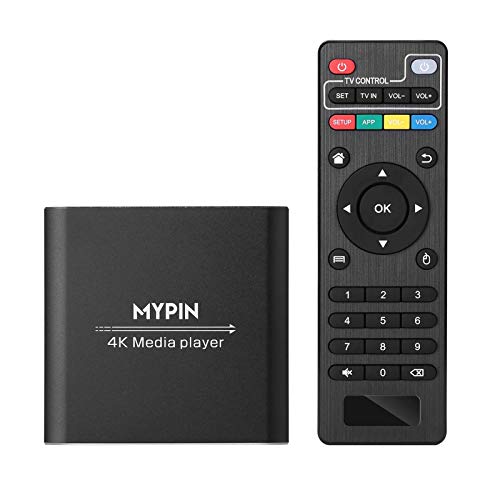
The 4K@30Hz model distinguishes itself with HDMI audio support up to 7.1 surround and an optical output. Its aluminum-alloy body and dual USB ports support a compact setup with two connected devices, though it reads only one at a time. It can play from USB drives up to 128GB, TF cards, or hard drives up to 8TB, and a USB mouse or keyboard can control it. Choose it for the optical connection or surround-sound setup; its video rate is 30 fps, not 60 fps.
Bottom line: Choose this when optical audio or 7.1 HDMI sound is a priority.
4K@30Hz Media Player, 14TB Support

The 14TB drive limit sets this 4K@30Hz player apart from the other options. It reads external USB 2.0 or 3.0 storage, including hard drives formatted in NTFS or exFAT, and accepts USB drives up to 512GB and SD cards. HDMI serves HDTVs, while the included analog AV cable supports older televisions. This is a practical fit when a large external library is the deciding factor; it does not specify 60 fps playback, so buyers who need that rate should consider MyPin 4K@60Hz Networkable Media Player.
Bottom line: Pick this for an external hard drive larger than 8TB.
Micca 4K USB and microSD Media Player

The Micca model is a compact player with USB and microSD playback, autoplay, looping, and resume functions for signage or repeated presentations. It outputs video up to 4096×2304 at 30 fps over a 4K/60Hz HDMI connection and also has composite AV output for analog displays or stereo audio. Its dimensions are about 2.95 × 2.52 × 0.59 inches.
Bottom line: Choose this for a compact signage player with microSD support.
4K USB and microSD Digital Media Player

This plug-and-play player is described for offline media playback, with USB and Micro SD support plus HDMI, analog AV, and optical outputs. It handles video up to 4096×2304 at 30Hz and can play or manage videos, music, photos, PowerPoint files, and PDFs. Dual USB ports allow a mouse, keyboard, or speakers to be connected. Choose it for signage or presentations that do not need Wi-Fi or an app; its 30Hz video ceiling is below MyPin 4K@60Hz Networkable Media Player’s 60Hz capability.
Bottom line: Pick this for offline playback across varied presentation files.
How to choose a 4K media player
Choose a player by matching frame rate, storage size, and output to the files and display you already have. A 30 fps file does not become smoother because the HDMI port is rated for 60Hz; for 60 fps footage, both the file and player must support that rate. Check the player’s maximum resolution and frame rate, then confirm the display has a matching HDMI input. For external libraries, compare the hard-drive capacity limit as well as USB-drive limits. A port that accepts two devices may still read only one at a time. If you plan to control playback with a mouse or keyboard, verify those controls are supported rather than assuming every USB port accepts peripherals.
Storage formats and drive limits
Most consumer USB media players read FAT32, NTFS, or exFAT, but support differs by model and file-size limits can matter. FAT32 has a maximum single-file size just under 4GB, so large video files typically require NTFS or exFAT support. Keep drive capacity and file-system compatibility separate: support for a 14TB disk does not guarantee that every format or partition works. For large libraries, use a drive formatted in a file system the player explicitly supports, and test one representative video before loading the whole collection. USB flash-drive limits also differ from hard-drive limits, so compare them independently when choosing removable storage.
HDMI, AV, and audio connections
HDMI carries digital video and audio to modern televisions, while composite AV serves older analog inputs. Composite video is standard-definition, so it cannot deliver 4K resolution; use HDMI for UHD playback. Optical audio carries digital sound to a compatible receiver or soundbar, but the receiving device also needs an optical input and matching audio-format support. HDMI surround audio likewise depends on the TV or receiver’s capabilities and the source audio track. Match output connectors at both ends before buying, especially for an older display or separate sound system. A 4K-capable player cannot make a non-4K display show 4K detail.
Playback modes for signage and presentations
Autoplay, looping, and resume address different display needs. Autoplay starts media when power returns, looping repeats a selected sequence, and resume returns to a previous playback position; confirm which behavior matters for unattended signage. A presentation player that supports PPT or PDF files may still handle animations or embedded media differently from a computer, so simplify slides and test them on the target display. For continuous operation, keep the player ventilated and use media encoded in formats it supports. A short test playlist can reveal resolution, audio, and file-compatibility issues before the screen is installed in a hard-to-reach location.
Frequently Asked Questions
Does a 4K player make every video 4K?
No, the player outputs only the resolution available in the source file, up to its supported maximum. A 1080p video remains 1080p unless the player performs upscaling, which these options do not establish.
Can a 4K media player work with an older TV?
Yes, if the player and TV share a compatible input such as composite AV. Composite video is standard-definition, so use an HDMI connection to get 4K output.
What file size can FAT32 storage hold?
FAT32 limits a single file to just under 4GB. Large video files generally need a player and storage device that support NTFS or exFAT.
Will a 60Hz HDMI port play 60 fps video?
Not by itself; the player, source video, and display must all support the desired resolution and frame rate. Confirm the player’s maximum frame rate rather than relying only on the HDMI port rating.
Can I connect a hard drive and USB flash drive together?
Some players have multiple USB ports, but that does not ensure simultaneous reading. For example, one model here supports two connected devices while reading only one at a time.