
PS2 Controller to USB Converter: 4 Options Compared

Xahpower PS2 to USB Adapter is the best starting point for most people because it supports original PS2 controllers on a PS3 or PC and says Windows 10 installs it automatically. Choose Mcbazel PS2 to USB Adapter instead if you want a 18-inch cable and use an original wired PS2 controller; it excludes PS1 pads and specialty accessories.
A PS2-to-USB converter changes the controller’s connector for a USB port, but game input support can still vary by computer, console, and game.
We earn a commission if you buy through links on this page. As an Amazon Associate I earn from qualifying purchases. Products are compared on manufacturer specifications, not hands-on testing.
- Best overall: Xahpower PS2 to USB Adapter – Supports original PS2 controllers on PS3 and PC, with Windows 10 automatic setup stated.
- Best for two adapters: PS2 to USB Adapter Converter, 2-Pack – The two-pack supports PS1 or PS2 vibration controllers, including wired and wireless models.
- Best for a longer cable: Mcbazel PS2 to USB Adapter – Its cable length is specified as 18 inches.
| Product | Best for | Pack count | Controller compatibility | Shop |
|---|---|---|---|---|
| Xahpower PS2 to USB Adapter | Windows 10 setup | 1 adapter | Original PS2; PS1 also supported | Check Price on Amazon |
| PS2 to USB Adapter Converter, 2-Pack | Two-adapter setup | 2 adapters | PS1/PS2 wired and wireless | Check Price on Amazon |
| Xahpower 2-Pack PS2 to USB Cable | Two Xahpower adapters | 2 adapters | Original PS2; PS1 also supported | Check Price on Amazon |
| Mcbazel PS2 to USB Adapter | 18-inch cable reach | 1 adapter | Original wired PS2 only | Check Price on Amazon |
PS2 Controller to USB Converters
Compare controller support and included adapter count before choosing a converter for a PC or PS3.
Xahpower PS2 to USB Adapter
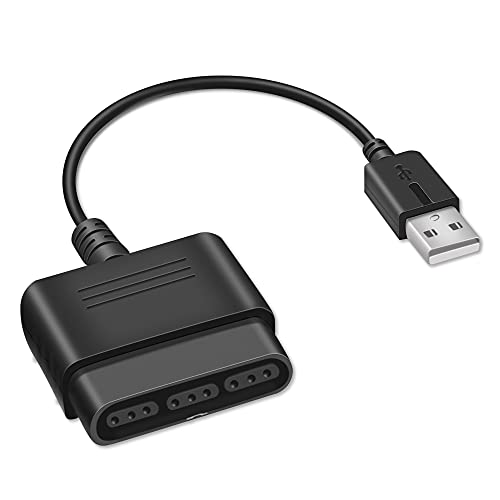
Xahpower PS2 to USB Adapter is the single-adapter option with Windows 10 automatic installation stated, unlike the multi-adapter choices. It connects original PS2 controllers to PS3 or PC USB ports, and the manufacturer also says it works with PS2 Guitar Hero devices. The Windows compatibility includes older versions such as Windows 98 through Windows 7 as well as Windows 10. This is a fit for someone who needs one adapter and an original PS2 pad; buyers using third-party controllers should choose another option because support is limited to original PS2 controllers.
Bottom line: Pick this if you need one adapter for an original PS2 controller and value stated Windows 10 setup.
PS2 to USB Adapter Converter, 2-Pack
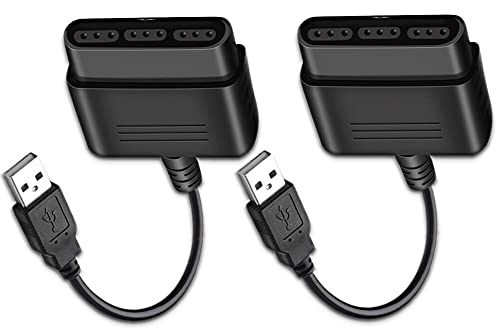
PS2 to USB Adapter Converter, 2-Pack stands out for its two-adapter pack and wider controller language: it supports original and third-party PS2 controllers, plus wired and wireless PS1/PS2 controllers. The adapter is described for PC or PS3 use and does not require external power or a driver. That breadth makes it the option to consider when you need adapters for more than one setup or use a third-party pad.
Bottom line: Choose this for two adapters or if your controller is a third-party PS2 model.
Xahpower 2-Pack PS2 to USB Cable

Xahpower 2-Pack PS2 to USB Cable pairs Xahpower’s original-PS2 and PS1 compatibility with a two-adapter pack, making it distinct from the single-unit Xahpower option. The manufacturer says it connects to PS3 and PC USB ports, recognizes automatically on Windows 10, and supports DualShock vibration. Older Windows versions are also named in its compatibility claims. Choose it when you want two adapters with that stated compatibility; the text limits compatibility to original PS2 controllers, so third-party pads are a reason to look at a different option.
Bottom line: Pick this for two adapters if you use original PS2 or PS1 controllers.
Mcbazel PS2 to USB Adapter

Mcbazel PS2 to USB Adapter is the most explicit about cable reach, with an 18-inch cable, and its compatibility is narrower than the other choices: original wired PS2 controllers only. It connects to a PS3 USB port, with PC use also named, but excludes PS1 controllers, third-party controllers, dancing mats, Guitar Hero, drums, and other specialty accessories. The manufacturer also cautions that some PS3 games may not work because features such as Sixaxis and the PS button are absent. Choose this only for a standard original wired PS2 controller.
Bottom line: Choose this for an original wired PS2 controller when an 18-inch cable suits your setup.
How to choose a PS2 controller to USB converter
Start with the controller, not the USB plug: adapters differ in whether they accept original-only, third-party, or PS1 controllers. A USB connection does not guarantee that every game recognizes every input. On Windows, older games commonly use DirectInput, while many newer PC games expect XInput; a converter may present the pad differently, so button mapping can require adjustment in the game or a controller configuration tool. For PS3, game-specific features such as the PS button or motion sensing may not transfer through a basic adapter. If you need two connections, compare pack count; if the ports are at a distance, confirm cable length before ordering.
Match specialty hardware carefully. Guitar controllers, dance mats, and drums can use different input behavior from a standard gamepad, and several converters explicitly exclude such accessories.
Controller compatibility and game support
Controller compatibility is the main dividing line: some converters accept only original wired PS2 controllers, while others claim support for third-party pads or PS1 controllers too. Mcbazel PS2 to USB Adapter is an original-wired-PS2-only choice, whereas PS2 to USB Adapter Converter, 2-Pack claims support for wired and wireless PS1/PS2 controllers, including third-party PS2 pads. Wireless support means the controller type is covered by the adapter claim; it does not establish that every wireless receiver or game feature will work. DualShock vibration also depends on the adapter and the game sending vibration data, so treat vibration support as a feature claim rather than a guarantee across all titles.
For a PC, test the controller in the intended game’s input settings and remap buttons if needed. For PS3, check whether the game requires a feature such as the PS button or Sixaxis motion control, which a basic converter may not provide.
USB setup and troubleshooting
Connect the controller to the adapter first, then plug the adapter into a working USB port; a loose controller-side connection can look like a driver problem. Some adapters claim plug-and-play behavior or Windows 10 automatic installation, but operating system support can vary with the host and game. On a PC, open the game’s controller settings and verify that each button registers before starting play. If the controls do not respond, try another USB port and restart the system, as the product guidance for Xahpower PS2 to USB Adapter recommends.
USB adapters do not necessarily convert every PS2 feature into a modern input standard. Older PC games may rely on DirectInput, while newer games may favor XInput, so a controller can connect successfully yet need per-game mapping. Confirm compatibility before relying on a specialty device or a PS3-only feature.
Frequently Asked Questions
Will a PS2 controller USB adapter work on Windows 10?
Some adapters claim Windows 10 automatic setup, including Xahpower PS2 to USB Adapter and Xahpower 2-Pack PS2 to USB Cable. Game input support is separate from driver setup, so check the game’s controller settings and remap controls if needed.
Can a PS1 controller use a PS2 USB converter?
Some models claim PS1 support, while Mcbazel PS2 to USB Adapter expressly excludes PS1 controllers. Verify the controller support for the particular adapter before connecting a PS1 pad.
Do PS2 to USB adapters support vibration?
Some product claims include vibration support, including Xahpower 2-Pack PS2 to USB Cable and PS2 to USB Adapter Converter, 2-Pack. Vibration still requires a compatible game that sends vibration data, so it is not guaranteed in every game.
Will a PS2 USB adapter work with Guitar Hero?
Support differs by adapter: Xahpower PS2 to USB Adapter says it works with PS2 Guitar Hero devices, while Mcbazel PS2 to USB Adapter excludes Guitar Hero and other specialty accessories. Match the specific peripheral to the adapter’s compatibility claim.
Can I use a wireless PS2 controller with a USB adapter?
PS2 to USB Adapter Converter, 2-Pack claims support for wireless PS1/PS2 controllers as well as wired models. Confirm that your controller and its receiver are compatible, since support claims do not guarantee every wireless setup.