
Raspberry Pi NAS Cases: 5 Options Compared by Fit

For a Raspberry Pi 4 NAS build with one 2.5-inch SATA drive, Geekworm NASPi V2.0 for Pi 4 is the clearest fit because its storage shield is designed for that drive type. A NAS case holds the Pi and storage hardware used to serve files over a network; choose a Pi 5 model instead if you need M.2 NVMe slots.
Choose Pironman 5-MAX, Pironman 5 Pro Max, or FREENOVE Pi 5 Case Kit Pro for a Pi 5 dual-NVMe setup, or GeeekPi Mini Tower NAS Kit for a Pi 4 build using M.2 SATA storage. These cases are not interchangeable: confirm your Pi generation and drive interface before choosing.
We earn a commission if you buy through links on this page. As an Amazon Associate I earn from qualifying purchases. Products are compared on manufacturer specifications, not hands-on testing.
- Best overall: Geekworm NASPi V2.0 for Pi 4 – Its X823 shield supports one 2.5-inch SATA HDD or SSD in a Raspberry Pi 4 case.
- Best for Pi 5 dual NVMe: Pironman 5-MAX – It has two M.2 NVMe slots and RAID 0/1 support.
- Best for a touchscreen build: Pironman 5 Pro Max – Its 4.3-inch screen accompanies dual NVMe slots in a Pi 5 case.
- Best for Pi 4 M.2 SATA: GeeekPi Mini Tower NAS Kit – Its expansion board supports M.2 SATA 2242, 2260, and 2280 drives.
| Product | Best for | Pi fit | Storage interface | Case size | Shop |
|---|---|---|---|---|---|
| Geekworm NASPi V2.0 for Pi 4 | Pi 4 SATA NAS | Raspberry Pi 4 | 2.5-inch SATA | 4.76 × 3.56 × 1.77 in | Check Price on Amazon |
| Pironman 5-MAX | Dual NVMe NAS | Raspberry Pi 5 | Dual M.2 NVMe | 6.10 × 5.31 × 3.66 in | Check Price on Amazon |
| Pironman 5 Pro Max | Screen-equipped NAS | Raspberry Pi 5 | Dual NVMe M.2 | — | Check Price on Amazon |
| FREENOVE Pi 5 Case Kit Pro | Touchscreen Pi 5 NAS | Raspberry Pi 5 | Dual M.2 NVMe | 6.89 × 5.83 × 4.33 in | Check Price on Amazon |
| GeeekPi Mini Tower NAS Kit | Pi 4 M.2 SATA | Raspberry Pi 4 Model B | M.2 SATA 2242/2260/2280 | — | Check Price on Amazon |
Raspberry Pi NAS cases
Match the case to your Pi generation and the storage interface on your drive before comparing cooling and extras.
Geekworm NASPi V2.0 for Pi 4
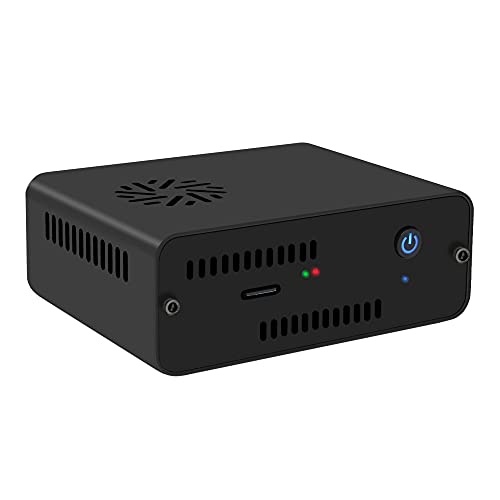
For a Raspberry Pi 4 NAS with a single 2.5-inch SATA drive, this kit combines the X823 storage shield, X-C1 adapter, fan bracket, PWM fan, and aluminum case. It supports HDDs or SSDs up to 9.8 mm thick, and the X-C1 V2.0 adds auto power-on; the V1.3 does not. Geekworm recommends a 5V, 4A USB-C supply for this kit. The main limitation is its single SATA-drive design, so choose a dual-M.2 case if you want multiple NVMe drives or a Pi 5 build.
Bottom line: Choose this for a Pi 4 and one 2.5-inch SATA drive.
Pironman 5-MAX
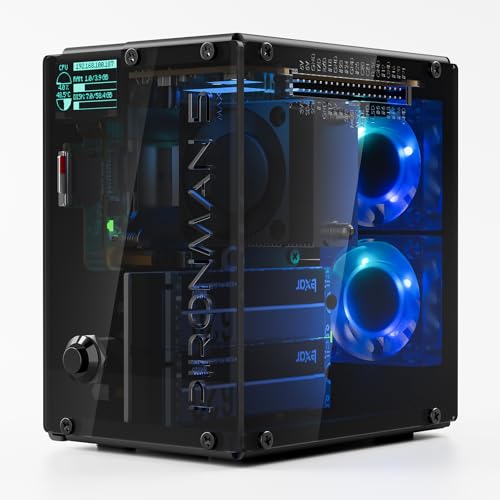
For a Pi 5 NAS that may also host an AI accelerator, this case pairs two M.2 NVMe slots and RAID 0/1 support with a PCIe Gen 2 switch. Its cooling and interface features include a PWM tower cooler, two RGB fans, an OLED module, and full-size HDMI. The Pi itself is not included, so plan for that component separately. This is an expansive mini-PC-style case rather than a compact single-drive enclosure; choose a simpler SATA case if you only need one 2.5-inch drive.
Bottom line: Choose this for a Pi 5 dual-NVMe build with room for extras.
Pironman 5 Pro Max

The standout here is its 4.3-inch touchscreen, joined by an adjustable camera, USB microphone, and built-in audio amplifier. For storage, the Pi 5 case has dual NVMe slots, a PCIe Gen 2 switch, and RAID 0/1 support; it also includes tower cooling, PWM RGB fans, an OLED display, and dual full-size HDMI. The Pi 5, SSDs, and Hailo accelerator are not included. The screen and media hardware add complexity that may not benefit a headless NAS, so this suits a combined desktop or development build better than a storage-only setup.
Bottom line: Choose this when a NAS build also needs a touchscreen and media hardware.
FREENOVE Pi 5 Case Kit Pro

This kit combines dual M.2 NVMe slots with a 4.3-inch touchscreen, stereo speakers, a 3.5 mm audio jack, and five PWM ARGB fans. Its feature notes say the SSD can serve as the system disk, regular storage, or NAS/RAID storage; the Pi 5 and SSD are not included. The kit calls for a 5V or 5.1V, 5A power supply. With its media hardware and five-fan cooling system, it is a larger, more feature-heavy choice than a basic NAS case; consider whether you need the screen and audio in a file server.
Bottom line: Choose this for a Pi 5 NAS that also needs a touchscreen and audio.
GeeekPi Mini Tower NAS Kit

This Pi 4 Model B mini tower uses an M.2 SATA expansion board rather than a 2.5-inch SATA bay or an NVMe interface. The board accepts 2242, 2260, and 2280 M.2 SATA drives, with support up to 2 TB, and the case uses ABS with an ICE Tower cooler and PWM RGB fan. It does not support NVMe SSDs, so check the drive interface as well as its M.2 size before choosing. The RGB lighting and OLED need setup to operate, which matters if you want features to work immediately without configuration.
Bottom line: Choose this for a Pi 4 Model B and an M.2 SATA drive, not NVMe.
How to choose a Raspberry Pi NAS case
Choose by Pi generation and drive interface first; a case built around Pi 4 SATA hardware is not a substitute for a Pi 5 NVMe setup. SATA and NVMe are different storage interfaces even when both drives use an M.2-shaped connector, so verify the drive protocol before buying. Raspberry Pi 4 Model B includes Gigabit Ethernet and USB 3.0, useful for a wired NAS with USB-attached storage. Pi 5 exposes PCIe for faster storage add-ons, but actual throughput depends on the adapter, drive, network, and workload. For a home file server, wired Ethernet is generally preferable to Wi-Fi for predictable access. Make sure the case supports the exact board and any drive thickness or connector position constraints.
Pi 4 SATA and Pi 5 NVMe storage compared
Pi 4 cases here use SATA storage, while the Pi 5 options add dual M.2 NVMe slots. M.2 describes a drive form factor, not its protocol: an M.2 SATA drive will not work in an NVMe-only slot. Use this comparison to identify the interface before checking capacity or enclosure style.
| Build type | Storage path | Best fit |
|---|---|---|
| Single-drive Pi 4 NAS | 2.5-inch SATA | One HDD or SSD |
| Pi 4 M.2 SATA NAS | M.2 SATA | 2242, 2260, or 2280 SATA drive |
| Pi 5 multi-drive NAS | Dual M.2 NVMe | NVMe storage and possible RAID |
Drive fit, power, and cooling
Measure the drive and check its protocol before assembling a NAS case; the NASPi accepts 2.5-inch drives no thicker than 9.8 mm, while the GeeekPi board is for M.2 SATA lengths 2242, 2260, or 2280. Power needs also differ by build: the NASPi recommends a 5V, 4A USB-C supply, while the FREENOVE kit calls for 5V or 5.1V at 5A. Drives and fans draw power in addition to the Pi, so use a supply that meets the case maker’s requirement. Small enclosures can trap heat; keep fan intakes and exhausts unobstructed, and avoid placing a case on fabric or inside a closed cabinet.
RAID is not a backup
RAID 1 mirrors data across drives, while RAID 0 stripes data for capacity or speed and does not provide redundancy. A mirrored array can keep operating after one drive fails, but it will not protect files from accidental deletion, malware, theft, or damage to the whole device. Keep a separate backup on another device or location and test that files can be restored. RAID support in a case or adapter also requires compatible software and a correctly configured operating system; hardware support alone does not make an array. For a modest home NAS, start with a simple single-drive setup unless you have a clear need for a multi-drive array.
Frequently Asked Questions
Can an M.2 SATA drive work in an NVMe slot?
No, the interfaces are different even if the connector and drive dimensions look similar. Check that the case’s expansion board explicitly supports SATA or NVMe as needed.
Does RAID 1 replace a separate backup?
No, RAID 1 mirrors changes as well as files, so accidental deletion or malware can affect both copies. Keep another backup on a separate device and check that you can restore it.
Is Gigabit Ethernet fast enough for a home NAS?
Gigabit Ethernet has a theoretical ceiling of 1,000 megabits per second, or 125 megabytes per second, before protocol overhead. Actual transfer rates depend on the Pi, drive, network equipment, and file workload.
How much power does a Raspberry Pi NAS need?
The required supply depends on the Pi, storage, and case hardware. For these kits, Geekworm recommends 5V at 4A for NASPi, while FREENOVE specifies 5V or 5.1V at 5A for its Pi 5 kit.
Can a NAS run over Wi-Fi instead of Ethernet?
Yes, but Wi-Fi throughput and latency vary with distance, interference, and router capability. For a fixed file server, wired Ethernet is usually the more predictable connection.