
Replacement Legs for Vizio TV: 4 Options by Fit

For a Vizio V505-H9, V505-H19 or M506X-H9, Vizio Replacement Stand for V505 and M506X is the specific replacement stand; No-Drill Legs for Vizio D40F-G9 and V405-G9 is made for the D40F-G9 and V405-G9. Check the model label on the back of the TV before choosing either dedicated set.
Choose a universal stand such as Universal Metal Stand ML1760 or PERLESMITH Universal Steel TV Legs only if your TV’s VESA pattern and weight fall within its supported range; those stands are not model-specific Vizio legs.
We earn a commission if you buy through links on this page. As an Amazon Associate I earn from qualifying purchases. Products are compared on manufacturer specifications, not hands-on testing.
- Best overall: Vizio Replacement Stand for V505 and M506X – Dedicated ABS stand legs for the Vizio V505 and M506X models.
- Best for D40F-G9 and V405-G9: No-Drill Legs for Vizio D40F-G9 and V405-G9 – Model-specific ABS legs with included screws and non-slip pads.
- Best for larger TVs: PERLESMITH Universal Steel TV Legs – Supports TVs up to 75 inches and 110 pounds, with VESA up to 800 × 600 mm.
| Product | Best for | Compatibility | Material | Mounting or adjustment | Shop |
|---|---|---|---|---|---|
| Vizio Replacement Stand for V505 and M506X | V505 and M506X | V505-H9, V505-H19, M506X-H9 | ABS plastic | Model-specific; measure mounting points | Check Price on Amazon |
| No-Drill Legs for Vizio D40F-G9 and V405-G9 | D40F-G9 and V405-G9 | Vizio D40F-G9, V405-G9 | ABS plastic | Model-specific; screws included | Check Price on Amazon |
| Universal Metal Stand ML1760 | Broad VESA fit | Most 20–65-inch TVs | Metal | VESA 75 × 75–800 × 500 mm; 2 heights | Check Price on Amazon |
| PERLESMITH Universal Steel TV Legs | Larger VESA TVs | 20–75-inch TVs | Reinforced steel | VESA 200 × 100–800 × 600 mm; 3 heights | Check Price on Amazon |
Replacement Legs for Vizio TV
Match the TV model for dedicated legs, or verify VESA pattern and weight for a universal tabletop stand.
Vizio Replacement Stand for V505 and M506X

These dedicated ABS legs fit the Vizio V505-H9, V505-H19 and M506X-H9 models, rather than a broad range of televisions. The maker says to compare the TV’s bottom ports and measurements with its compatibility picture before buying; a mismatch means the legs will not install. The black plastic construction is intended to support the TV on a table, and the product notes a 3 mm feature to protect the table and TV. This set is not the right choice for a Vizio model outside the named fit group or for someone seeking a height-adjustable universal stand.
Bottom line: Choose this set if your TV label confirms one of the three compatible models.
No-Drill Legs for Vizio D40F-G9 and V405-G9
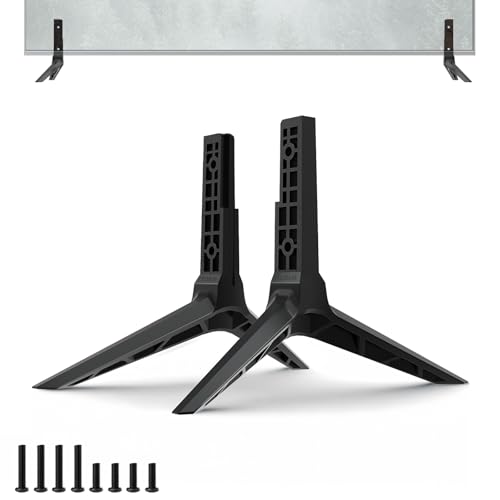
These ABS legs target the Vizio D40F-G9 and V405-G9, distinguishing them from the V505- and M506X-fit set. The maker says installation uses included screws and describes setup as taking minutes; the package also includes instructions and non-slip pads. Their model-specific design is useful when the original legs are missing, but they are not universal and do not fit other brands or Vizio models outside the two named here. Check the label on the rear of the TV before ordering, rather than relying on screen size alone.
Bottom line: Pick these when the rear label reads D40F-G9 or V405-G9.
Universal Metal Stand ML1760

The ML1760 is a universal metal tabletop stand, not a Vizio-specific replacement leg set. The maker says it fits most 20- to 65-inch TVs weighing up to 50 kg (about 110 pounds) and supports VESA patterns from 75 × 75 mm to 800 × 500 mm. Two mounting-hole height positions allow some adjustment, and soft pads protect the cabinet or floor under the base. This option can suit a Vizio only when its mounting pattern and weight are compatible; it will not use model-specific bottom ports as dedicated legs do.
Bottom line: Choose this if your Vizio matches its VESA range and weight limit.
PERLESMITH Universal Steel TV Legs
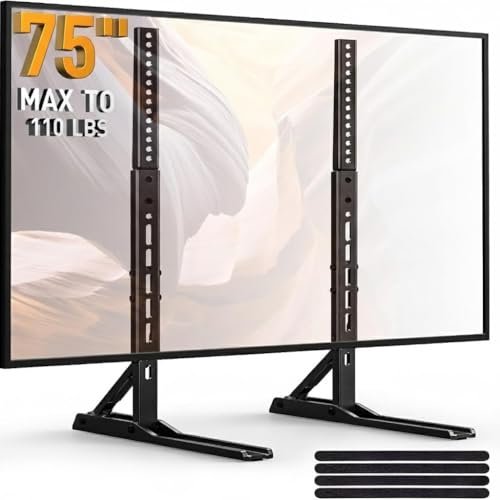
PERLESMITH offers a wider screen-size range than the other universal option here: the maker says these reinforced-steel legs fit 20- to 75-inch TVs up to 110 pounds. The supported VESA patterns run from 200 × 100 mm to 800 × 600 mm, and three height settings provide positioning flexibility. Foot pads and cable management are also included among the features. This stand is an alternative to model-specific Vizio legs, not a guaranteed fit for every Vizio; verify the TV’s VESA pattern and weight first.
Bottom line: Choose this for a compatible TV that needs the wider VESA or screen-size range.
How to choose replacement legs for a Vizio TV
Start with the full model number on the TV’s rear label: dedicated legs in this group fit only the Vizio models named for each set. Screen size alone is not enough to establish compatibility. For a universal stand, check the four-hole VESA pattern on the back of the TV; measurements are conventionally given as horizontal × vertical spacing in millimeters. Then check the TV’s weight against the stand’s limit. Choose a dedicated set when its model number matches exactly; choose a universal stand only when both its VESA range and weight limit match. If you cannot identify the model or mounting pattern, confirm those measurements before ordering.
VESA fit and universal stand limits
VESA measurements describe the distance between mounting holes, not the width of the television: a 200 × 100 mm pattern means 200 mm horizontally and 100 mm vertically. Measure center to center between the threaded holes, then compare both dimensions with the stand’s supported range. The two universal options differ in range: one begins at 75 × 75 mm and reaches 800 × 500 mm, while the other begins at 200 × 100 mm and reaches 800 × 600 mm. A pattern outside either range will not line up, even if the TV’s screen size is within range. Also check weight, since screen size does not determine a TV’s weight.
The comparison below separates model-specific fit from universal mounting ranges.
| Stand type | Fit check | Useful distinction |
|---|---|---|
| Dedicated Vizio legs | Exact TV model | Designed for named models, not universal |
| Universal metal stand | 75 × 75–800 × 500 mm VESA; up to about 110 lb | Two height positions |
| Universal steel stand | 200 × 100–800 × 600 mm VESA; up to 110 lb | Three height positions |
Installing replacement TV legs safely
Use a stable, flat surface and support the TV while fastening legs; a large screen can tip or be damaged if it is left unsupported during installation. Set the screen face-down only on a clean, padded surface that supports the panel without pressure on the display. Use the screws intended for the stand and stop if a screw does not thread smoothly; forcing hardware can damage the TV’s threaded inserts. After assembly, place the TV on a level cabinet with enough depth for the feet and keep cables from pulling the set forward. Non-slip pads can reduce sliding, but they do not replace a secure, stable setup.
Common fit mistakes with TV replacement legs
The most common mismatch is choosing legs by screen size or brand while overlooking the exact model or VESA spacing. Vizio model numbers can differ by a character, so read the label rather than guessing from the bezel or remote. Another mistake is treating a universal stand’s maximum screen size as proof that it fits: hole spacing and weight still have to fall inside its supported limits. For safe use, keep the combined TV and stand on a level surface and do not exceed the stand’s weight rating. If the replacement feet leave the TV unstable or the screws do not seat correctly, do not use the setup until fit is confirmed.
Frequently Asked Questions
How do I measure a TV’s VESA pattern?
Measure the center-to-center distance between the four mounting holes horizontally and vertically, in millimeters. Compare both measurements with the stand’s VESA range before choosing it.
Can universal TV legs fit any Vizio TV?
No; a universal stand still requires a matching VESA pattern and a TV weight within its limit. For example, the ML1760 supports patterns through 800 × 500 mm and a load up to about 110 pounds.
How much weight can the universal stands support?
The ML1760 supports up to 50 kg, which is about 110 pounds, and the PERLESMITH stand supports up to 110 pounds. Keep the TV’s weight within the limit for the stand you select.
Do replacement TV legs need to match the screen size?
Dedicated legs need to match the TV model, while universal stands must meet their screen-size range as well as VESA and weight limits. A screen-size match alone does not confirm mounting compatibility.