
Samsung A54 Wireless Charging Adapter Options Compared

IVY QI USB-C Receiver is the closest match for a Samsung Galaxy A54 because it is a USB-C wireless charging receiver made for that phone. The A54 does not have built-in wireless charging, so an external receiver is needed to use a compatible charging pad.
Choose another option if you prefer a maximum output or a clearly defined case-thickness limit; receiver placement and case material affect whether charging works reliably.
We earn a commission if you buy through links on this page. As an Amazon Associate I earn from qualifying purchases. Products are compared on manufacturer specifications, not hands-on testing.
- Best overall: IVY QI USB-C Receiver – The receiver explicitly includes the Galaxy A54 among its compatible USB-C models.
- Best for output guidance: 8W External Type-C Receiver – It gives an 8W maximum output and advises aligning the receiver with the pad center.
- Best for thin cases: Type-C Wireless Receiver Sticker – It specifies a case thickness under 3 mm or direct attachment to the phone.
| Product | Best for | Case guidance | Shop |
|---|---|---|---|
| IVY QI USB-C Receiver | A54 compatibility | Most soft cases | Check Price on Amazon |
| 8W External Type-C Receiver | Output guidance | Simple PC or silicone | Check Price on Amazon |
| Type-C Wireless Receiver Sticker | Thin-case setups | Under 3 mm | Check Price on Amazon |
Samsung A54 Wireless Charging Adapters
These USB-C receivers add a wireless charging coil to the Galaxy A54, with differences in output guidance and case fit.
IVY QI USB-C Receiver

The IVY QI receiver explicitly names the Galaxy A54 among its compatible USB-C phones, making its model fit the clearest of these options. The thin receiver plugs into the phone’s charging port and rests against its back; the maker says it can work with most soft cases and claims charging efficiency above 72%. Avoid metallic or thick cases, which can block the wireless signal. The connector occupies the USB-C port while installed, so this setup suits someone willing to leave the receiver attached rather than plug in a cable during charging.
Bottom line: Choose this if explicit A54 compatibility matters more than an output rating.
8W External Type-C Receiver

The 8W External Type-C Receiver is the only option here with a maximum output, and its maker cautions that it is not fast charging. It is specified for the Galaxy A54 and other A-series USB-C phones. For the highest output, the maker says to align the receiver’s top with the center of the charging pad. A simple PC or silicone case is supported, while thick, metal or armor cases may interfere. Choose it when output guidance is useful, but not if you expect wall-charger speed.
Bottom line: Pick this if you want a 8W maximum and can accept slower charging.
Type-C Wireless Receiver Sticker
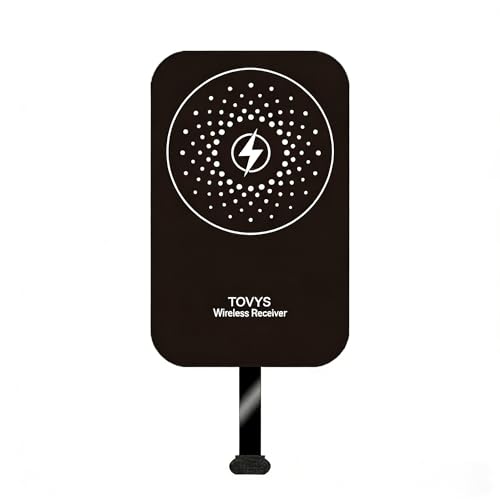
The Type-C Wireless Receiver Sticker gives the most precise case-thickness guidance: use a case under 3 mm thick, or attach the receiver directly to the phone’s back. Its compatibility text includes the Galaxy A54 along with other USB-C phones. Installation involves plugging the receiver into the USB-C port, fixing it on the back, and putting on the case. The maker cites protection against overvoltage, overcurrent, overheating and foreign objects. Its suitability depends on a thin case, so it is a poor fit for anyone who needs to keep a thicker case on the phone.
Bottom line: Choose this if your case is under 3 mm or you can attach the receiver directly.
How to choose a wireless charging adapter for the A54
A USB-C receiver adapter is the needed add-on because the Galaxy A54 does not have built-in wireless charging. The receiver plugs into the phone’s USB-C port and places a coil on the back, where a compatible wireless pad can transfer power. Match the connector first, then consider output guidance and case fit: the available options range from an unspecified output to a maximum of 8W. Wireless charging is generally slower than a direct wall connection, and alignment between the receiver coil and pad affects charging. If you need the phone’s USB-C port free while charging, this receiver style may not suit your setup.
Case thickness and receiver placement
Case material and thickness matter because a receiver needs to sit close to the pad’s coil. One of these options gives a specific threshold of under 3 mm; another says to use a simple PC or silicone case, while the third warns against thick or metallic cases. Remove a metal plate or magnetic accessory from between the phone and charger, since metal can obstruct charging or heat up. Place the receiver flat against the phone’s back and center it over the pad coil; even a small offset can reduce power transfer or prevent charging. If your case is thicker than 3 mm, choose an uncased setup or verify fit before relying on wireless charging.
Wireless receiver adapter types compared
Receiver adapters share the same basic approach but differ in how precisely they guide setup. A receiver with a named maximum output gives a reference point, not a promise that every pad will deliver that power; pad capability and coil alignment still matter. An adapter with broad phone compatibility can be flexible, while specific A54 compatibility reduces guesswork. Compare their practical tradeoffs in the table below.
| Adapter style | Useful when | Main constraint |
|---|---|---|
| Receiver with output | You want an output ceiling to compare | Maximum output does not mean fast charging |
| Receiver with broad compatibility | You may use it with other USB-C phones | Case material and fit still matter |
| Receiver with thickness guidance | Your case is under 3 mm | Thicker cases may block charging |
Heat, alignment and charging safety
Some warmth is common during wireless charging, but stop using the setup if the phone or receiver becomes uncomfortably hot. Keep the receiver and pad on a hard, ventilated surface rather than covering them with bedding or fabric, which can trap heat. Remove coins, cards with magnetic strips, and other metal objects from between the phone and pad. If charging starts and stops, first recenter the receiver on the pad and remove a thick or metallic case; repeated interruptions can indicate poor alignment or excess distance. Never assume a receiver’s safety features make an incompatible charger or obstructed setup safe.
Frequently Asked Questions
Does the Galaxy A54 charge wirelessly without an adapter?
No, the Galaxy A54 does not have built-in wireless charging. A USB-C receiver adapter adds the coil needed to use a compatible wireless charging pad.
Will a wireless receiver work through my phone case?
It can work through a thin, nonmetal case, but thickness and material affect the signal. One receiver here specifies a case under 3 mm; remove metal plates or thick armor-style cases if charging fails.
How do I align a receiver with a charging pad?
Place the receiver flat against the phone’s back and center it over the pad’s coil. The 8W receiver’s maker specifically advises aligning its top with the center of the pad for maximum output.
Is warmth normal while wireless charging a phone?
Some warmth is normal, but a phone or receiver that becomes uncomfortably hot should be disconnected. Keep the setup uncovered and remove objects between the phone and pad that could obstruct charging.
Can I use the phone’s USB-C port while the receiver is attached?
The receiver plugs into the USB-C port, so that port is occupied while the adapter is installed. Remove the receiver before connecting a USB-C cable.